iOS 中根據屏幕寬度自適應分布按鈕的實例代碼
編輯:IOS開發綜合
下載demo鏈接:https://github.com/MinLee6/buttonShow.git
屏幕擺放的控件有兩種方式,一種根據具體內容變化,一種根據屏幕寬度變化。
下面我分別將兩個方式,用代碼的方式呈現:
1:根據具體內容變化
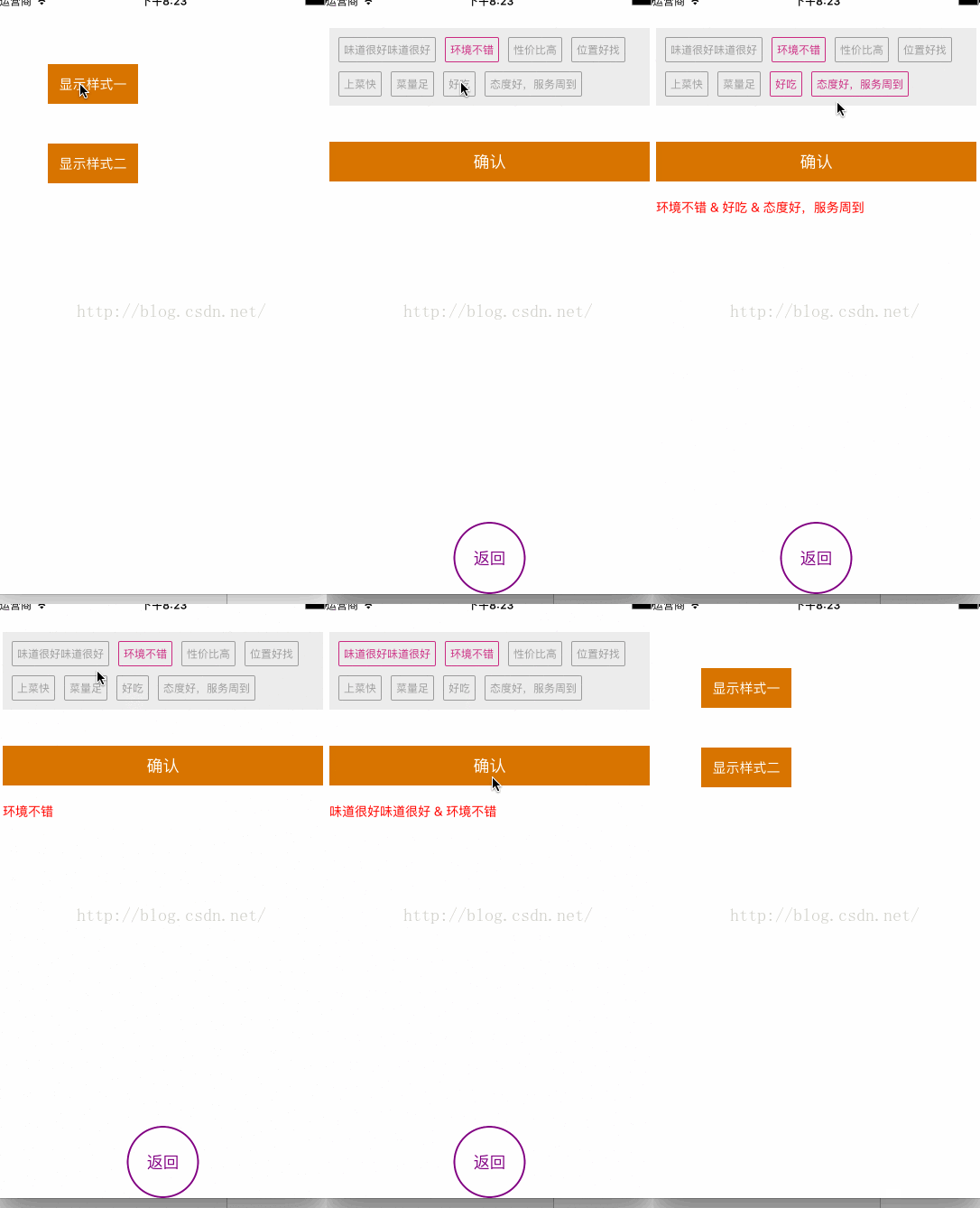
//
// StyleOneViewController.m
// buttonShow
//
// Created by limin on 15/06/15.
// Copyright © 2015年 信諾匯通信息科技(北京)有限公司. All rights reserved.
//
#import "StyleOneViewController.h"
#import "UIViewExt.h"
//每列間隔
#define KViewMargin 10
//每行列數高
#define KVieH 28
#define KscreenW [UIScreen mainScreen].bounds.size.width
#define Color(R,G,B) [UIColor colorWithRed:R/255.0 green:G/255.0 blue:B/255.0 alpha:1.0]
@interface StyleOneViewController ()
{
UIButton *tmpBtn;
CGFloat btnW;
CGFloat btnViewHeight;
}
/* 存放按鈕的view */
@property(nonatomic,strong)UIView *btnsView;
/* 按鈕上的文字 */
@property(nonatomic,strong)NSMutableArray *btnMsgArrays;
@property (nonatomic,strong) NSMutableArray* btnIDArrays;
/** 所有按鈕 */
@property(nonatomic,strong)NSMutableArray *allBtnArrays;
/** 服務器提供按鈕標簽 */
@property(nonatomic,strong)NSArray *tagInfoArray;
//-------展示選中的文字
/* 確認按鈕 */
@property(nonatomic,strong)UIButton *sureButton;
/* 文字 */
@property(nonatomic,strong)UILabel *showLabel;
@end
@implementation StyleOneViewController
- (void)viewDidLoad {
[super viewDidLoad];
self.view.backgroundColor = [UIColor whiteColor];
[self getTagMsg];
}
-(void)getTagMsg
{
self.btnMsgArrays = [[NSMutableArray alloc]init];
_allBtnArrays = [[NSMutableArray alloc]init];
self.btnIDArrays = [[NSMutableArray alloc]init];
self.tagInfoArray = @[@{@"id":@"1",@"tagmsg":@"味道很好味道很好"},
@{@"id":@"1",@"tagmsg":@"環境不錯"},
@{@"id":@"1",@"tagmsg":@"性價比高"},
@{@"id":@"1",@"tagmsg":@"位置好找"},
@{@"id":@"1",@"tagmsg":@"上菜快"},
@{@"id":@"1",@"tagmsg":@"菜量足"},
@{@"id":@"1",@"tagmsg":@"好吃"},
@{@"id":@"1",@"tagmsg":@"態度好,服務周到"}
];
//挨個賦值
for (int i=0; i<_tagInfoArray.count; i++) {
NSDictionary *dict = _tagInfoArray[i];
[self.btnIDArrays addObject:dict[@"id"]];
[self.btnMsgArrays addObject:dict[@"tagmsg"]];
}
[self createBtns];
}
//創建按鈕
-(void)createBtns{
//創建放置button的view
self.btnsView = [[UIView alloc]initWithFrame:CGRectMake(10, 40, KscreenW-2*KViewMargin, 40)];
self.btnsView.backgroundColor = Color(237, 237, 237);
[self.view addSubview:self.btnsView];
/**
* 數組存放適配屏幕大小的每行按鈕的個數
*/
NSMutableArray *indexbtns=[self returnBtnsForRowAndCol];
//統計按鈕View的高度
btnViewHeight=indexbtns.count*(KVieH+KViewMargin)+10;
//設置btnView的高度
self.btnsView.height=btnViewHeight;
NSInteger count=0;
CGFloat Y;
//循環創建按鈕
for (int row=0; row<indexbtns.count; row++) {
for (int col=0; col<[indexbtns[row]intValue]; col++) {
CGFloat X;
Y=10+row*(KViewMargin+KVieH);
//按鈕的寬
btnW=[self returnBtnWithWithStr:self.btnMsgArrays[count]];
if (tmpBtn&&col) {
X=CGRectGetMaxX(tmpBtn.frame)+KViewMargin;
}else{
X=KViewMargin+col*btnW;
}
UIButton *btn=[[UIButton alloc]initWithFrame:CGRectMake(X, Y, btnW, KVieH)];
[btn setTitle:self.btnMsgArrays[count] forState:UIControlStateNormal];
btn.titleLabel.font=[UIFont systemFontOfSize:12];
btn.layer.borderWidth=1;
btn.layer.borderColor = Color(156,156,156).CGColor;
[btn setTitleColor:Color(156, 156, 156) forState:UIControlStateNormal];
[btn setTitleColor:Color(202, 48, 130) forState:UIControlStateSelected];
btn.backgroundColor=[UIColor clearColor];
btn.layer.cornerRadius=2;
btn.tag=[self.btnIDArrays[count] integerValue];
[btn addTarget:self action:@selector(btnClick:) forControlEvents:UIControlEventTouchUpInside];
[self.allBtnArrays addObject:btn];
tmpBtn=btn;
[self.btnsView addSubview:btn];
count+=1;
}
}
//創建確認按鈕
UIButton *btn = [[UIButton alloc]initWithFrame:CGRectMake(KViewMargin, self.btnsView.bottom+40, KscreenW-2*KViewMargin, 44)];
[btn setTitle:@"確認" forState:UIControlStateNormal];
[btn setTitleColor:[UIColor whiteColor] forState:UIControlStateNormal];
btn.backgroundColor = Color(214, 116, 0);
[btn addTarget:self action:@selector(showSelectedClick:) forControlEvents:UIControlEventTouchUpInside];
self.sureButton = btn;
[self.view addSubview:btn];
//返回按鈕
UIButton *btn2 = [[UIButton alloc]initWithFrame:CGRectMake((KscreenW-80)*0.5, self.view.height-80, 80, 80)];
[btn2 setTitle:@"返回" forState:UIControlStateNormal];
[btn2 setTitleColor:[UIColor purpleColor] forState:UIControlStateNormal];
btn2.layer.cornerRadius = 40;
btn2.clipsToBounds = YES;
btn2.layer.borderColor = [UIColor purpleColor].CGColor;
btn2.layer.borderWidth = 2;
[btn2 addTarget:self action:@selector(backBtnClick:) forControlEvents:UIControlEventTouchUpInside];
[self.view addSubview:btn2];
}
#pragma mark-返回view中有幾行幾列按鈕
-(NSMutableArray*)returnBtnsForRowAndCol{
CGFloat allWidth = 0.0;
NSInteger countW=0;
NSMutableArray *indexbtns=[NSMutableArray array];
NSMutableArray *tmpbtns=[NSMutableArray array];
for (int j=0;j<self.btnMsgArrays.count;j++) {
CGFloat width=[self returnBtnWithWithStr:self.btnMsgArrays[j]];
allWidth+=width+KViewMargin;
countW+=1;
if (allWidth>KscreenW-10) {
//判斷第一行情況
NSInteger lastNum=[[tmpbtns lastObject]integerValue];
[indexbtns addObject:@(lastNum)];
[tmpbtns removeAllObjects];
allWidth=0.0;
countW=0;
j-=1;
}else{
[tmpbtns addObject:@(countW)];
}
}
if (tmpbtns.count!=0) {
NSInteger lastNum=[[tmpbtns lastObject]integerValue];
[indexbtns addObject:@(lastNum)];
}
return indexbtns;
}
-(CGFloat)returnBtnWithWithStr:(NSString *)str{
//計算字符長度
NSDictionary *minattributesri = @{NSFontAttributeName:[UIFont systemFontOfSize:12]};
CGSize mindetailSizeRi = [str boundingRectWithSize:CGSizeMake(100, MAXFLOAT) options:NSStringDrawingUsesFontLeading attributes:minattributesri context:nil].size;
return mindetailSizeRi.width+12;
}
#pragma mark-按鈕點擊事件
-(void)btnClick:(UIButton *)btn
{
btn.selected = !btn.isSelected;
if (btn.isSelected) {
btn.layer.borderColor = Color(202, 48, 130).CGColor;
}else
{
btn.layer.borderColor = Color(156, 156, 156).CGColor;
}
}
-(void)showSelectedClick:(UIButton *)btn
{
NSMutableArray *strArray = [[NSMutableArray alloc]init];
for (UIButton *btn in self.allBtnArrays) {
if (btn.isSelected) {
[strArray addObject:btn.currentTitle];
}
}
NSString *str = [strArray componentsJoinedByString:@" & "];
UIFont *font = [UIFont systemFontOfSize:14];
CGFloat strH = [str boundingRectWithSize:CGSizeMake(KscreenW-2*KViewMargin, MAXFLOAT) options:NSStringDrawingUsesLineFragmentOrigin attributes:@{NSFontAttributeName:font} context:nil].size.height;
//展示文字
if (!self.showLabel) {
UILabel *label = [[UILabel alloc]initWithFrame:CGRectMake(KViewMargin, self.sureButton.bottom+20, KscreenW-2*KViewMargin, strH)];
label.font = font;
label.textColor = [UIColor redColor];
label.numberOfLines = 0;
self.showLabel = label;
[self.view addSubview:label];
}
self.showLabel.text = str;
self.showLabel.height = strH;
}
-(void)backBtnClick:(UIButton *)btn
{
[self dismissViewControllerAnimated:YES completion:nil];
}
- (void)didReceiveMemoryWarning {
[super didReceiveMemoryWarning];
// Dispose of any resources that can be recreated.
}
/*
#pragma mark - Navigation
// In a storyboard-based application, you will often want to do a little preparation before navigation
- (void)prepareForSegue:(UIStoryboardSegue *)segue sender:(id)sender {
// Get the new view controller using [segue destinationViewController].
// Pass the selected object to the new view controller.
}
*/
@end
2:根據屏幕寬度變化。
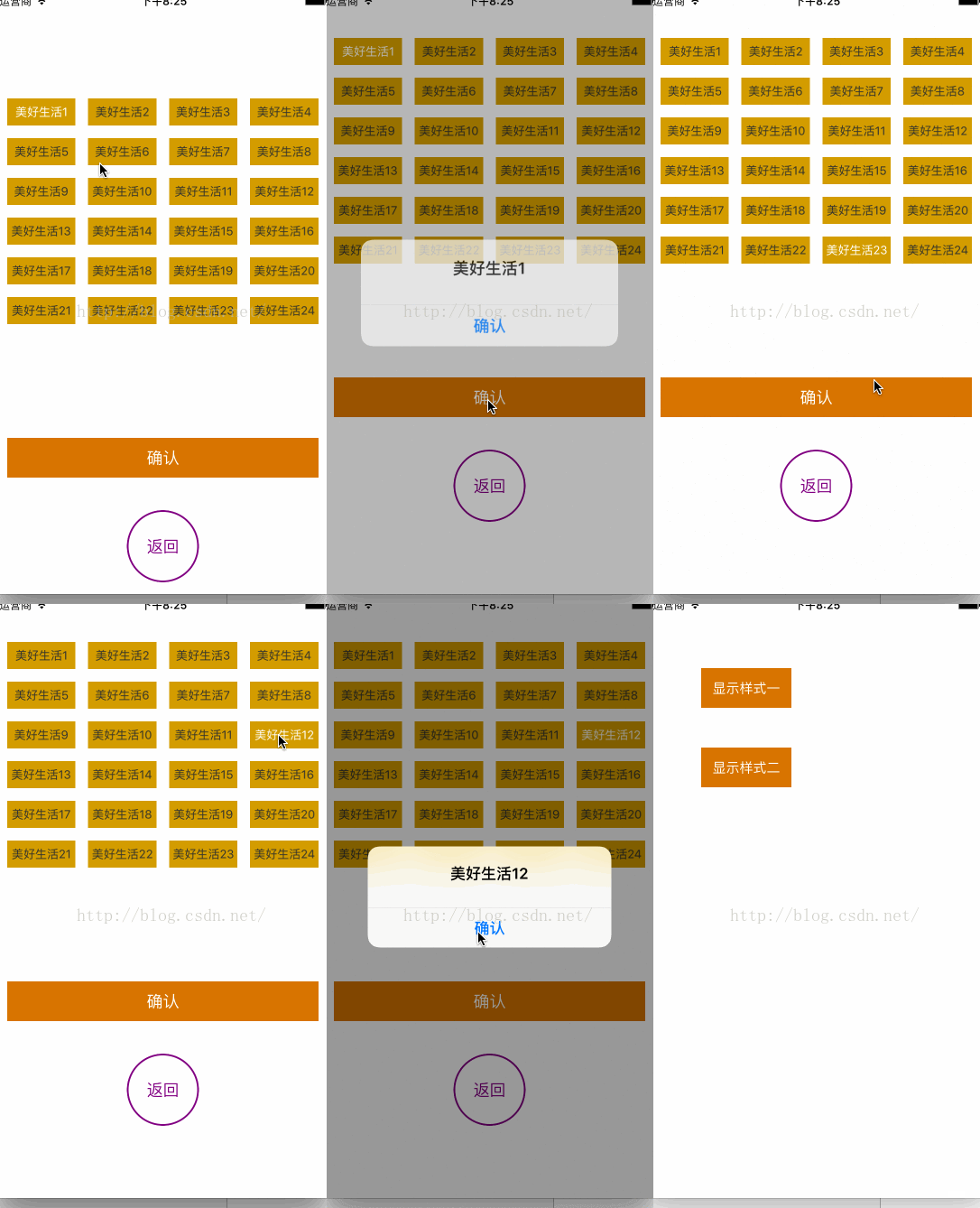
//// StyleTwoViewController.m
// buttonShow
//
// Created by limin on 16/11/15.
// Copyright © 2016年 君安信(北京)科技有限公司. All rights reserved.
//
#import "StyleTwoViewController.h"
#import "UIViewExt.h"
#define kTagMargin 14
#define kCellMargin 15
#define kScreenWidth [UIScreen mainScreen].bounds.size.width
#define Color(R,G,B) [UIColor colorWithRed:R/255.0 green:G/255.0 blue:B/255.0 alpha:1.0]
@interface StyleTwoViewController ()
/* 按鈕 */
@property(nonatomic,strong)NSMutableArray *btnsArray;
/* 按鈕文字 */
@property(nonatomic,strong)NSArray *tagsArray;
/* 默認選擇的按鈕 */
@property(nonatomic,strong)UIButton *selectedBtn;
/* 標簽 */
@property(nonatomic,copy)NSString *selectTopicTitle;
@end
@implementation StyleTwoViewController
- (void)viewDidLoad {
[super viewDidLoad];
self.view.backgroundColor = [UIColor whiteColor];
[self getTagMsg];
}
-(void)getTagMsg
{
_btnsArray = [NSMutableArray array];
//添加tag按鈕
NSArray *tagsArray = @[@"美好生活1",@"美好生活2",@"美好生活3",@"美好生活4",@"美好生活5",@"美好生活6",@"美好生活7",@"美好生活8",@"美好生活9",@"美好生活10",@"美好生活11",@"美好生活12",@"美好生活13",@"美好生活14",@"美好生活15",@"美好生活16",@"美好生活17",@"美好生活18",@"美好生活19",@"美好生活20",@"美好生活21",@"美好生活22",@"美好生活23",@"美好生活24"];
_tagsArray = tagsArray;
[self createTagSqures:tagsArray];
}
#pragma mark - 創建方塊
-(void)createTagSqures:(NSArray *)tags
{
//一行最多4個。
int maxCols = 4;
//寬度、高度
CGFloat TotalWidth = kScreenWidth - 2*kCellMargin - (maxCols-1)*kTagMargin;
CGFloat BtnWidth = TotalWidth / maxCols;
CGFloat BtnHeight = 30;
for (int i=0; i<tags.count; i++) {
//創建按鈕
UIButton *btn = [UIButton buttonWithType:UIButtonTypeCustom];
btn.backgroundColor = Color(211, 156, 4);
//設置按鈕屬性
[btn setBackgroundImage:[UIImage imageNamed:@"discover_btnbg"] forState:UIControlStateNormal];
[btn setBackgroundImage:[UIImage imageNamed:@"discover_btnbg"] forState:UIControlStateDisabled];
btn.adjustsImageWhenHighlighted = NO;
[btn setTitleColor:Color(51, 51, 51) forState:UIControlStateNormal];
[btn setTitleColor:[UIColor whiteColor] forState:UIControlStateDisabled];
[btn.titleLabel setFont:[UIFont systemFontOfSize:13]];
btn.titleLabel.textAlignment = NSTextAlignmentCenter;
btn.tag = i+10;
// 監聽點擊
[btn addTarget:self action:@selector(TagBtnClick:) forControlEvents:UIControlEventTouchUpInside];
//按鈕賦值
[btn setTitle:tags[i] forState:UIControlStateNormal];
[self.view addSubview:btn];
//計算frame
int col = i % maxCols;
int row = i / maxCols;
btn.x = kCellMargin + col*(BtnWidth + kTagMargin);
btn.y = 40 + 11 + row * (BtnHeight + kTagMargin);
btn.width = BtnWidth;
btn.height = BtnHeight;
//設置所有按鈕默認狀態為NO 。
btn.enabled = YES;
[self.btnsArray addObject:btn];
}
//默認第一個按鈕為選中
UIButton *btn = self.btnsArray[0];
btn.enabled = NO;
self.selectedBtn = btn;
self.selectTopicTitle = self.tagsArray[0];
//返回按鈕
UIButton *btn2 = [[UIButton alloc]initWithFrame:CGRectMake((kScreenWidth-80)*0.5, self.view.height-160, 80, 80)];
[btn2 setTitle:@"返回" forState:UIControlStateNormal];
[btn2 setTitleColor:[UIColor purpleColor] forState:UIControlStateNormal];
btn2.layer.cornerRadius = 40;
btn2.clipsToBounds = YES;
btn2.layer.borderColor = [UIColor purpleColor].CGColor;
btn2.layer.borderWidth = 2;
[btn2 addTarget:self action:@selector(backBtnClick:) forControlEvents:UIControlEventTouchUpInside];
[self.view addSubview:btn2];
//創建確認按鈕
UIButton *btn3 = [[UIButton alloc]initWithFrame:CGRectMake(kCellMargin, btn2.top-80, kScreenWidth-2*kCellMargin, 44)];
[btn3 setTitle:@"確認" forState:UIControlStateNormal];
[btn3 setTitleColor:[UIColor whiteColor] forState:UIControlStateNormal];
btn3.backgroundColor = Color(214, 116, 0);
[btn3 addTarget:self action:@selector(showSelectedClick:) forControlEvents:UIControlEventTouchUpInside];
[self.view addSubview:btn3];
}
#pragma mark - 按鈕點擊事件
- (void)TagBtnClick:(UIButton *)button
{
//獲取點擊的button,取消選中樣式
self.selectedBtn.enabled = YES;
button.enabled = NO;
self.selectedBtn = button;
NSInteger index = button.tag-10;
NSString *selectStr = self.tagsArray[index];
self.selectTopicTitle = selectStr;
}
-(void)showSelectedClick:(UIButton *)button
{
//保留選擇標簽的文字
NSLog(@"所選擇的文字:%@",self.selectTopicTitle);
UIAlertView *alert = [[UIAlertView alloc]initWithTitle:self.selectTopicTitle message:@"" delegate:nil cancelButtonTitle:@"確認" otherButtonTitles:nil];
[alert show];
}
-(void)backBtnClick:(UIButton *)btn
{
[self dismissViewControllerAnimated:YES completion:nil];
}
- (void)didReceiveMemoryWarning {
[super didReceiveMemoryWarning];
// Dispose of any resources that can be recreated.
}
/*
#pragma mark - Navigation
// In a storyboard-based application, you will often want to do a little preparation before navigation
- (void)prepareForSegue:(UIStoryboardSegue *)segue sender:(id)sender {
// Get the new view controller using [segue destinationViewController].
// Pass the selected object to the new view controller.
}
*/
@end
以上所述是小編給大家介紹的iOS 中根據屏幕寬度自適應分布按鈕的實例代碼,希望對大家有所幫助,如果大家有任何疑問請給我留言,小編會及時回復大家的。在此也非常感謝大家對本站網站的支持!

相關文章
+