
IOS 自定義UICollectionView的頭視圖或者尾視圖UICollectionReusableView
編輯:IOS開發綜合
IOS 自定義UICollectionView的頭視圖或者尾視圖UICollectionReusableView
其實看標題就知道是需要繼承於UICollectionReusableView,實現一個滿足自己需求的視圖.那麼如何操作了,看下面代碼:
ViewController.m文件中

#import "ViewController.h"
#import "LSHControl.h"
#import "SHCollectionReusableView.h"
#import "SHCollectionViewCell.h"

#define SHCollectionViewCellIdetifiler  @"CollectionViewCell"
#define SHCollectionReusableViewHeader  @"CollectionHeader"
#define SHCollectionReusableViewFooter  @"CollectionFooter"

@interface ViewController ()<UICollectionViewDelegate,UICollectionViewDataSource>{
  NSArray *recipeImages;
  NSArray *hearderTitleArray;
}


@property(nonatomic,strong) UICollectionView *rightCollectionView;

@end

@implementation ViewController

- (void)viewDidLoad {

  [super viewDidLoad];

  NSArray *mainDishImages = [NSArray arrayWithObjects:@"egg_benedict.jpg", @"full_breakfast.jpg", @"ham_and_cheese_panini.jpg", @"ham_and_egg_sandwich.jpg", @"hamburger.jpg", @"instant_noodle_with_egg.jpg", @"japanese_noodle_with_pork.jpg", @"mushroom_risotto.jpg", @"noodle_with_bbq_pork.jpg", @"thai_shrimp_cake.jpg", @"vegetable_curry.jpg", nil];
  NSArray *drinkDessertImages = [NSArray arrayWithObjects:@"angry_birds_cake.jpg", @"creme_brelee.jpg", @"green_tea.jpg", @"starbucks_coffee.jpg", @"white_chocolate_donut.jpg", nil];
  recipeImages = [NSArray arrayWithObjects:mainDishImages, drinkDessertImages, nil];

  hearderTitleArray=@[@"分區1",@"分區2"];

  [self createCollectionView];

}

-(void)createCollectionView{

  UICollectionViewFlowLayout *flowLayout=[[UICollectionViewFlowLayout alloc] init];
  flowLayout.minimumInteritemSpacing=0.f;//item左右間隔
  flowLayout.minimumLineSpacing=5.f;//item上下間隔
  flowLayout.sectionInset=UIEdgeInsetsMake(5,15,5, 15);//item對象上下左右的距離
  flowLayout.itemSize=CGSizeMake(80, 80);//每一個 item 對象大小
  flowLayout.scrollDirection=UICollectionViewScrollDirectionVertical;//設置滾動方向,默認垂直方向.
  flowLayout.headerReferenceSize=CGSizeMake(self.view.frame.size.width, 30);//頭視圖的大小
  flowLayout.footerReferenceSize=CGSizeMake(self.view.frame.size.width, 30);//尾視圖大小

  self.rightCollectionView= [LSHControl createCollectionViewFromFrame:self.view.frame collectionViewLayout:flowLayout dataSource:self delegate:self backgroudColor:[UIColor whiteColor]];

  //自定義重用視圖
  [self.rightCollectionView registerNib:[UINib nibWithNibName:@"SHCollectionViewCell" bundle:nil] forCellWithReuseIdentifier:SHCollectionViewCellIdetifiler];

  [self.rightCollectionView registerClass:[SHCollectionReusableView class] forSupplementaryViewOfKind:UICollectionElementKindSectionHeader withReuseIdentifier:SHCollectionReusableViewHeader];

  //使用原有重用視圖
  [self.rightCollectionView registerClass:[UICollectionReusableView class] forSupplementaryViewOfKind:UICollectionElementKindSectionFooter withReuseIdentifier:SHCollectionReusableViewFooter ];

  [self.view addSubview:self.rightCollectionView];

}

- (NSInteger)numberOfSectionsInCollectionView:(UICollectionView *)collectionView
{
  return [recipeImages count];
}

- (NSInteger)collectionView:(UICollectionView *)collectionView numberOfItemsInSection:(NSInteger)section{
  return [[recipeImages objectAtIndex:section] count];
}

- (UICollectionReusableView *)collectionView:(UICollectionView *)collectionView viewForSupplementaryElementOfKind:(NSString *)kind atIndexPath:(NSIndexPath *)indexPath
{
  UICollectionReusableView *reusableview = nil;

  if (kind == UICollectionElementKindSectionHeader) {

    SHCollectionReusableView *headerView = [collectionView dequeueReusableSupplementaryViewOfKind:UICollectionElementKindSectionHeader withReuseIdentifier:SHCollectionReusableViewHeader forIndexPath:indexPath];
    /**
     *
     * 注意:雖然這裡沒有看到明顯的initWithFrame方法,但是在獲取重用視圖的時候,系統會自動調用initWithFrame方法的.所以在initWithFrame裡面進行初始化操作,是沒有問題的!
     */

    [headerView getSHCollectionReusableViewHearderTitle:hearderTitleArray[indexPath.section]];

    reusableview = headerView;
  }

  if (kind == UICollectionElementKindSectionFooter) {

    UICollectionReusableView *footerview = [collectionView dequeueReusableSupplementaryViewOfKind:UICollectionElementKindSectionFooter withReuseIdentifier:SHCollectionReusableViewFooter forIndexPath:indexPath];
    /**
     *  如果頭尾視圖沒什麼很多內容,直接創建對應控件進行添加即可,無需自定義.
     */
    footerview.backgroundColor=[UIColor redColor];
    reusableview = footerview;
  }

  return reusableview;
}


- (UICollectionViewCell *)collectionView:(UICollectionView *)collectionView cellForItemAtIndexPath:(NSIndexPath *)indexPath{

  /**
   *
   *  這裡自定義cell,使用xib進行布局.對於如何使用xib創建視圖,不明白的,可以看我之前寫的一篇文章.
   */


  SHCollectionViewCell *cell = (SHCollectionViewCell *)[collectionView dequeueReusableCellWithReuseIdentifier:SHCollectionViewCellIdetifiler forIndexPath:indexPath];

  UIImageView *recipeImageView = (UIImageView *)[cell viewWithTag:100];
  recipeImageView.image = [UIImage imageNamed:[recipeImages[indexPath.section] objectAtIndex:indexPath.row]];
  cell.backgroundView = [[UIImageView alloc] initWithImage:[UIImage imageNamed:@"photo-frame-2.png"]];

  return cell;
}

@end
自定義UICollectionViewCell,使用 xib進行布局
#import <UIKit/UIKit.h>

@interface SHCollectionViewCell : UICollectionViewCell

@property (weak, nonatomic) IBOutlet UIImageView *recipeImageView;

@end

#import "SHCollectionViewCell.h"
@implementation SHCollectionViewCell


@end
自定義UICollectionReusableView,手寫代碼進行布局
#import <UIKit/UIKit.h>

@interface SHCollectionReusableView : UICollectionReusableView

/**
 *  聲明相應的數據模型屬性,進行賦值操作,獲取頭視圖或尾視圖需要的數據.或者提供一個方法獲取需要的數據.
 */

-(void)getSHCollectionReusableViewHearderTitle:(NSString *)title;

@end
#import "SHCollectionReusableView.h"
#import "LSHControl.h"

@interface SHCollectionReusableView (){

  UILabel *titleLabel;
}

@end

@implementation SHCollectionReusableView


-(id)initWithFrame:(CGRect)frame{

  self=[super initWithFrame:frame];

  if (self) {

    self.backgroundColor=[UIColor greenColor];
    [self createBasicView];
  }
  return self;

}

/**
 *  進行基本布局操作,根據需求進行.
 */
-(void)createBasicView{


 titleLabel=[LSHControl createLabelWithFrame:CGRectMake(5, 0,self.frame.size.width-50, self.frame.size.height) Font:[UIFont systemFontOfSize:14.0] Text:@"" color:[UIColor grayColor]];
 [self addSubview:titleLabel];


}


/**
 *  設置相應的數據
 *
 *  @param title
 */
-(void)getSHCollectionReusableViewHearderTitle:(NSString *)title{

  titleLabel.text=title;

}

@end
效果如下圖:
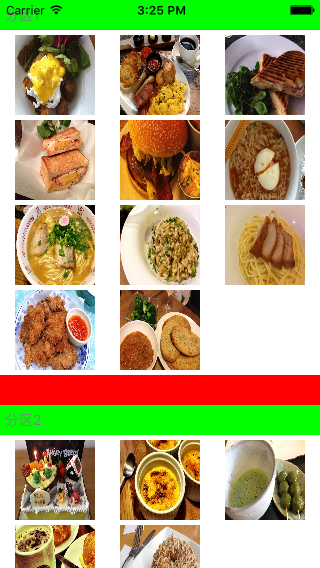
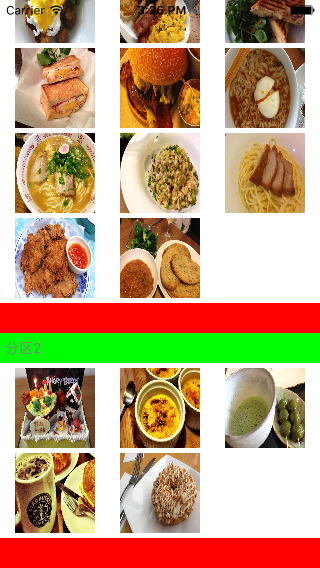
感謝閱讀,希望能幫助到大家,謝謝大家對本站的支持!
相關文章
+