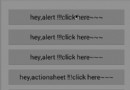
iphone/ipad應用的升級更新提醒和評分提醒
編輯:IOS開發綜合
在使用iphone/ipad應用的時候,有時候應用有更新升級,appstore會提醒用戶有相應的更新,程序中需要在用戶打開應用的時候提醒用戶更新,那麼就需要自己在程序當中寫一個提醒事項,簡歷彈出框提醒用戶一下,就ok了!
具體代碼分享給大家,請大家注意,必須要有app的id。那麼你會想應用第一次沒有id怎麼辦?審請上線的時候就會得到id了,到時候有了id直接填上去就行了。
首先寫一個單例類:
//
//  AppUpdateGrade.h
//  QingDaoBroadcastIpad
//
//  Created by iHope on 13-7-23.
//  Copyright (c) 2013年 hlren. All rights reserved.
//  任海麗

#import <Foundation/Foundation.h>

@interface AppUpdateGrade : NSObject
{
    NSString *appId; //app的id
    NSString *trackViewUrl; //app的地址
}
+(AppUpdateGrade*)sharedAppupdateGrade; //創建
-(void)appUpdate:(NSString *)appleID; //更新
-(void)appGrade:(NSString *)appleID; //評分

@end
//
//  AppUpdateGrade.m
//  QingDaoBroadcastIpad
//
//  Created by iHope on 13-7-23.
//  Copyright (c) 2013年 hlren. All rights reserved.
//

#import "AppUpdateGrade.h"

@implementation AppUpdateGrade

static AppUpdateGrade* appUpdateGrade = nil;
+(AppUpdateGrade*)sharedAppupdateGrade
{
    @synchronized(self)
    {
        if (appUpdateGrade == nil)
        {
            appUpdateGrade = [[self alloc] init];
        }
    }
    return appUpdateGrade;
}

//更新升級
-(void)appUpdate:(NSString *)appleID
{
    appId = appleID;
    //http://itunes.apple.com/lookup?id=xx

    //根據appid從蘋果服務器上得到json數據,再從json數據中得到版本信息
    NSMutableURLRequest *request = [[NSMutableURLRequest alloc] init];
    // 設置URL
    [request setURL:[NSURL URLWithString:[NSString stringWithFormat:@"http://itunes.apple.com/lookup?id=%@",appleID]]];
    // 設置HTTP方法
    [request setHTTPMethod:@"GET"];
    // 發送同步請求, 這裡得returnData就是返回得數據楽
    NSData *returnData = [NSURLConnection sendSynchronousRequest:request    returningResponse:nil error:nil];

    NSDictionary *jsonData = [NSJSONSerialization JSONObjectWithData:returnData options:0 error:nil];
    NSLog(@"%@",jsonData);

    NSArray *infoArray = [jsonData objectForKey:@"results"];
    if (infoArray.count!=0) {
        NSDictionary *releaseInfo = [infoArray objectAtIndex:0];
        NSString *latestVersion = [releaseInfo objectForKey:@"version"];
        NSString *trackViewUrl1 = [releaseInfo objectForKey:@"trackViewUrl"];//地址trackViewUrl
        trackViewUrl = trackViewUrl1; //地址
        double doubleUpdateVersion = [latestVersion doubleValue];


        //獲取當前version版本信息
        //當前運行程序的版本信息,可以在 mainBundle 裡面獲取:
        NSDictionary *infoDict = [[NSBundle mainBundle] infoDictionary];
        NSString *currentVersion = [infoDict objectForKey:@"CFBundleVersion"];
        double doubleCurrentVersion = [currentVersion doubleValue];
        NSLog(@"doubleCurrentVersion:%f,%f",doubleCurrentVersion,doubleUpdateVersion);

        if (doubleCurrentVersion < doubleUpdateVersion) {

            UIAlertView *alert;
            alert = [[UIAlertView alloc] initWithTitle:@"app應用名稱"
                                               message:@"有新版本,是否升級!"
                                              delegate: self
                                     cancelButtonTitle:@"取消"
                                     otherButtonTitles: @"升級", nil];
            alert.tag = 1001;
            [alert show];
        }

    }else{
        //無此應用
    }

}

//評分
-(void)appGrade:(NSString *)appleID{
    appId = appleID;
    BOOL neverGrade = [[[NSUserDefaults standardUserDefaults] objectForKey:@"neverGrade"] boolValue];
    if(neverGrade != YES) {
        //提醒評分
        UIAlertView *alert;
        alert = [[UIAlertView alloc] initWithTitle:@"app應用名稱"
                                           message:@"請去appstore給我們評分"
                                          delegate: self
                                 cancelButtonTitle:@"取消"
                                 otherButtonTitles: @"現在去",@"不再提醒 ", nil];
        alert.tag = 1000;
        [alert show];
    }
}
-(void)alertView:(UIAlertView *)alertView clickedButtonAtIndex:(NSInteger)buttonIndex
{
    switch (alertView.tag) {
        case 1000:
        {
            //評分
            // Never Review Button
            if (buttonIndex == 2)
            {
                NSString *number = [NSString stringWithFormat:@"%d", YES];
                [[NSUserDefaults standardUserDefaults] setObject:number forKey:@"neverGrade"];
                [[NSUserDefaults standardUserDefaults] synchronize];
            }
            // Review Button
            else if (buttonIndex == 1)
            {
                NSString *number = [NSString stringWithFormat:@"%d", YES];
                [[NSUserDefaults standardUserDefaults] setObject:number forKey:@"neverGrade"];
                [[NSUserDefaults standardUserDefaults] synchronize];

                //"itms-apps://ax.itunes.apple.com/WebObjects/MZStore.woa/wa/viewContentsUserReviews?type=Purple+Software&id=
                NSString *str = [NSString stringWithFormat:
                                 @"itms-apps://ax.itunes.apple.com/WebObjects/MZStore.woa/wa/viewContentsUserReviews?type=Purple+Software&id=%@",
                                 appId ];

                [[UIApplication sharedApplication] openURL:[NSURL URLWithString:str]];
            }
        }
            break;
        case 1001:
        {
            //升級
            if (buttonIndex == 1) {
                NSLog(@"%@",trackViewUrl);
                [[UIApplication sharedApplication] openURL:[NSURL URLWithString:trackViewUrl]];

            }
        }
            break;
        default:
            break;
    }

}
@end
1、更新升級
需要得到當前應用的version版本,獲得之前版本的version,比較之下是否需要更新!
當前應用的version:
NSDictionary *infoDict = [[NSBundle mainBundle] infoDictionary];
NSString *currentVersion = [infoDict objectForKey:@"CFBundleVersion"];
之前應用的version:
需要請求http://itunes.apple.com/lookup?id=appid來獲取數據,分析出version;
2、應用評分
"itms-apps://ax.itunes.apple.com/WebObjects/MZStore.woa/wa/viewContentsUserReviews?type=Purple+Software&id=appid“
直接打開這個鏈接就可以給應用評份;

使用,導入#import "AppUpdateGrade.h"
 升級
    [[AppUpdateGrade sharedAppupdateGrade]appUpdate:@"appid"];
    //評分  afterDelay秒  60*1==60分鐘,表示1分鐘後調用pinfen方法
    [self performSelector:@selector(pinfen) withObject:self afterDelay:1];

//升級
    [[AppUpdateGrade sharedAppupdateGrade]appUpdate:@"appid"];
    //評分  afterDelay秒  60*1==60分鐘,表示1分鐘後調用pinfen方法
    [self performSelector:@selector(pinfen) withObject:self afterDelay:1];
 (void)pinfen
{
    //評分
    [[AppUpdateGrade sharedAppupdateGrade]appGrade:@"appid"];
}

- (void)pinfen
{
    //評分
    [[AppUpdateGrade sharedAppupdateGrade]appGrade:@"appid"];
}
相關文章
+- iOS獲得以後裝備型號等信息(全)包括iPhone7和iPhone7P
- xcode8提交ipa掉敗沒法構建版本成績的處理計劃
- Objective-C 代碼與Javascript 代碼互相挪用實例
- iOS開辟之UIPickerView完成城市選擇器的步調詳解
- iPhone/iPad開辟經由過程LocalNotification完成iOS准時當地推送功效
- iOS法式開辟之應用PlaceholderImageView完成優雅的圖片加載後果
- iOS Runntime 靜態添加類辦法並挪用-class_addMethod
- iOS開辟之用javascript挪用oc辦法而非url
- iOS App中挪用iPhone各類感應器的辦法總結
- 實例講授iOS中的UIPageViewController翻頁視圖掌握器
- IOS代碼筆記UIView的placeholder的後果
- iOS中應用JSPatch框架使Objective-C與JavaScript代碼交互
- iOS中治理剪切板的UIPasteboard粘貼板類用法詳解
- iOS App開辟中的UIPageControl分頁控件應用小結
- 詳解iOS App中UIPickerView轉動選擇欄的添加辦法