IOS實現彈出菜單效果MenuViewController(背景 景深 彈出菜單)
編輯:IOS開發綜合
在寫項目時,要實現一個從下移上來的一個彈出菜單,並且背景變深的這麼一個效果,在此分享給大家。
主要說一下思路及一些核心代碼貼出來,要想下載源碼,
請到:http://download.csdn.net/download/rhljiayou/6280989
一個簡單,效果好,比較實用的菜單彈出效果的實現,效果圖:
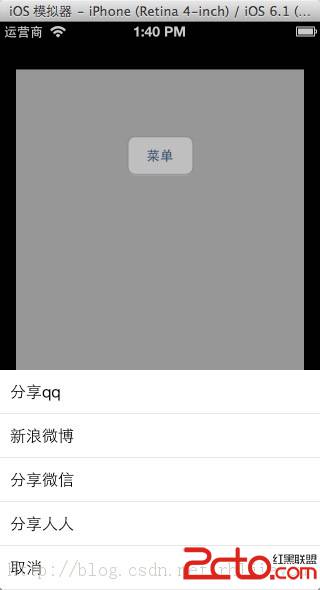 實現方式:將self.view當前頁面縮小,在當前頁的上面添加一個菜單的view,即在self.view.superview添加。
實現方式:將self.view當前頁面縮小,在當前頁的上面添加一個菜單的view,即在self.view.superview添加。
//顯示
- (void) show:(UIView*)parent
{
    parentView = parent;

    //先隱藏backView,table
    backView.alpha = 0;
    _table.alpha = 0;

    //移動table
    [_table setTransform:CGAffineTransformMakeTranslation(0, _table.frame.size.height)];

    //父窗口添加本view,---這個會調用viewDidLoad
    [parentView.superview addSubview:self.view];

    //添加動畫,添加到父窗口中,使之從下移動上
    [UIView animateWithDuration:0.3 animations:^{
        //父窗口縮小
        CGAffineTransform t = CGAffineTransformMakeScale(0.9, 0.9);
        [parentView setTransform:t];

        //顯示backview,table
        backView.alpha = 1;
        _table.alpha = 1;

        //移動table,CGAffineTransformIdentity還原原始坐標
        [_table setTransform:CGAffineTransformIdentity];

    } completion:^(BOOL finished) {

    }];


}
//隱藏
- (void) hide
{
    //添加動畫,添加到父窗口中,使之從下移動上
    [UIView animateWithDuration:0.3 animations:^{
        //父窗口還原
        CGAffineTransform t = CGAffineTransformIdentity;
        [parentView setTransform:t];

        //顯示backview,table
        backView.alpha = 0;
        _table.alpha = 0;

        //移動table
        [_table setTransform:CGAffineTransformMakeTranslation(0, _table.frame.size.height)];

    } completion:^(BOOL finished) {
        [self.view removeFromSuperview];
    }];
}

- (void)viewDidLoad
{
    [super viewDidLoad];

    self.view.backgroundColor = [UIColor clearColor];

    //背影黑罩
    backView = [[UIView alloc]initWithFrame:self.view.bounds];
    backView.backgroundColor = [UIColor colorWithRed:0 green:0 blue:0 alpha:0.3];
    [self.view addSubview:backView];

    //算出table的CGRect
    CGRect rect = self.view.bounds;
    int height = _titleArray.count * 44;
    rect.origin.y = rect.size.height - height;
    rect.size.height = height;

    _table = [[UITableView alloc]initWithFrame:rect];
    _table.delegate = self;
    _table.dataSource = self;
    [self.view addSubview:_table];

}

相關文章
+