iOS 小心刪除Documents中的文件
編輯:IOS開發綜合
在iOS開發中,刪除Sandbox中Documents目錄下的文件可能是個比較常用的操作,下面是我封裝的部分代碼:
- (void)viewDidLoad
{
    [super viewDidLoad];

    NSString *fileName = @"test";
    NSString *filePath = [self getDirectoryOfDocumentFileWithName:fileName];
    NSLog(@"%@", filePath);
    if (filePath) {
        [self removeFileAtPath:filePath];
    }
}

- (NSString *)getDirectoryOfDocumentFolder {
    NSArray *paths = NSSearchPathForDirectoriesInDomains(NSDocumentDirectory, NSUserDomainMask, YES); // 獲取所有Document文件夾路徑
    NSString *documentsPath = paths[0]; // 搜索目標文件所在Document文件夾的路徑,通常為第一個

    if (!documentsPath) {
        NSLog(@"Documents目錄不存在");
    }

    return documentsPath;
}

- (NSString *)getDirectoryOfDocumentFileWithName:(NSString *)fileName {
    NSString *documentsPath = [self getDirectoryOfDocumentFolder];
    if (documentsPath) {
        return [documentsPath stringByAppendingPathComponent:fileName]; // 獲取用於存取的目標文件的完整路徑
    }

    return nil;
}

- (BOOL)isFileExitsAtPath:(NSString *)filePath {
    NSFileManager *fileManager = [NSFileManager defaultManager];
    if ([fileManager fileExistsAtPath:filePath isDirectory:NULL]) {
        return YES;
    }

    return NO;
}

- (void)removeFileAtPath:(NSString *)filePath {
    NSError *error = nil;
    if ([self isFileExitsAtPath:filePath]) {
        [[NSFileManager defaultManager] removeItemAtPath:filePath error:&error];

        if (error) {
            NSLog(@"移除文件失敗,錯誤信息:%@", error);
        }
        else {
            NSLog(@"成功移除文件");
        }
    }
    else {
        NSLog(@"文件不存在");
    }
}
在viewDidLoad方法中,fileName給出了Documents文件夾中的文件名,然後獲取其完整路徑,並通過remove方法來移除。
在Documents下新建一個test文件夾,運行後控制台輸出:
2014-03-15 13:02:54.527 RemoveDocument[849:70b] /Users/apple/Library/Application Support/iPhone Simulator/7.0.3/Applications/AA0DC0B6-EED1-4F2F-B470-326B7A5CB656/Documents/test
2014-03-15 13:02:54.529 RemoveDocument[849:70b] 成功移除文件
非常成功。
但是,假如fileName為空白,例如:
//    NSString *fileName = @"test";
    NSString *fileName = @"";
運行看看,控制台輸出如下:
2014-03-15 13:01:14.381 RemoveDocument[816:70b] /Users/apple/Library/Application Support/iPhone Simulator/7.0.3/Applications/AA0DC0B6-EED1-4F2F-B470-326B7A5CB656/Documents
2014-03-15 13:01:14.383 RemoveDocument[816:70b] 成功移除文件
打開模擬器目錄:
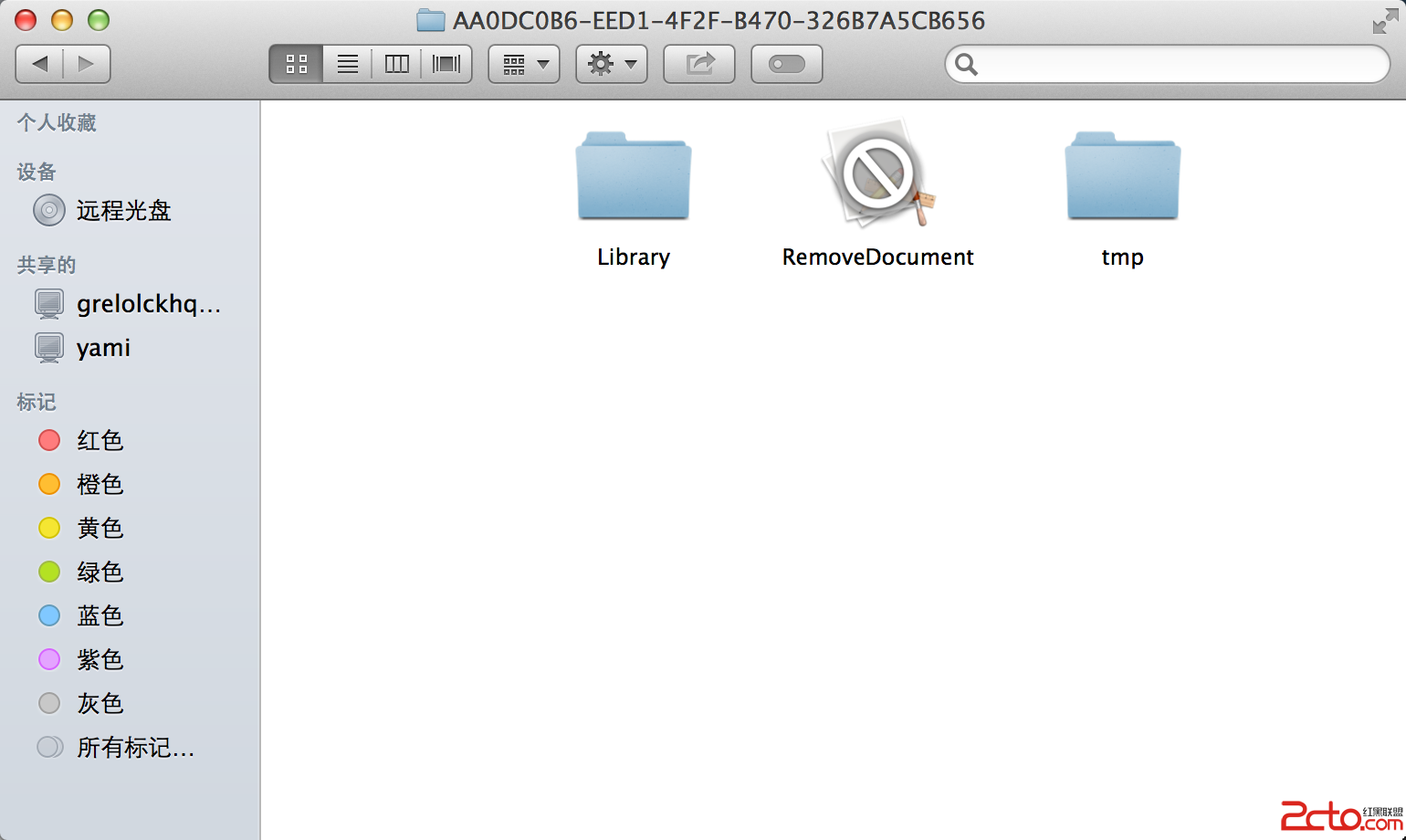
可以看見整個Documents文件夾都被刪除了。原因是如果為stringByAppendingPathComponent:方法傳遞的參數是@"",那麼返回的就是當前路徑,即Documents文件夾的路徑。
這種行為非常非常的危險,要特別小心。
比較保險的方法是先做一個判斷:
- (void)viewDidLoad
{
    [super viewDidLoad];

//    NSString *fileName = @"test";
    NSString *fileName = @"";
    NSString *filePath = [self getDirectoryOfDocumentFileWithName:fileName];
    NSLog(@"%@", filePath);
    if (filePath) {
        [self removeFileAtPath:filePath];
    }
}

- (NSString *)getDirectoryOfDocumentFileWithName:(NSString *)fileName {
    if ([fileName isEqualToString:@""]) {
        return nil;
    }

    NSString *documentsPath = [self getDirectoryOfDocumentFolder];
    if (documentsPath) {
        return [documentsPath stringByAppendingPathComponent:fileName]; // 獲取用於存取的目標文件的完整路徑
    }

    return nil;
}
當然也可以把判斷放在getDirectoryOfDocumentFileWithName:方法之外,這個視需求而定。
- 上一頁:IOS7的狀態欄和導航欄
- 下一頁:iOS多線程之NSRunloop

相關文章
+