IOS-UITableView入門(3)
編輯:IOS開發綜合
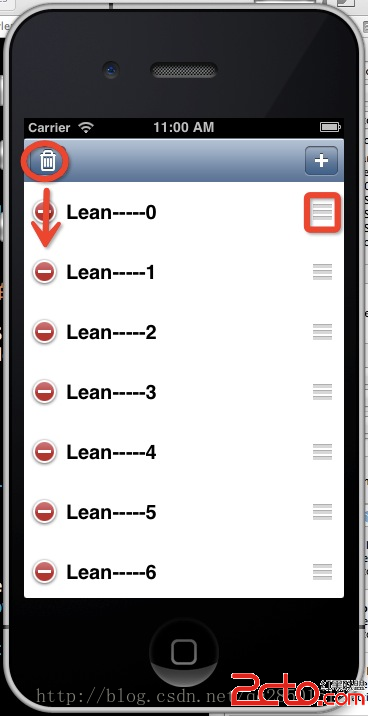
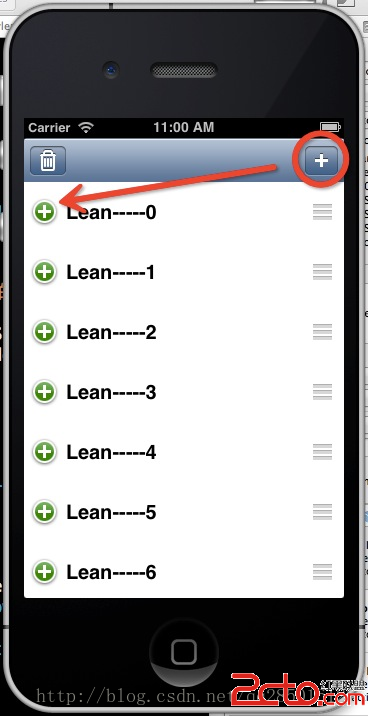
UITableView本身自帶了(增、刪)編輯功能:
1.只要調用UITableView的編輯代碼 就會進入編輯狀態:
[self.tableView setEditing:!self.tableView.editing animated:YES];
2.進入編輯狀態的UITableView會調用代理的
- (UITableViewCellEditingStyle) tableView:(UITableView *)tableView editingStyleForRowAtIndexPath:以便判斷是增加還是刪除的方法。
UITableViewCellEditingStyle為一個枚舉值,如UITableViewCellEditingStyleDelete,UITableViewCellEditingStyleInsert
整體的代碼如下:
#pragma mark 點擊編輯刪除
- (IBAction)trashClick:(id)sender {
    self.tableView.tag=EDIT_MOVE;
    [self.tableView setEditing:!self.tableView.editing animated:YES];
}

#pragma mark -TableViewDataSource
#pragma mark 當出現編輯狀態時 如果是刪除狀態時 點擊刪除保存時調用的方法
#pragma mark 當為增加狀態事 點擊增加按鈕保存時調用的方法
- (void)tableView:(UITableView *)tableView commitEditingStyle:(UITableViewCellEditingStyle)editingStyle forRowAtIndexPath:(NSIndexPath *)indexPath
{
    if (tableView.tag==20)
    {
        [self.arr removeObjectAtIndex:indexPath.row];
        [tableView deleteRowsAtIndexPaths:@[indexPath] withRowAnimation:UITableViewRowAnimationLeft];
    }
    else
    {
        [self.arr insertObject:@"new row..." atIndex:indexPath.row+1];
        NSIndexPath *indexNew=[NSIndexPath indexPathForRow:indexPath.row+1 inSection:0];
        [tableView insertRowsAtIndexPaths:@[indexNew] withRowAnimation:UITableViewRowAnimationRight];
    }

}

#pragma mark 點擊編輯時出現的刪除或者增加的按鈕
- (UITableViewCellEditingStyle) tableView:(UITableView *)tableView editingStyleForRowAtIndexPath:(NSIndexPath *)indexPath
{
    if (tableView.tag==20)
    {
        return UITableViewCellEditingStyleDelete;
    }
    else
    {
        return UITableViewCellEditingStyleInsert;
    }
}

#pragma mark 移動item時,以便編輯模式後還能保存編輯的順序
-(void)tableView:(UITableView *)tableView moveRowAtIndexPath:(NSIndexPath *)sourceIndexPath toIndexPath:(NSIndexPath *)destinationIndexPath
{
    NSString *currStr=self.arr[sourceIndexPath.row];
    [self.arr removeObjectAtIndex:sourceIndexPath.row];
    [self.arr insertObject:currStr atIndex:destinationIndexPath.row];
    [tableView reloadData];
}

#pragma mark 點擊編輯增加
- (IBAction)addClick:(id)sender {
    self.tableView.tag=EDIT_ADD;
    [self.tableView setEditing:!self.tableView.editing animated:YES];
}

相關文章
+