iOS UITableView 快速滾動(索引方式實現)
編輯:IOS開發綜合
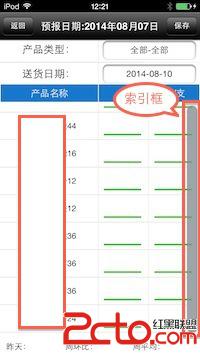
思路:UITableView一次性加載數據過多時,需要滑動多次觸底。想通過索引實現快速滑動,索引中加載20個空點。用戶在最右端滑動時,索引框顯示,當觸及索引點時指向其想對應的UITableView的RowIndex來實現快速滾動。這方法有缺陷:普通滑動時滾動條被遮蓋了。
主要代碼:
//獲取數據
-(void)getTableData{

    dispatch_async(dispatch_get_global_queue(DISPATCH_QUEUE_PRIORITY_DEFAULT, 0), ^{
        dispatch_async(dispatch_get_main_queue(), ^{
            // 獲取數據庫數據
            self.listArray = [[ReportLogic sharedInstance] getProductByCategory];
            if ([self.listArray count] == 0) {
                [GlobalApplication Alert:@提示 :@暫無數據];
            }else{
                // 索引目錄,20個空點
                NSMutableArray *stArray =  [[NSMutableArray alloc] init];
                self.sectionTitles = stArray;
                [stArray release];
                for (int i=0;i<20;i++)
                {
                    NSString *index = @;
                    [self.sectionTitles insertObject:index atIndex:i];
                }
            }
            // 數據刷新
            [self.fmTableView reloadData];
        });
    });
}

#pragma mark index
// 分區數
-(NSInteger)numberOfSectionsInTableView:(UITableView *)tableView{
    return 1;
}

// 索引目錄
-(NSArray *)sectionIndexTitlesForTableView:(UITableView *)tableView{

    return self.sectionTitles;
}

// 滑動時點擊目錄
-(NSInteger)tableView:(UITableView *)tableView sectionForSectionIndexTitle:(NSString *)title atIndex:(NSInteger)index{

     // 修正索引焦點為UITableView的RowIndex,頭尾和中間值
    if (index == 0) {
        index = 1;
    }else if(index == self.sectionTitles.count - 1){
        index = self.listArray.count -1;
    }else
         index = round(index*self.listArray.count/20);
    [self.fmTableView scrollToRowAtIndexPath:[NSIndexPath indexPathForRow:index inSection:0] atScrollPosition:UITableViewScrollPositionBottom animated:YES];
    return index;
}
效果:

相關文章
+