iOS_2_按鈕控制物體形變
編輯:IOS開發綜合
BeyondViewController.h
// // BeyondViewController.h // 02_按鈕控制物體形變 // // Created by beyond on 14-7-21. // Copyright (c) 2014年 com.beyond. All rights reserved. // #import@interface BeyondViewController : UIViewController // 控制器成員記住界面上的頭像按鈕 @property (weak, nonatomic) IBOutlet UIButton *headBtn; // 按鈕控制 head button 上 下 左 右 移動 - (IBAction)btnClick:(UIButton *)sender; - (IBAction)AffineTransform:(UIButton *)sender; - (IBAction)reset:(UIButton *)sender; @end
BeyondViewController.m
//
//  BeyondViewController.m
//  02_按鈕控制物體形變
//
//  Created by beyond on 14-7-21.
//  Copyright (c) 2014年 com.beyond. All rights reserved.
//

#import "BeyondViewController.h"

#define kDelta 20
const int DELTA = 50;

@interface BeyondViewController ()
{
    // 左旋轉 最笨方法 成員變量 記住弧度 可累計
    CGFloat _angel;

    // 成員記住 headBtn默認的frame
    CGRect _headBtnFrame;
}
@end

@implementation BeyondViewController

- (void)viewDidLoad
{
    [super viewDidLoad];
    // view一加載 就用 成員 記住 headBtn的初始位置
    _headBtnFrame = _headBtn.frame;

    // 調用自定義方法,代碼創建 buttuon
    [self addButtionByCoding];
    [self addTextFieldByCoding];

}

# pragma mark - 按鈕控制 head button 上 下 左 右 移動
- (void)moveByFrame:(UIButton *)sender
{
    // UIView的類方法 實現動畫效果(開始動畫)
    [UIView beginAnimations:nil context:nil];
    // 默認動畫持續時間是 0.2
    [UIView setAnimationDuration:1];


    // 以下三步為OC標准代碼,因為OC中不允許直接修該對象中結構體屬性的成員的值,要通過中間的臨時結構體變量
    CGRect frame = self.headBtn.frame;
    // 一般數字是一樣的話就可以抽取為: 1,變量; 2,宏; 3,const int
    // CGFloat delta = 50;
    // #define kDelta 50
    // const int DELTA = 50;


    int tag = [sender tag];
    switch (tag) {
        case 1:
            frame.origin.y -= kDelta;
            break;
        case 2:
            frame.origin.x += kDelta;
            break;
        case 3:
            frame.origin.y += kDelta;
            break;
        case 4:
            frame.origin.x -= kDelta;
            break;

        default:
            break;
    }


    self.headBtn.frame=frame;


    // UIView的類方法 實現動畫效果(結束動畫)
    [UIView commitAnimations];
}
- (IBAction)btnClick:(UIButton *)sender {

    [self animateWithBlock:^{


        // 以下三步為OC標准代碼,因為OC中不允許直接修該對象中結構體屬性的成員的值,要通過中間的臨時結構體變量
        CGPoint center = self.headBtn.center;
        // 一般數字是一樣的話就可以抽取為: 1,變量; 2,宏; 3,const int
        // CGFloat delta = 50;
        // #define kDelta 50
        // const int DELTA = 50;


        int tag = [sender tag];
        switch (tag) {
            case 1:
                center.y -= kDelta;
                break;
            case 2:
                center.x += kDelta;
                break;
            case 3:
                center.y += kDelta;
                break;
            case 4:
                center.x -= kDelta;
                break;

            default:
                break;
        }


        self.headBtn.center = center;

    }];

}


#pragma mark - 按鈕控制 head button 左右旋轉 放大 縮小
- (IBAction)AffineTransform:(UIButton *)sender {

    // UIView的類方法 實現動畫效果(開始動畫)
    [UIView beginAnimations:nil context:nil];
    // 默認動畫持續時間是 0.2
    [UIView setAnimationDuration:1];
    int tag = [sender tag];
    switch (tag) {
        case 11:
            // _angel -= M_PI_4;
            // 旋轉 順時針為正方向,使用弧度 M_PI_4 就是順時針旋轉45度
            //_headBtn.transform = CGAffineTransformMakeRotation(_angel);

            // CGAffineTransformRotate方法:返回一個新的結構體,是一個在原來 的結構體基礎上進行一定弧度旋轉的新的結構體
            _headBtn.transform = CGAffineTransformRotate(_headBtn.transform, - M_PI_4);
            break;
        case 12:
            // _angel += M_PI_4;
            // 旋轉 順時針為正方向,使用弧度 M_PI_4 就是順時針旋轉45度
            //_headBtn.transform = CGAffineTransformMakeRotation(_angel);

            // CGAffineTransformRotate方法:返回一個新的結構體,是一個在原來 的結構體基礎上進行一定弧度旋轉的新的結構體
            _headBtn.transform = CGAffineTransformRotate(_headBtn.transform,  M_PI_4);
            break;
        case 13:
            // 縮小
            // _headBtn.transform = CGAffineTransformMakeScale(0.5, 0.5);
            _headBtn.transform = CGAffineTransformScale(_headBtn.transform, 0.8, 0.8);
            break;
        case 14:
            // 放大
            // _headBtn.transform = CGAffineTransformMakeScale(1.5, 1.5);
            _headBtn.transform = CGAffineTransformScale(_headBtn.transform, 1.2, 1.2);
            break;
        case 0:
            // 點擊headBtn的時候,清空並還原為默認狀態
            _headBtn.transform = CGAffineTransformIdentity;
            _headBtn.frame = _headBtnFrame;
            break;
        default:
            break;
    }

    // UIView的類方法 實現動畫效果(結束動畫)
    [UIView commitAnimations];
}

#pragma mark - 通過block封裝代碼
// void (^myBlock)();
void (^myBlock)() = ^{
    NSLog(@"beyond");
};
// 手動調用block()時有點問題

- (void)animateWithBlock:(void(^)())block
{
    // UIView的類方法 實現動畫效果(開始動畫)
    [UIView beginAnimations:nil context:nil];
    // 默認動畫持續時間是 0.2
    [UIView setAnimationDuration:1];

    block();

    // UIView的類方法 實現動畫效果(結束動畫)
    [UIView commitAnimations];
}
- (IBAction)reset:(UIButton *)sender {
    [self animateWithBlock:^{
        // 點擊的時候,清空並還原為默認狀態
        _headBtn.transform = CGAffineTransformIdentity;
        _headBtn.frame = _headBtnFrame;
    }];
}

- (void) addButtionByCoding
{
    // 1,用類方法創建 button實例
    UIButton *button = [[UIButton alloc] init];
    // 2,設置button的細節
    button.frame = CGRectMake(0, 0, 100, 100);

    // 正常狀態
    [button setTitle:@"normal" forState:UIControlStateNormal];
    [button setTitleColor:[UIColor redColor] forState:UIControlStateNormal];
    // [button setImage:[UIImage imageNamed:@"btn_01.png"] forState:UIControlStateNormal];
    [button setBackgroundImage:[UIImage imageNamed:@"btn_01.png"] forState:UIControlStateNormal];
    // 點擊時高亮狀態
    [button setTitle:@"highlighted" forState:UIControlStateHighlighted];
    [button setTitleColor:[UIColor blueColor] forState:UIControlStateNormal];
    // [button setImage:[UIImage imageNamed:@"btn_02.png"] forState:UIControlStateHighlighted];
    [button setBackgroundImage:[UIImage imageNamed:@"btn_02.png"] forState:UIControlStateHighlighted];
    // 為按鈕添加點擊事件
    [button addTarget:self action:@selector(codeBtnClick:) forControlEvents:UIControlEventTouchUpInside];
    // 3,添加button到當前控制器的view裡面
    [self.view addSubview:button];
}
// 代碼創建的按鈕的點擊事件
- (void) codeBtnClick:(UIButton *)sender
{
    NSLog(@"%@",sender);
    NSLog(@"%p",sender);
}
// 代碼創建文本輸入框
- (void) addTextFieldByCoding
{
    // 1,類方法創建控件
    UITextField *textField = [[UITextField alloc]init];
    // 2,控件細節
    textField.frame = CGRectMake(100, 0, 100, 100);
    textField.backgroundColor = [UIColor grayColor];
    // 系統字體大小
    textField.font = [UIFont systemFontOfSize:20];
    textField.font = [UIFont boldSystemFontOfSize:30];
    // 居中顯示
    CGFloat x = self.view.frame.size.width*0.5;
    CGFloat y = self.view.frame.size.height*0.5;
    // textField.center = CGPointMake(x, y);
    // 以下三步為OC標准代碼,因為OC中不允許直接修該對象中結構體屬性的成員的值,要通過中間的臨時結構體變量
    CGPoint center = textField.center;
    center.x = x;
    center.y = y;
    textField.center = center;

    // 3,將控件添加到當前控制器的view
    [self.view addSubview:textField];
}
@end
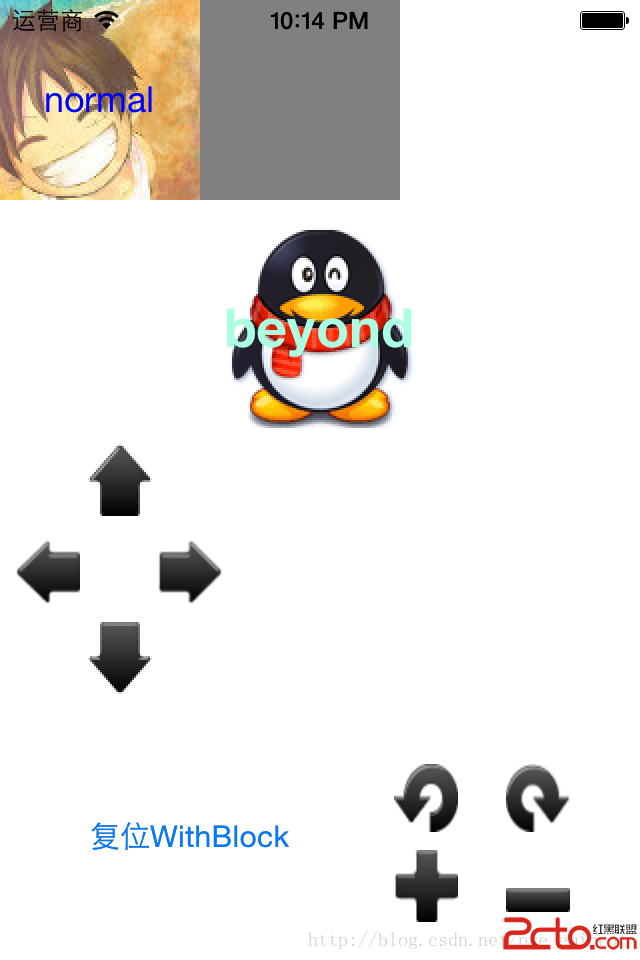
效果圖
相關文章
+