[iOS]UITableViewController完成收回鍵盤操作
編輯:IOS開發綜合
UITableViewController 本身能夠實現鍵盤適配(cell中控件焦點會移動到鍵盤上方
在做鍵盤收回的時候思考過如下方案
1、tableview添加點擊事件
結果:點擊事件和tableview的didselect 沖突,導致didselect失效
2、scrollview代理滾動收回鍵盤
結果:目的可以達到,但是當點擊textfield的時候,此時鍵盤會出現之後直接收回。原因是先適配→調用scrollview代理。
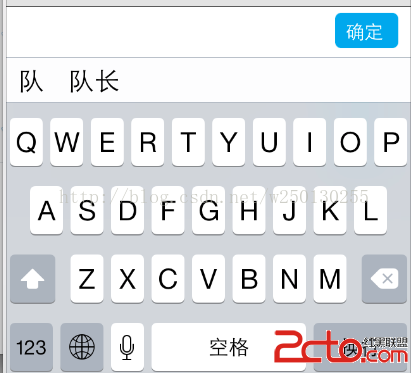
最後采用如下方案 如圖:
    _sureBtn = [UIButton buttonWithType:UIButtonTypeCustom];
    _sureBtn.frame = CGRectMake(self.view.size.width-60, 5, 50, 28);
    _sureBtn.backgroundColor = [UIColor colorWithRed:0.150 green:0.662 blue:0.915 alpha:1.000];
    _sureBtn.titleLabel.font = [UIFont systemFontOfSize:15];
    _sureBtn.layer.cornerRadius = 5.0;
    [_sureBtn setTitle:@確定 forState:UIControlStateNormal];
    [_sureBtn addTarget:self action:@selector(changeRemarks) forControlEvents:UIControlEventTouchUpInside];
    _view=[[UIView alloc] initWithFrame:CGRectMake(0, 0, self.view.frame.size.width, 40)];
    _view.backgroundColor=[UIColor whiteColor];
    UIView *line = [[UIView alloc] initWithFrame:CGRectMake(0, 0, self.view.frame.size.width, 0.5)];
    line.backgroundColor = [UIColor blackColor];
    [_view addSubview:line];
    [_view addSubview:_sureBtn];
在使用的時候,對Textfield進如下處理
_begoodatField.inputAccessoryView = _view;
如果是tableview中cell的文本框
則需要在定義一個臨時textfield。
使用的時候
 _xuexiaoField=cellMenu.celltext;
 _xuexiaoField.inputAccessoryView = _view;//cellMenu為自定義cell的名字
附上確定按鈕方法
- (void)changeRemarks
{
    [_nicktextField resignFirstResponder];
    [_xuexiaoField resignFirstResponder];
    [_begoodatField resignFirstResponder ];
    [_bumenField resignFirstResponder ];
}


相關文章
+