iOS給鍵盤添加控制欄
編輯:IOS開發綜合
iOS中鍵盤的使用很頻繁,有時給鍵盤上添加一個控制欄可以方便快捷的在不同輸入框內進行切換或隱藏
這裡簡單說下具體實現方式
初始化一個UIToolBar並添加到界面,隨著鍵盤的高度的更改而動態更改,從而進行展示
下面來看代碼實現
頭文件部分
#import#import @interface UIKeyboardTool : NSObject ///用於界面展示的toolbar @property (nonatomic,strong) UIToolbar *toolBar; ///用於光標切換的數組 @property (nonatomic,strong) NSArray *fieldArray; ///顯示鍵盤 -(void)showToolBar:(UITextField *)field; @end
初始化
-(instancetype)init
{
    if (self == [super init])
    {

        CGFloat screenHeight = [[UIScreen mainScreen] bounds].size.height;
        CGFloat screenWidth = [[UIScreen mainScreen] bounds].size.width;

        toolBar = [[UIToolbar alloc] initWithFrame:CGRectMake(0, screenHeight, screenWidth, 44)];


        UIBarButtonItem *nextItem = [[UIBarButtonItem alloc] initWithTitle:@下一個 style:(UIBarButtonItemStylePlain) target:self action:@selector(showNext)];
        UIBarButtonItem *previousItem = [[UIBarButtonItem alloc] initWithTitle:@上一個 style:(UIBarButtonItemStylePlain) target:self action:@selector(showPrevious)];
        UIBarButtonItem *spaceItem = [[UIBarButtonItem alloc] initWithBarButtonSystemItem:(UIBarButtonSystemItemFlexibleSpace) target:self action:nil];
        UIBarButtonItem *doneItem = [[UIBarButtonItem alloc] initWithTitle:@隱藏 style:(UIBarButtonItemStylePlain) target:self action:@selector(showHide)];

        toolBar.items = @[nextItem,previousItem,spaceItem,doneItem];

        ///監聽鍵盤高度變化
        [[NSNotificationCenter defaultCenter] addObserver:self selector:@selector(keyboardFrameChange:) name:UIKeyboardWillChangeFrameNotification object:nil];

        currentField =  nil;

    }
    return self;
}
鍵盤顯示
///顯示鍵盤
-(void)showToolBar:(UITextField *)field
{
    currentField = field;

    [UIView beginAnimations:nil context:nil];
    [UIView setAnimationDuration:0.25];
    CGFloat screenHeight = [[UIScreen mainScreen] bounds].size.height;
    CGFloat screenWidth = [[UIScreen mainScreen] bounds].size.width;
    [toolBar setFrame:CGRectMake(0, screenHeight-300, screenWidth, 44)];
    [UIView commitAnimations];

}
輸入框切換
///點擊下一個
- (void)showNext
{
    NSInteger current = [fieldArray indexOfObject:currentField];

    if ((current + 1) < fieldArray.count)
    {
        UITextField *field = [fieldArray objectAtIndex:current + 1];
        [field becomeFirstResponder];
    }
}
隨著IOS的更新,iOS的鍵盤高度不在是iOS5中的216,而是有多種情況,所以通過監聽系統事件
UIKeyboardWillChangeFrameNotification
來動態處理高度變化,通知返回的值是一個NSDictionary
這裡面的值如下
///動畫曲線類型
UIKeyboardAnimationCurveUserInfoKey = 7;
///動畫持續時間
UIKeyboardAnimationDurationUserInfoKey = 0.25;
UIKeyboardBoundsUserInfoKey = NSRect: {{0, 0}, {375, 258}};
///鍵盤動畫起始時的中心點
UIKeyboardCenterBeginUserInfoKey = NSPoint: {187.5, 796};
///鍵盤動畫結束時的中心點
UIKeyboardCenterEndUserInfoKey = NSPoint: {187.5, 538};
///鍵盤動畫起始時的大小
UIKeyboardFrameBeginUserInfoKey = NSRect: {{0, 667}, {375, 258}};
///鍵盤動畫結束時的大小
UIKeyboardFrameEndUserInfoKey = NSRect: {{0, 409}, {375, 258}};
///鍵盤是否是展示,bool類型,1展示,2隱藏
UIKeyboardIsLocalUserInfoKey = 1;
根據最後的bool值來判斷
///動態更改frame
-(void)keyboardFrameChange:(NSNotification *)notify
{
    NSDictionary *dict = [notify userInfo];
    NSValue *endValue = [dict objectForKey:UIKeyboardFrameEndUserInfoKey];

    CGRect endFrame = [endValue CGRectValue];


    [UIView beginAnimations:nil context:nil];
    [UIView setAnimationDuration:0.25];
    CGFloat screenHeight = [[UIScreen mainScreen] bounds].size.height;
    CGFloat screenWidth = [[UIScreen mainScreen] bounds].size.width;

    NSNumber *isShowKeyboardValue = [dict objectForKey:@UIKeyboardIsLocalUserInfoKey];
    BOOL isShowKeyboard = isShowKeyboardValue.boolValue;


    if (isShowKeyboard)
    {
        ///鍵盤高度更改
        [toolBar setFrame:CGRectMake(0, endFrame.origin.y - 44 , screenWidth, 44)];

    }
    else
    {
        ///鍵盤隱藏
        [toolBar setFrame:CGRectMake(0, screenHeight, screenWidth, 44)];

    }

    [UIView commitAnimations];

}
如何使用
初始化
    tool = [[UIKeyboardTool alloc] init];
    tool.fieldArray = @[field,field1,field2];
    [self.view addSubview:tool.toolBar];
展示
-(void)textFieldDidBeginEditing:(nonnull UITextField *)textField
{
    [tool showToolBar:textField];
}
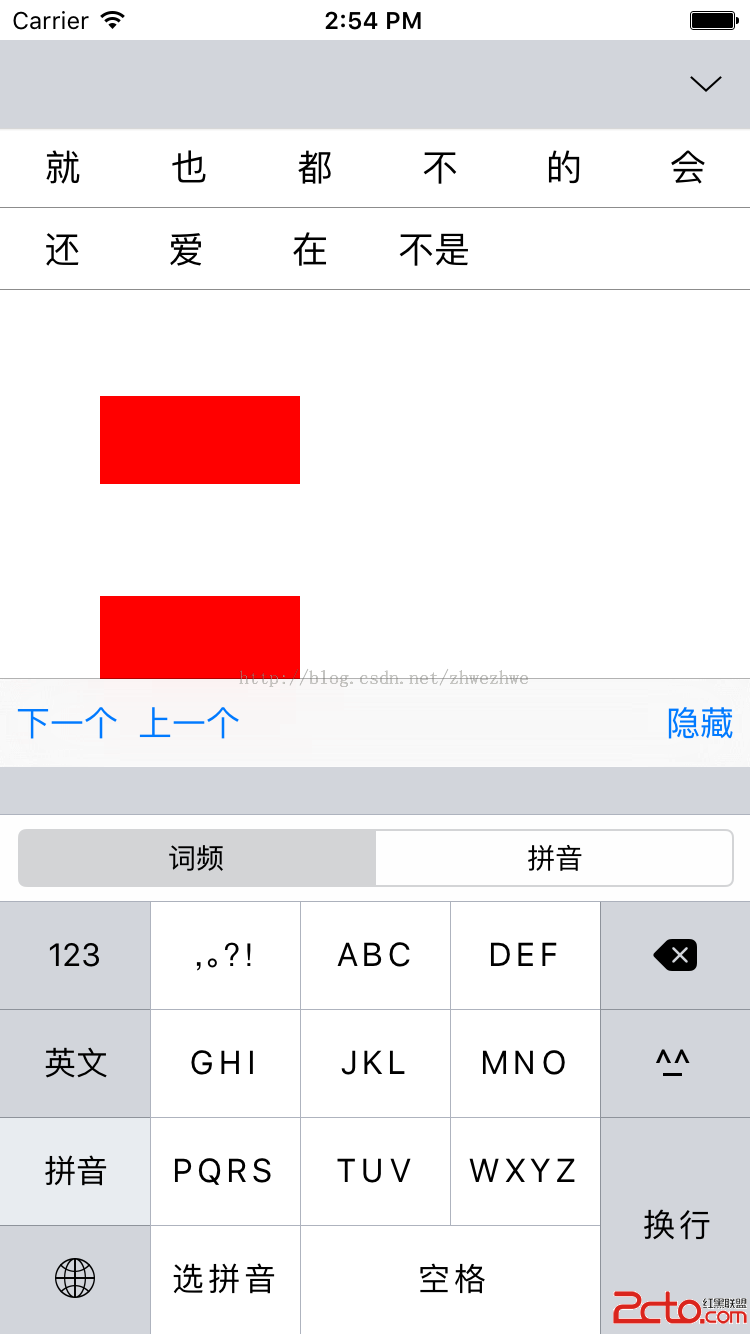
遇到的問題,隨著iOS9的更新,當打開單詞聯想界面的時候,之前的版本背景是不透明的,但是iOS9上變成了透明的,這樣導致的結果就會如下情況,而且這時候的控制欄是不能點擊,英系那個美觀
- 上一頁:IOS 推送詳解
- 下一頁:iOS---sha1加密的一個坑
相關文章
+