ios學習8_KVC和字典轉模型
編輯:IOS開發綜合
Key Value Coding是cocoa的一個標准組成部分,它能讓我們可以通過name(key)的方式訪問屬性,某些情況下極大地簡化了代碼,可稱之為cocoa的大招。
如下的例子:
使用KVC的好處
不使用KVC
- (id)tableView:(NSTableView *)tableview
objectValueForTableColumn:(id)column row:(NSInteger)row {
    ChildObject *child = [childrenArray objectAtIndex:row];
    if ([[column identifier] isEqualToString:@name]) {
       return [child name];
    }
   if ([[column identifier] isEqualToString:@age]) {
       return [child age];
    }
   if ([[column identifier] isEqualToString:@favoriteColor]) {
       return [child favoriteColor];
    }
    // And so on.
}
使用KVC
- (id)tableView:(NSTableView *)tableview
objectValueForTableColumn:(id)column row:(NSInteger)row {
    ChildObject *child = [childrenArray objectAtIndex:row];
    return [child valueForKey:[column identifier]];
}
顯而易見,簡化了很多代碼。
KVC操作
KVC賦值
1 給當前對象屬性賦值
- (void)setValue:(id)value forKey:(NSString *)key;
2給對象的屬性的屬性賦值
- (void)setValue:(id)value forKeyPath:(NSString *)keyPath;
3 處理未定義的鍵
- (void) setValue:(id)value forUndefinedKey:(NSString *)key
4 字典轉模型:會為我們把和dictionary的key名字相同的class proerty設置上dict中key對應的value
- (void)setValuesForKeysWithDictionary:(NSDictionary *)keyedValues;
注意:要求字典中的key和對象屬性一樣,都是基本的OC數據類型:Array/Dictionary/Boolean/Data/Number/String
KVC取值
1 獲取對象屬性的值
- (id)valueForKey:(NSString *)key;
2 獲取對象屬性的屬性的值
- (id)valueForKeyPath:(NSString *)keyPath;
例子:
Person * p = [[Person alloc]init];
Car *car = [[Car alloc]init];
p.car = car;
[p setValue:@qhyuan forKeyPath:@name];
[p setValue:@(20) forKey:@id];
[p setValue:@baoshijie forKeyPath:@car.brand];
[p setValue:@180000 forKeyPath:@car.price];
NSLog(@kvc賦值的person對象----%@,p);
NSString * name = [p valueForKey:@name];
NSString * brand = [p valueForKeyPath:@car.brand];
NSLog(@%@ %@,name, brand);
字典轉模型
常規情況
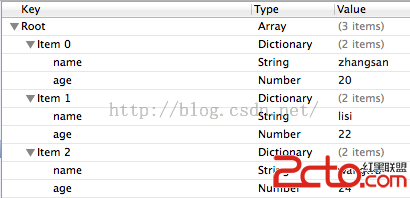
模型
Person.h
@interface Person : NSObject
@property (nonatomic, copy) NSString * name;
@property (nonatomic, assign) int age;
- (instancetype) initWithDict:(NSDictionary *) dict;
+ (instancetype) personWithDict:(NSDictionary *) dict;
+ (NSArray *) person;
@end
Person.m
@implementation Person
- (instancetype) initWithDict:(NSDictionary *) dict
{
    if(self = [self init])
{
// 使用KVC 字典轉模型 如此方便,省去了大量的賦值代碼
[self setValuesForKeysWithDictionary:dict];
    //self.name = dict[@name];
    //self.age = [dict[@age] integerValue];
    }
    return self;
}
+ (instancetype) personWithDict:(NSDictionary *) dict
{
    return [[self alloc]initWithDict:dict];
}
+ (NSArray *) person
{
    NSMutableArray * mutablePersons = [NSMutableArray array];
    NSString * path = [[NSBundle mainBundle] pathForResource:@persons.plist ofType:nil];
    NSArray *persons = [[NSArray alloc] initWithContentsOfFile:path];
    for (NSDictionary * person in persons) {
        [mutablePersons addObject:[self personWithDict:person]];
    }
    return mutablePersons;
}
- (NSString *) description
{
    NSString * desc = [NSString stringWithFormat:@<%p:(%@,%d)>,self,self.name,self.age];
    return desc;
}
@end
字典中多個某些key是OC中的關鍵字
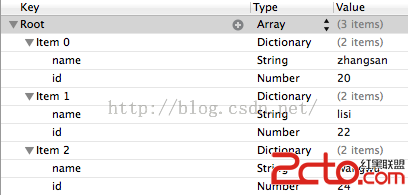
如果將鍵age換成了id
會拋出異常:*** Terminating app due to uncaught exception 'NSUnknownKeyException',reason: '[
重寫以下方法即可,處理未定義的鍵
- (void)setValue:(id)value forUndefinedKey:(NSString *)key;
解決方式:
- (void) setValue:(id)value forUndefinedKey:(NSString *)key
{
    if([key isEqualToString:@id])
        key = @age;
    [super setValue:value forKey:key];
}
字典裡面還包含某些對應自定義類的字典或者數組
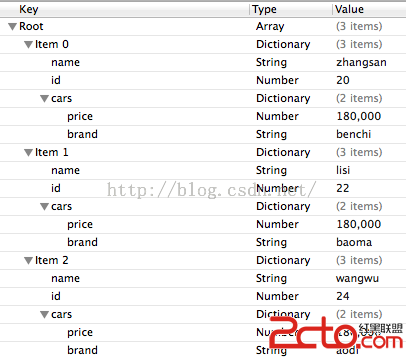
Person類增加了一個Car類型的屬性
@property (nonatomic, strong) Car * car;
我們只需要重寫以下方法
- (void)setValue:(id)value forKey:(NSString *)key;
解決方法:
- (void)setValue:(id)value forKey:(NSString *)key
{
    if([key isEqualToString:@cars])
    {
        Car *car = [Car carWithDict:(NSDictionary *)value];
        self.car = car;
    }
    else
        [super setValue:value forKey:key];
}
打印結果
字典轉模型[5525:60b] (
)
相關文章
+