iOS高級開發——CollectionView修改cell的文本及模型重構
編輯:IOS開發綜合
該篇博客是在《iOS高級開發——CollectionView的動態增刪cell及模型重構》的基礎上繼續進行開發的。在之前那篇博客中,我們實現了動態的增刪cell,並且使用了模型Model進行重構。今天我們要實現的是動態修改cell中的描述文字,通過這個案例,我們能發現使用Model的好處。代碼已經上傳至:https://github.com/chenyufeng1991/CollectionView .中的“動態增加cell和section實現” 。
(1)我這裡通過長按cell的操作,彈出輸入對話框,然後輸入修改的描述文字。CollectionView本身沒有長按事件,我這裡通過增加長按手勢來實現。該功能在《iOS高級開發——CollectionView的cell長按事件實現》中也有說明。實現代碼如下:
#pragma mark - 創建長按手勢
- (void)createLongPressGesture{

  //創建長按手勢監聽
  UILongPressGestureRecognizer *longPress = [[UILongPressGestureRecognizer alloc]
                                             initWithTarget:self
                                             action:@selector(myHandleTableviewCellLongPressed:)];
  longPress.minimumPressDuration = 1.0;
  //將長按手勢添加到需要實現長按操作的視圖裡
  [self.collectionView addGestureRecognizer:longPress];
}
(2)然後需要在長按開始的方法內彈出輸入對話框,在點擊對話框確定按鈕的時候進行修改文本。實現代碼如下:
- (void) myHandleTableviewCellLongPressed:(UILongPressGestureRecognizer *)gestureRecognizer {


  CGPoint pointTouch = [gestureRecognizer locationInView:self.collectionView];

  if (gestureRecognizer.state == UIGestureRecognizerStateBegan) {
    NSLog(@長按手勢開始);

    NSIndexPath *indexPath = [self.collectionView indexPathForItemAtPoint:pointTouch];
    if (indexPath == nil) {
      NSLog(@空);
    }else{
      UIAlertController *alertController = [UIAlertController alertControllerWithTitle:@提示 message:@請輸入修改後的描述文字 preferredStyle:UIAlertControllerStyleAlert];
      //以下方法就可以實現在提示框中輸入文本;
      [alertController addAction:[UIAlertAction actionWithTitle:@確定 style:UIAlertActionStyleDefault handler:^(UIAlertAction * _Nonnull action) {
        UITextField *cellDescTextField = alertController.textFields.firstObject;

        NSString *cellDesc = cellDescTextField.text;
        NSLog(@輸入的文字是:%@,cellDesc);


        //找到當前操作的section;
        SectionModel *section = [self.dataSectionArray objectAtIndex:indexPath.section];
        //找到當前操作的cell;
        CellModel *cell = [section.cellArray objectAtIndex:indexPath.row];
        //修改該cell的描述文字;
        cell.cellDesc = cellDesc;

        //確定當前的cell數組;
        self.dataCellArray = section.cellArray;
        //替換cell數組中的內容;
        [self.dataCellArray replaceObjectAtIndex:indexPath.row withObject:cell];
        //更新界面;
        [self.collectionView reloadData];


      }]];

      [alertController addAction:[UIAlertAction actionWithTitle:@取消 style:UIAlertActionStyleDefault handler:nil]];
      [alertController addTextFieldWithConfigurationHandler:^(UITextField * _Nonnull textField) {
        textField.placeholder = @請輸入Section名稱;
      }];
      [self presentViewController:alertController animated:true completion:nil];

      NSLog(@Section = %ld,Row = %ld,(long)indexPath.section,(long)indexPath.row);

    }
  }
  if (gestureRecognizer.state == UIGestureRecognizerStateChanged) {
    NSLog(@長按手勢改變,發生長按拖拽動作執行該方法);
  }

  if (gestureRecognizer.state == UIGestureRecognizerStateEnded) {
    NSLog(@長按手勢結束);
  }
}
(3)實現效果如下:
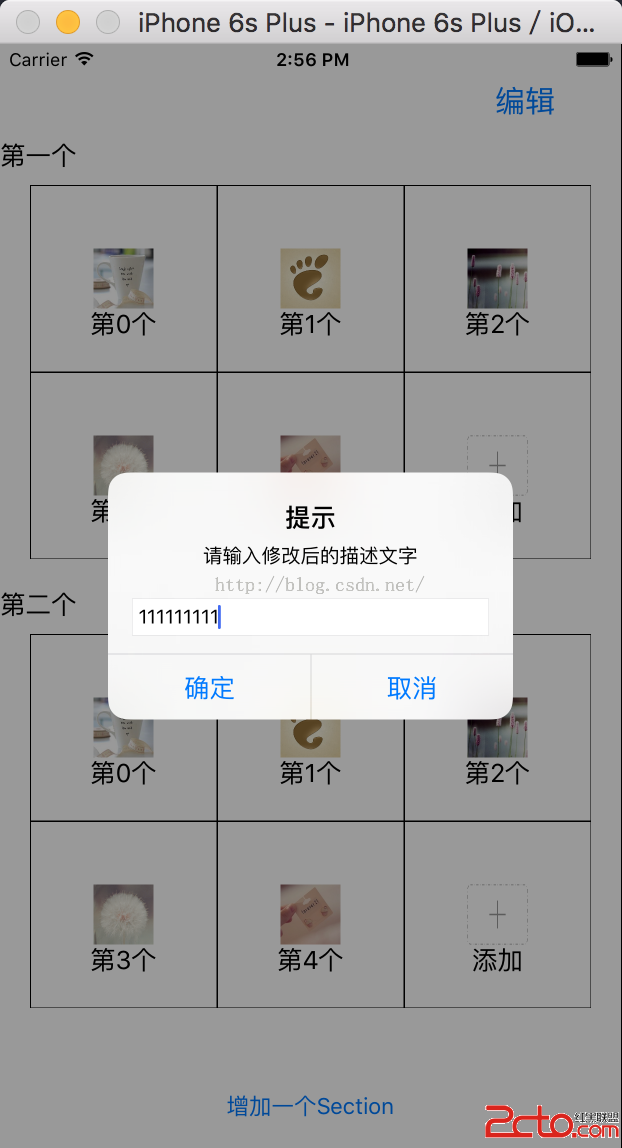
。
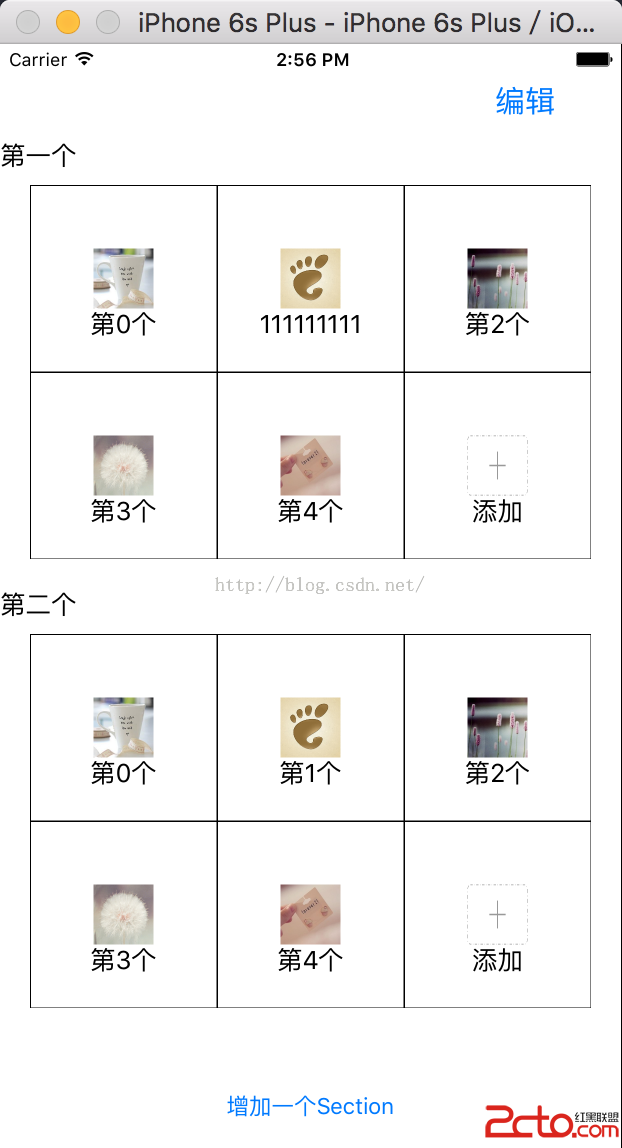 。
。
總結,我會持續對CollectionView的使用進行更新,並實現其他復雜實用的效果。請大家不斷關注。
- 上一頁:[IOS 開發]基本 UI 控件詳解 (UIButton | UITextField | UITextView | UISwitch)
- 下一頁:iOS 9 Auto Layout界面自動布局系列6-自適應布局


相關文章
+