
iOS中TableView的不同類型
編輯:IOS開發綜合
TableView是iOS開發中經常用到的View,針對不同的顯示需求,我們需要不同的Cell來進行顯示,比較復雜的顯示我們一般會自定義Cell的樣式,但是簡單的顯示就可以靠iOS本身支持的列表類型了。
iOS目前支持四中列表類型,分別是:
UITableViewCellStyleDefault:默認類型,可以顯示圖片和文本 UITableViewCellStyleSubtitle:可以顯示圖片、文本和子文本 UITableViewCellStyleValue1:可以顯示圖片、文本和子文本 UITableViewCellStyleValue2:可以顯示文本和子文本其顯示的樣式也各不相同,按順序如下所示:
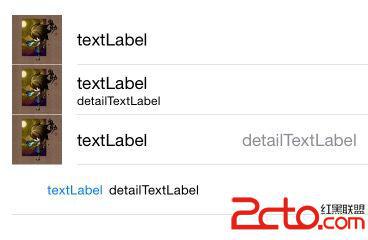 要設置也很簡單,代碼如下:
- (UITableViewCell *)tableView:(UITableView *)tableView cellForRowAtIndexPath:(NSIndexPath *)indexPath {
    UITableViewCell *cell;
    // 共四種類型
    switch (indexPath.row) {
        case 0:// UITableViewCellStyleDefault:默認的類型,支持顯示圖片和文本
        {
            NSString *CellOne = @"CellOne";
            // 設置tableview類型
            cell =[[UITableViewCell alloc]initWithStyle:UITableViewCellStyleDefault reuseIdentifier:CellOne];
            // 設置不可點擊
            cell.selectionStyle = UITableViewCellSelectionStyleNone;
            cell.imageView.image = [UIImage imageNamed:@"icon"];// 圖片
            cell.textLabel.text = @"textLabel";// 文本
        }
            break;
        case 1:// UITableViewCellStyleSubtitle類型,支持顯示圖片和文本以及子文本
        {
            NSString *CellTwo = @"CellTwo";
            // 設置tableview類型
            cell = [[UITableViewCell alloc]initWithStyle:UITableViewCellStyleSubtitle reuseIdentifier:CellTwo];
            // 設置不可點擊
            cell.selectionStyle = UITableViewCellSelectionStyleNone;
            cell.imageView.image = [UIImage imageNamed:@"icon"];// 圖片
            cell.textLabel.text = @"textLabel";// 文本
            cell.detailTextLabel.text = @"detailTextLabel";// 子文本
        }
            break;
        case 2:// UITableViewCellStyleValue1類型,支持顯示圖片和文本以及子文本
        {
            NSString *CellThree = @"CellThree";
            // 設置tableview類型
            cell =[[UITableViewCell alloc]initWithStyle:UITableViewCellStyleValue1 reuseIdentifier:CellThree];
            // 設置不可點擊
            cell.selectionStyle = UITableViewCellSelectionStyleNone;
            cell.imageView.image = [UIImage imageNamed:@"icon"];// 圖片
            cell.textLabel.text = @"textLabel";// 文本
            cell.detailTextLabel.text = @"detailTextLabel";// 子文本
        }
            break;
        case 3:// UITableViewCellStyleValue2類型,支持顯示文本以及子文本
        {
            NSString *CellFour = @"CellFour";
            // 設置tableview類型
            cell =[[UITableViewCell alloc]initWithStyle:UITableViewCellStyleValue2 reuseIdentifier:CellFour];
            // 設置不可點擊
            cell.selectionStyle = UITableViewCellSelectionStyleNone;
            cell.textLabel.text = @"textLabel";// 文本
            cell.detailTextLabel.text = @"detailTextLabel";// 子文本
        }
            break;
    }
    return cell;
}
相關文章
+