iOS中 本地通知/本地通知詳解 韓俊強的博客
編輯:IOS開發綜合
Notification是智能手機應用編程中非常常用的一種傳遞信息的機制,而且可以非常好的節省資源,不用消耗資源來不停地檢查信息狀態(Pooling),在iOS下應用分為兩種不同的Notification種類,本地和遠程。本地的Notification由iOS下NotificationManager統一管理,只需要將封裝好的本地Notification對象加入到系統Notification管理機制隊列中,系統會在指定的時間激發將本地Notification,應用只需設計好處理Notification的方法就完成了整個Notification流程了。
本地Notification所使用的對象是UILocalNotification,UILocalNotification的屬性涵蓋了所有處理Notification需要的內容。UILocalNotification的屬性有fireDate、timeZone、repeatInterval、repeatCalendar、alertBody、 alertAction、hasAction、alertLaunchImage、applicationIconBadgeNumber、 soundName和userInfo。
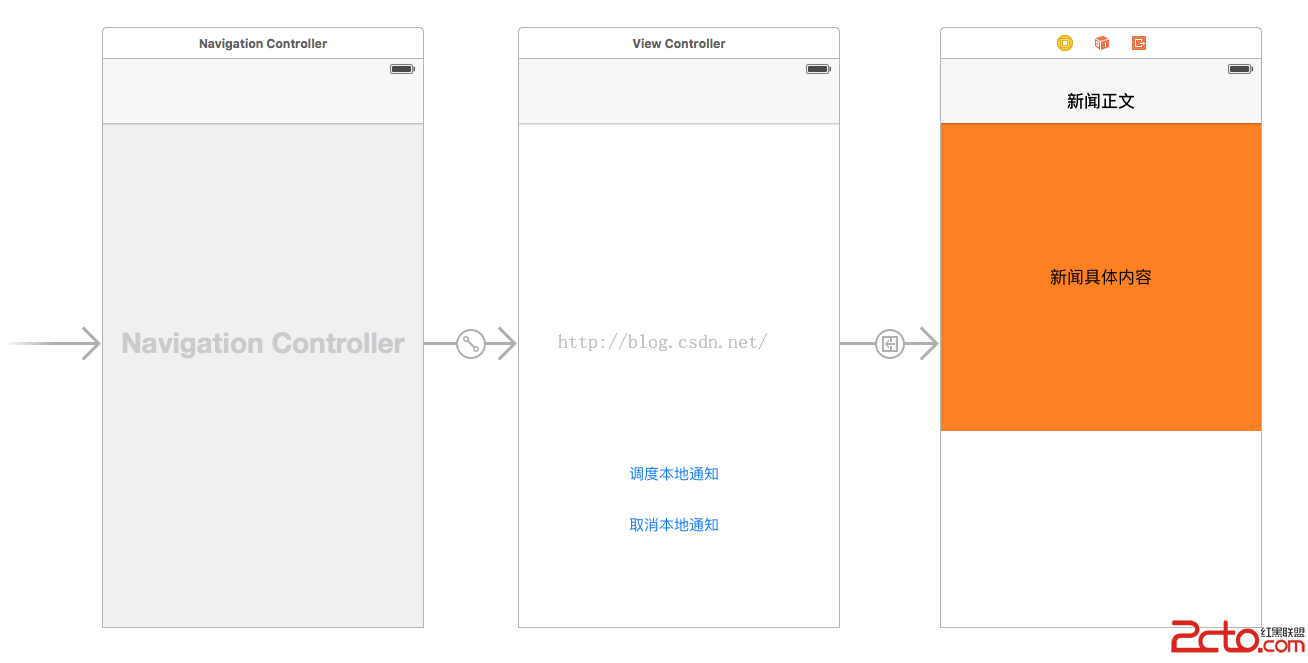
1.首先要明白模擬器和真機的區別:模擬器不會有音頻提示,另外就是沒有檢測允許接受通知,所以我補充一下幾點:
1.添加監測通知:
 if ([UIApplication instancesRespondToSelector:@selector(registerUserNotificationSettings:)]){

        [application registerUserNotificationSettings:[UIUserNotificationSettings settingsForTypes:UIUserNotificationTypeAlert|UIUserNotificationTypeBadge|UIUserNotificationTypeSound categories:nil]];
    }
上代碼:
#import "ViewController.h"
#import "DetailViewController.h"
@interface ViewController ()
@property (weak, nonatomic) IBOutlet UIButton *schedule;
@property (weak, nonatomic) IBOutlet UIButton *unSchedule;

@end

@implementation ViewController

- (void)viewDidLoad {
    [super viewDidLoad];
    // Do any additional setup after loading the view, typically from a nib.
}

// 調度通知
- (IBAction)schedule:(UIButton *)sender {

    // 1.創建通知
    UILocalNotification *ln = [[UILocalNotification alloc]init];

    if (ln) {
        // 設置時區
        ln.timeZone = [NSTimeZone defaultTimeZone];
        // 通知第一次發出的時間
        ln.fireDate = [[NSDate date]dateByAddingTimeInterval:5];

        // 2.設置通知屬性
        ln.soundName = @"click.wav"; // 音效文件名
        // 通知的具體內容
        ln.alertBody = @"重大新聞:小韓哥的博客又更新了,趕快進來看看吧!....";

        // 鎖屏界面顯示的小標題,完整標題:(“滑動來”+小標題)
        ln.alertAction = @"查看新聞吧";

        // 設置app圖標數字
        ln.applicationIconBadgeNumber = 10;

        // 設置app的額外信息
        ln.userInfo = @{
                        @"icon":@"text.png",
                        @"title":@"重大新聞",
                        @"time":@"2016-02-28",
                        @"body":@"重大新聞:小韓哥的博客又更新了,趕快進來看看吧!"
                        };
        // 設置重啟圖片
        ln.alertLaunchImage = @"101339g76j7j9t2zgzdvkj.jpg";

        // 設置重復發出通知的時間間隔
//        ln.repeatInterval = NSCalendarUnitMinute;

        // 3.調度通知(啟動任務,在規定的時間發出通知)
        [[UIApplication sharedApplication]scheduleLocalNotification:ln];
        // 直接發出通知沒意義
//        [[UIApplication sharedApplication]presentLocalNotificationNow:ln];
    }

}
- (IBAction)noSchedule:(UIButton *)sender
{
//    [[UIApplication sharedApplication]cancelAllLocalNotifications];
    // 已經發出且過期的通知會從數組裡自動移除
    NSArray *notes = [UIApplication sharedApplication].scheduledLocalNotifications;
    NSLog(@"%@",notes);
}


- (void)prepareForSegue:(UIStoryboardSegue *)segue sender:(UILocalNotification *)note
{
    DetailViewController *detailVC = segue.destinationViewController;
    detailVC.userInfo = note.userInfo;
}
@end
2.通知詳情頁面設置基本屬性:
.h #import@interface DetailViewController : UIViewController @property (nonatomic, strong) NSDictionary *userInfo; @end .m #import "DetailViewController.h" @interface DetailViewController () @property (weak, nonatomic) IBOutlet UILabel *userInfoContent; @end @implementation DetailViewController - (void)viewDidLoad { [super viewDidLoad]; self.userInfoContent.text = self.userInfo[@"body"]; } - (void)setUserInfo:(NSDictionary *)userInfo { _userInfo = userInfo; } @end
3.didFinishLaunchingWithOptions 實時監測:
- (BOOL)application:(UIApplication *)application didFinishLaunchingWithOptions:(NSDictionary *)launchOptions {
    //注冊本地通知

    if ([UIApplication instancesRespondToSelector:@selector(registerUserNotificationSettings:)]){

        [application registerUserNotificationSettings:[UIUserNotificationSettings settingsForTypes:UIUserNotificationTypeAlert|UIUserNotificationTypeBadge|UIUserNotificationTypeSound categories:nil]];
    }

//    NSLog(@"-----didFinishLaunchingWithOptions---");
    UILabel *label = [[UILabel alloc]init];
    label.frame = CGRectMake(0, 64, 320, 100);
    label.backgroundColor = [UIColor redColor];
    label.font = [UIFont systemFontOfSize:11];
    label.numberOfLines = 0;
    label.textColor = [UIColor whiteColor];
    label.text = [launchOptions description];
    [[[self.window.rootViewController.childViewControllers firstObject] view]addSubview:label];

    UILocalNotification *note = launchOptions[UIApplicationLaunchOptionsURLKey];
    if (note) {
        label.text = @"點擊本地通知啟動的程序";
    }else{
        label.text = @"直接點擊app圖標啟動的程序";
    }
    self.label = label;
    return YES;
}
/**
 * 當用戶點擊本地通知進入app的時候調用(app當時並沒有被關閉)
 * 若app已關閉不會被調用此方法
 */
- (void)application:(UIApplication *)application didReceiveLocalNotification:(UILocalNotification *)notification
{
    self.label.text = @"點擊通知再次回到前台";
    ViewController *homeVC = [self.window.rootViewController.childViewControllers firstObject];
//    [homeVC performSegueWithIdentifier:@"toHome" sender:notification];
    [homeVC performSegueWithIdentifier:@"toHome" sender:notification];

}
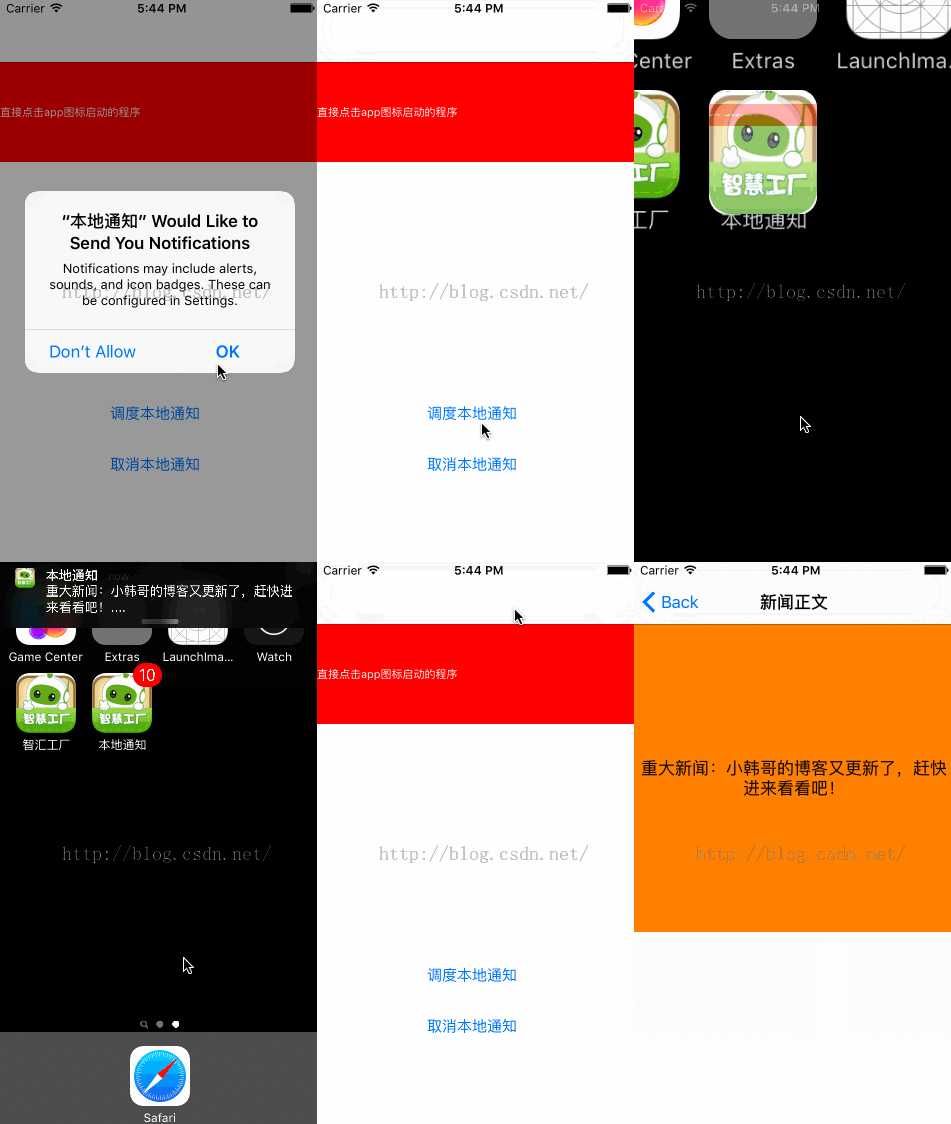
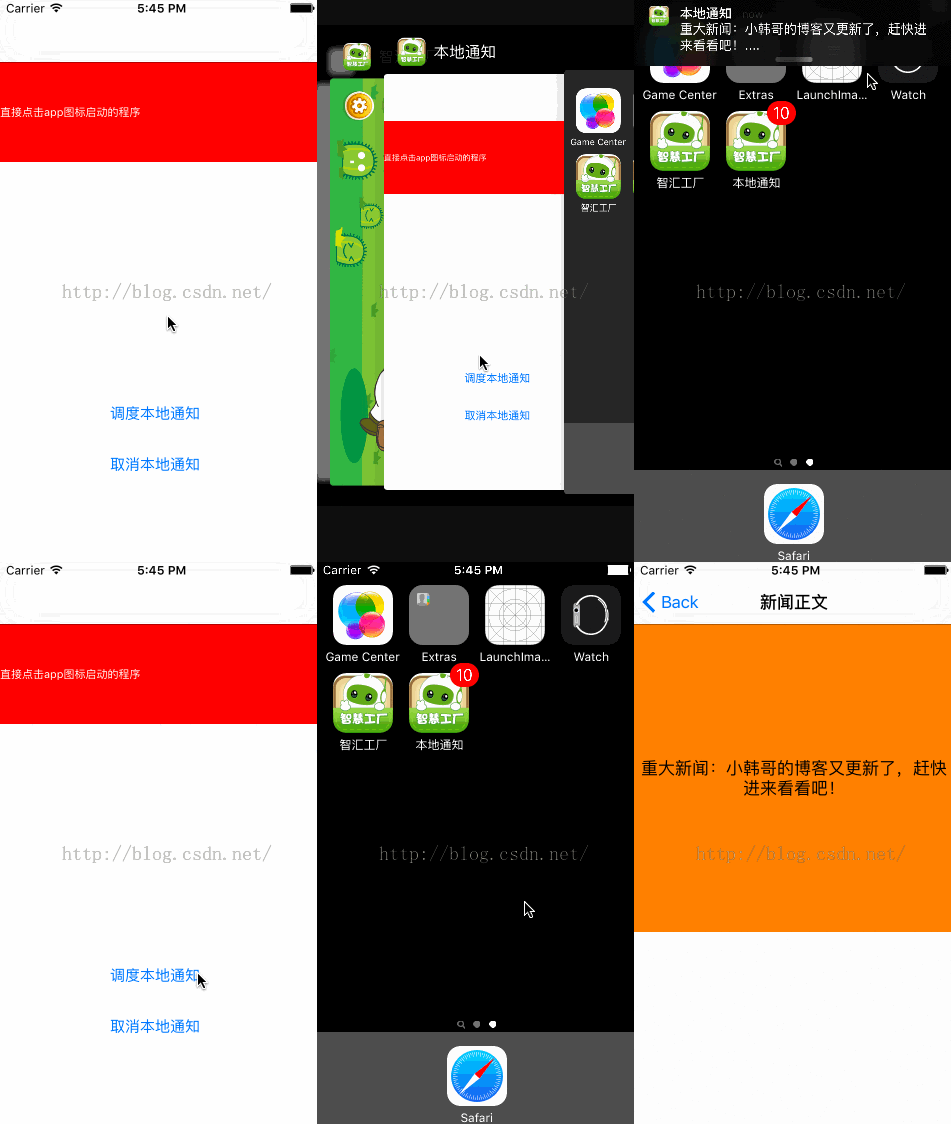
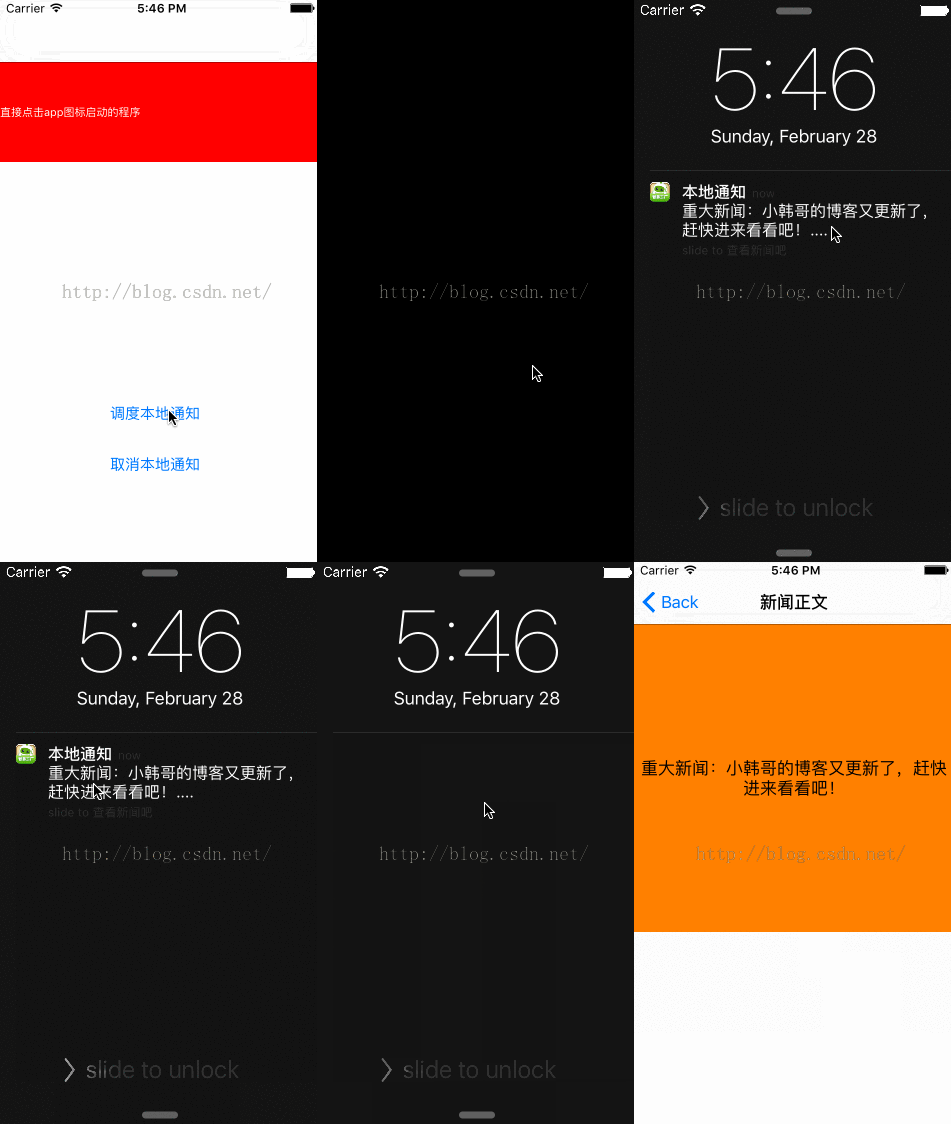
三種情況展示:(重要)
1.程序運行在後台
相關文章
+