
iOS系統原生二維碼條形碼掃描
編輯:IOS開發綜合
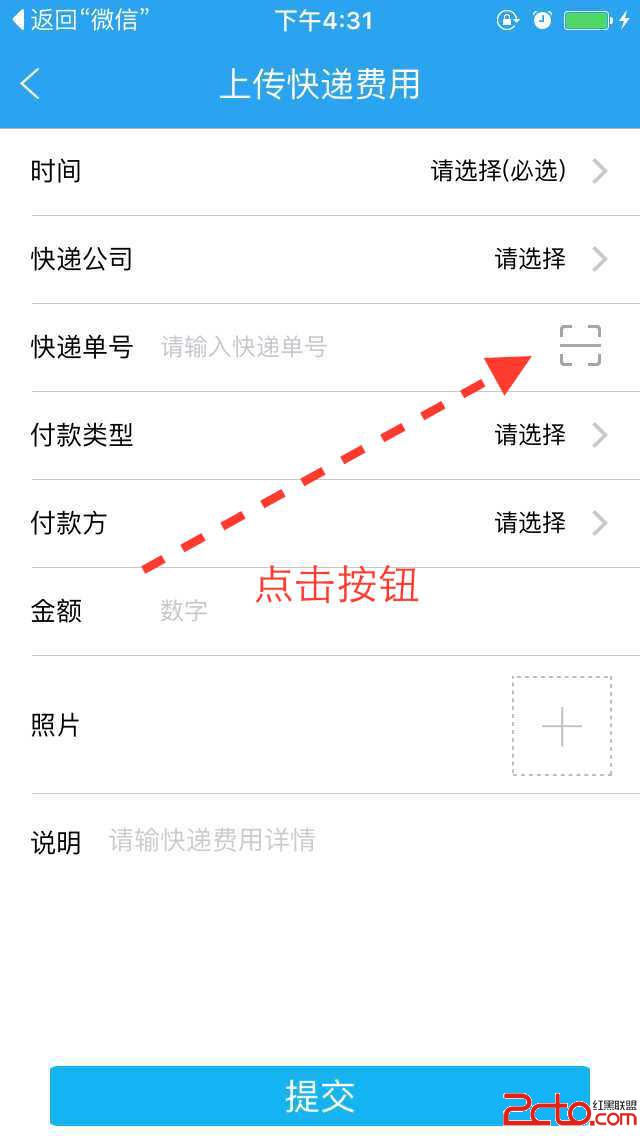
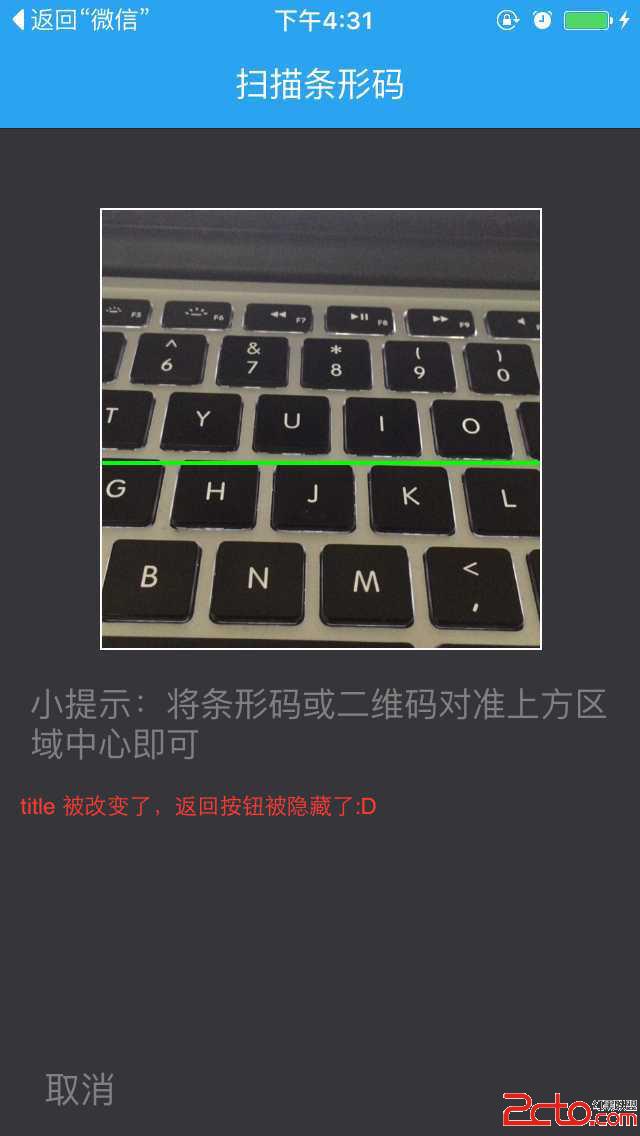
本文講述如何用系統自帶的東東實現二維碼掃描的功能:點擊當前頁面的某個按鈕,創建掃描VIEW。細心的小伙伴可以發現 title被改變了,返回按鈕被隱藏了。這個代碼自己寫就行了,與本文關系不大。。。綠色的線會上下跑,不要擔心:D
實現效果如下:
1.在工程中添加框架AVFoundation.framework
2.聲明代理:AVCaptureMetadataOutputObjectsDelegate 。 define 幾個東東用來畫框、畫線:
#define SCANVIEW_EdgeTop 40.0
#define SCANVIEW_EdgeLeft 50.0
#define TINTCOLOR_ALPHA 0.2 //淺色透明度
#define DARKCOLOR_ALPHA 0.5 //深色透明度
#define VIEW_WIDTH [UIScreen mainScreen].bounds.size.width
#define VIEW_HEIGHT [UIScreen mainScreen].bounds.size.height
3.聲明以下屬性:
    AVCaptureSession * session;//輸入輸出的中間橋梁
    UIView *AVCapView;//此 view 用來放置掃描框、取消按鈕、說明 label
    UIView *_QrCodeline;//上下移動綠色的線條
    NSTimer *_timer;
4.在某個方法中(我是點擊掃描按鈕)創建掃描界面,開始掃描:
 //創建一個 view 來放置掃描區域、說明 label、取消按鈕
    UIView *tempView = [[UIView alloc]initWithFrame:CGRectMake(0, 0, 320, [UIScreen mainScreen].bounds.size.height )];
    AVCapView = tempView;
    AVCapView.backgroundColor = [UIColor colorWithRed:54.f/255 green:53.f/255 blue:58.f/255 alpha:1];

    UIButton *cancelBtn = [[UIButton alloc]initWithFrame:CGRectMake(15, [UIScreen mainScreen].bounds.size.height - 100, 50, 25)];
    UILabel *label = [[UILabel alloc]initWithFrame:CGRectMake(15, 268, 290, 60)];
    label.numberOfLines = 0;
    label.text = @"小提示:將條形碼或二維碼對准上方區域中心即可";
    label.textColor = [UIColor grayColor];
    [cancelBtn setTitle:@"取消" forState: UIControlStateNormal];
    [cancelBtn setTitleColor:[UIColor grayColor] forState:UIControlStateNormal];
    [cancelBtn addTarget:self action:@selector(touchAVCancelBtn) forControlEvents:UIControlEventTouchUpInside];
    [AVCapView addSubview:label];
    [AVCapView addSubview:cancelBtn];
    [self.view addSubview:AVCapView];


    //畫上邊框
    UIView *topView = [[UIView alloc] initWithFrame:CGRectMake(SCANVIEW_EdgeLeft, SCANVIEW_EdgeTop, VIEW_WIDTH- 2 * SCANVIEW_EdgeLeft, 1)];
    topView.backgroundColor = [UIColor whiteColor];
    [AVCapView addSubview:topView];

    //畫左邊框
    UIView *leftView = [[UIView alloc] initWithFrame:CGRectMake(SCANVIEW_EdgeLeft, SCANVIEW_EdgeTop , 1,VIEW_WIDTH - 2 * SCANVIEW_EdgeLeft )];
    leftView.backgroundColor = [UIColor whiteColor];
    [AVCapView addSubview:leftView];

    //畫右邊框
    UIView *rightView = [[UIView alloc] initWithFrame:CGRectMake(SCANVIEW_EdgeLeft + VIEW_WIDTH- 2 * SCANVIEW_EdgeLeft, SCANVIEW_EdgeTop , 1,VIEW_WIDTH - 2 * SCANVIEW_EdgeLeft + 1)];
    rightView.backgroundColor = [UIColor whiteColor];
    [AVCapView addSubview:rightView];

    //畫下邊框
    UIView *downView = [[UIView alloc] initWithFrame:CGRectMake(SCANVIEW_EdgeLeft, SCANVIEW_EdgeTop + VIEW_WIDTH- 2 * SCANVIEW_EdgeLeft,VIEW_WIDTH - 2 * SCANVIEW_EdgeLeft ,1 )];
    downView.backgroundColor = [UIColor whiteColor];
    [AVCapView addSubview:downView];


    //畫中間的基准線
    _QrCodeline = [[UIView alloc] initWithFrame:CGRectMake(SCANVIEW_EdgeLeft + 1, SCANVIEW_EdgeTop, VIEW_WIDTH- 2 * SCANVIEW_EdgeLeft - 1, 2)];
    _QrCodeline.backgroundColor = [UIColor greenColor];
    [AVCapView addSubview:_QrCodeline];


    // 先讓基准線運動一次,避免定時器的時差
    [UIView animateWithDuration:1.2 animations:^{

        _QrCodeline.frame = CGRectMake(SCANVIEW_EdgeLeft + 1, VIEW_WIDTH - 2 * SCANVIEW_EdgeLeft + SCANVIEW_EdgeTop , VIEW_WIDTH - 2 * SCANVIEW_EdgeLeft - 1, 2);

    }];

    [self performSelector:@selector(createTimer) withObject:nil afterDelay:0.4];


    AVCaptureDevice * device = [AVCaptureDevice defaultDeviceWithMediaType:AVMediaTypeVideo];
    //創建輸入流
    AVCaptureDeviceInput * input = [AVCaptureDeviceInput deviceInputWithDevice:device error:nil];
    //創建輸出流
    AVCaptureMetadataOutput * output = [[AVCaptureMetadataOutput alloc]init];
    //設置代理 在主線程裡刷新
    [output setMetadataObjectsDelegate:self queue:dispatch_get_main_queue()];

    //初始化鏈接對象
    session = [[AVCaptureSession alloc]init];
    //高質量采集率
    [session setSessionPreset:AVCaptureSessionPresetHigh];

    [session addInput:input];
    [session addOutput:output];
    //設置掃碼支持的編碼格式(如下設置條形碼和二維碼兼容)
    output.metadataObjectTypes=@[AVMetadataObjectTypeQRCode,AVMetadataObjectTypeEAN13Code, AVMetadataObjectTypeEAN8Code, AVMetadataObjectTypeCode128Code];

    AVCaptureVideoPreviewLayer * layer = [AVCaptureVideoPreviewLayer layerWithSession:session];
    layer.videoGravity=AVLayerVideoGravityResizeAspectFill;
    layer.frame = CGRectMake(SCANVIEW_EdgeLeft, SCANVIEW_EdgeTop, VIEW_WIDTH- 2 * SCANVIEW_EdgeLeft, 220);
    [AVCapView.layer insertSublayer:layer atIndex:0];
    //開始捕獲
    [session startRunning];
5.實現定時器、還有基准線的滾動方法
- (void)createTimer
{
    _timer=[NSTimer scheduledTimerWithTimeInterval:1.1 target:self selector:@selector(moveUpAndDownLine) userInfo:nil repeats:YES];
}

- (void)stopTimer
{
    if ([_timer isValid] == YES) {
        [_timer invalidate];
        _timer = nil;
    }

}

// 滾來滾去 :D :D :D
- (void)moveUpAndDownLine
{
    CGFloat YY = _QrCodeline.frame.origin.y;

    if (YY != VIEW_WIDTH - 2 * SCANVIEW_EdgeLeft + SCANVIEW_EdgeTop ) {
        [UIView animateWithDuration:1.2 animations:^{
            _QrCodeline.frame = CGRectMake(SCANVIEW_EdgeLeft + 1, VIEW_WIDTH - 2 * SCANVIEW_EdgeLeft + SCANVIEW_EdgeTop , VIEW_WIDTH - 2 * SCANVIEW_EdgeLeft - 1,2);
        }];
    }else {
        [UIView animateWithDuration:1.2 animations:^{
            _QrCodeline.frame = CGRectMake(SCANVIEW_EdgeLeft + 1, SCANVIEW_EdgeTop, VIEW_WIDTH - 2 * SCANVIEW_EdgeLeft - 1,2);
        }];

    }
}
6.掃描成功後,想干嘛干嘛,就在這個代理方法裡面實現就行了
-(void)captureOutput:(AVCaptureOutput *)captureOutput didOutputMetadataObjects:(NSArray *)metadataObjects fromConnection:(AVCaptureConnection *)connection{
    if (metadataObjects.count>0) {
        //[session stopRunning];
        AVMetadataMachineReadableCodeObject * metadataObject = [metadataObjects objectAtIndex : 0 ];
        //輸出掃描字符串
        NSLog(@"%@",metadataObject.stringValue);
        [session stopRunning];
        [self stopTimer];
        [AVCapView removeFromSuperview];
        .....
    }
}
7.如果用戶不想掃描了,點擊取消按鈕:
- (void)touchAVCancelBtn{
    [session stopRunning];//攝像也要停止
    [self stopTimer];//定時器要停止
    [AVCapView removeFromSuperview];//剛剛創建的 view 要移除

   ...
}
- 上一頁:Info.plist和pch文件的作用,UIApplication,iOS程序的啟動過程,AppDelegate 方法解釋,UIWindow,生命周期方法
- 下一頁:iOS自適應布局之Masonry(一)

相關文章
+
- Android中getActivity()為null的解決辦法
- iOS --- UIView與CALayer的聯系與區別
- iOS中assign、copy 、retain等關鍵字的含義
- iOS - Applications must be ready for upload on iTunes Connect before they can be validated or submit
- iOS開發之UIImageView
- IOS 應用之間的跳轉和數據傳遞詳解
- ios strong和weak
- iOS- <項目筆記>UI控件常見屬性總結
- 如何實現iOS圖書動畫:第1部分(上)
- 簡介Objective-C解析XML與JSON數據格局的辦法