
IOS集成ShareSDK社會化分享
編輯:IOS開發綜合
最近在應用中加入了分享功能,使用了ShareSDK v3.x,以下紀錄了在工程中集成ShareSDK社會化分享的步驟。
IOS版本:9.3開發環境:Xcode 7.3ShareSDK版本:v3.x ShareSDK官網上提供了快速集成的主要步驟,鏈接如下:http://wiki.mob.com/ios簡潔版快速集成/,不詳細說了。因為項目裡只需要分享到QQ、微信和新浪微博平台,所以只加入對應的頭文件,導入相應的庫,將不需要的刪除了。下面是ShareSDK初始化配置和分享界面及分享動作部分代碼。 初始化代碼,其中的AppID、AppKey、appSecret要替換為自己的,這些是在需要分享的平台上申請得到的。在activePlatforms中微信平台沒有使用SSDKPlatformTypeWechat,因為SSDKPlatformTypeWechat默認包括微信好友、朋友圈和微信收藏,因為不需要收藏,所以用了子選項。
/* 初始化代碼 */
-(void) shareSDKInit{
    /**
     *  設置ShareSDK的appKey,如果尚未在ShareSDK官網注冊過App,請移步到http://mob.com/login 登錄後台進行應用注冊,
     *  在將生成的AppKey傳入到此方法中。我們Demo提供的appKey為內部測試使用,可能會修改配置信息,請不要使用。
     *  方法中的第二個參數用於指定要使用哪些社交平台,以數組形式傳入。第三個參數為需要連接社交平台SDK時觸發,
     *  在此事件中寫入連接代碼。第四個參數則為配置本地社交平台時觸發,根據返回的平台類型來配置平台信息。
     *  如果您使用的時服務端托管平台信息時,第二、四項參數可以傳入nil,第三項參數則根據服務端托管平台來決定要連接的社交SDK。
     */
    [ShareSDK registerApp:@"bundle id"
          activePlatforms:@[
                            @(SSDKPlatformTypeSinaWeibo),
                            @(SSDKPlatformSubTypeWechatSession),
                            @(SSDKPlatformSubTypeWechatTimeline),
                            @(SSDKPlatformTypeQQ)
                            ]
                 onImport:^(SSDKPlatformType platformType) {

                     switch (platformType)
                     {
                         case SSDKPlatformTypeWechat:
                             [ShareSDKConnector connectWeChat:[WXApi class]];
                             [ShareSDKConnector connectWeChat:[WXApi class] delegate:self];
                             break;
                         case SSDKPlatformTypeQQ:
                             [ShareSDKConnector connectQQ:[QQApiInterface class]
                                        tencentOAuthClass:[TencentOAuth class]];
                             break;
                         case SSDKPlatformTypeSinaWeibo:
                             [ShareSDKConnector connectWeibo:[WeiboSDK class]];
                             break;
                         default:
                             break;
                     }
                 }
          onConfiguration:^(SSDKPlatformType platformType, NSMutableDictionary *appInfo) {

              switch (platformType)
              {
                  case SSDKPlatformTypeSinaWeibo:
                      //設置新浪微博應用信息,其中authType設置為使用SSO+Web形式授權
                      [appInfo SSDKSetupSinaWeiboByAppKey:@"2122649601"
                                                appSecret:@"4f2923d4f6657cb98a35b8e1ec8a3dr6"
                                              redirectUri:@"http://open.weibo.com/apps/"
                                                 authType:SSDKAuthTypeBoth];
                      break;
                  case SSDKPlatformTypeTencentWeibo:
                      //設置騰訊微博應用信息,其中authType設置為只用Web形式授權
                      [appInfo SSDKSetupTencentWeiboByAppKey:@"801207650"
                                                   appSecret:@"ae36f4ee3946e1cbb18d6965b0b2ff5c"
                                                 redirectUri:@"http://www.sharesdk.cn"];
                      break;
                  case SSDKPlatformTypeWechat:
                      [appInfo SSDKSetupWeChatByAppId:@"wx8c206faf30cb4ba7"
                                            appSecret:@"0ef244c823dc1302a91b50a99ee70e4f"];
                      break;
                  case SSDKPlatformTypeQQ:
                      [appInfo SSDKSetupQQByAppId:@"1105459316"
                                           appKey:@"ACed2xqrNZimx3gF"
                                         authType:SSDKAuthTypeBoth];
                      break;
                  default:
                      break;
              }
          }];
}
點擊分享按鈕後就會執行以下程序,這裡顯示分享菜單內容以及處理分享結果。
- (void)shareShow:(NSString *)shareUrl{

    /**
     * 在簡單分享中,只要設置共有分享參數即可分享到任意的社交平台
     **/
    __weak ViewController *theController = self;

    //1、創建分享參數(必要)
    NSMutableDictionary *shareParams = [NSMutableDictionary dictionary];


    /* 打開客戶端 */
    [shareParams SSDKEnableUseClientShare];

    NSArray* imageArray = @[[UIImage imageNamed:@"shareImg.png"]];
    [shareParams SSDKSetupShareParamsByText:@"分享內容"
                                     images:imageArray
                                        url:[NSURL URLWithString:@"http://www.star-v.com.cn"]
                                      title:@"分享標題"
                                       type:SSDKContentTypeAuto];

    //1.2、自定義分享平台(非必要)
    NSMutableArray *activePlatforms = [NSMutableArray arrayWithArray:[ShareSDK activePlatforms]];
    //添加一個自定義的平台(非必要)
    SSUIShareActionSheetCustomItem *item = [SSUIShareActionSheetCustomItem itemWithIcon:[UIImage imageNamed:@"Icon.png"]
                                                                                  label:@"自定義"
                                                                                onClick:^{

                                                                                    //自定義item被點擊的處理邏輯
                                                                                    NSLog(@"=== 自定義item被點擊 ===");
                                                                                    UIAlertView *alertView = [[UIAlertView alloc] initWithTitle:@"自定義item被點擊"
                                                                                                                                        message:nil
                                                                                                                                       delegate:nil
                                                                                                                              cancelButtonTitle:@"確定"
                                                                                                                              otherButtonTitles:nil];
                                                                                    [alertView show];
                                                                                }];
    [activePlatforms addObject:item];

    //設置分享菜單欄樣式(非必要)
    [SSUIShareActionSheetStyle setActionSheetBackgroundColor:[UIColor colorWithRed:100/255.0 green:100/255.0 blue:100/255.0 alpha:0.5]];
    [SSUIShareActionSheetStyle setActionSheetColor:[UIColor colorWithRed:21.0/255.0 green:21.0/255.0 blue:21.0/255.0 alpha:0.8]];
    [SSUIShareActionSheetStyle setCancelButtonBackgroundColor:[UIColor colorWithRed:21.0/255.0 green:21.0/255.0 blue:21.0/255.0 alpha:0.8]];
    [SSUIShareActionSheetStyle setCancelButtonLabelColor:[UIColor whiteColor]];
    [SSUIShareActionSheetStyle setItemNameColor:[UIColor whiteColor]];
    [SSUIShareActionSheetStyle setItemNameFont:[UIFont systemFontOfSize:10]];
    [SSUIShareActionSheetStyle setCurrentPageIndicatorTintColor:[UIColor colorWithRed:156/255.0 green:156/255.0 blue:156/255.0 alpha:1.0]];
    [SSUIShareActionSheetStyle setPageIndicatorTintColor:[UIColor colorWithRed:62/255.0 green:62/255.0 blue:62/255.0 alpha:1.0]];

    //2、分享
    SSUIShareActionSheetController *sheet = [ShareSDK showShareActionSheet:self.view
                             items:@[@(SSDKPlatformTypeQQ),@(SSDKPlatformSubTypeWechatSession),@(SSDKPlatformSubTypeWechatTimeline),@(SSDKPlatformTypeSinaWeibo)]
                       shareParams:shareParams
               onShareStateChanged:^(SSDKResponseState state, SSDKPlatformType platformType, NSDictionary *userData, SSDKContentEntity *contentEntity, NSError *error, BOOL end) {

                   switch (state) {

                       case SSDKResponseStateBegin:
                       {
                           //[theController showLoadingView:YES];
                           break;
                       }
                       case SSDKResponseStateSuccess:
                       {
                           //Facebook Messenger、WhatsApp等平台捕獲不到分享成功或失敗的狀態,最合適的方式就是對這些平台區別對待
                           if (platformType == SSDKPlatformTypeFacebookMessenger)
                           {
                               break;
                           }

                           UIAlertView *alertView = [[UIAlertView alloc] initWithTitle:@"分享成功"
                                                                               message:nil
                                                                              delegate:nil
                                                                     cancelButtonTitle:@"確定"
                                                                     otherButtonTitles:nil];
                           [alertView show];
                           break;
                       }
                       case SSDKResponseStateFail:
                       {
                           if (platformType == SSDKPlatformTypeSMS && [error code] == 201)
                           {
                               UIAlertView *alert = [[UIAlertView alloc] initWithTitle:@"分享失敗"
                                                                               message:@"失敗原因可能是:1、短信應用沒有設置帳號;2、設備不支持短信應用;3、短信應用在iOS 7以上才能發送帶附件的短信。"
                                                                              delegate:nil
                                                                     cancelButtonTitle:@"OK"
                                                                     otherButtonTitles:nil, nil];
                               [alert show];
                               break;
                           }
                           else if(platformType == SSDKPlatformTypeMail && [error code] == 201)
                           {
                               UIAlertView *alert = [[UIAlertView alloc] initWithTitle:@"分享失敗"
                                                                               message:@"失敗原因可能是:1、郵件應用沒有設置帳號;2、設備不支持郵件應用;"
                                                                              delegate:nil
                                                                     cancelButtonTitle:@"OK"
                                                                     otherButtonTitles:nil, nil];
                               [alert show];
                               break;
                           }
                           else
                           {
                               UIAlertView *alert = [[UIAlertView alloc] initWithTitle:@"分享失敗"
                                                                               message:[NSString stringWithFormat:@"%@",error]
                                                                              delegate:nil
                                                                     cancelButtonTitle:@"OK"
                                                                     otherButtonTitles:nil, nil];
                               [alert show];
                               break;
                           }
                           break;
                       }
                       case SSDKResponseStateCancel:
                       {
                           UIAlertView *alertView = [[UIAlertView alloc] initWithTitle:@"分享已取消"
                                                                               message:nil
                                                                              delegate:nil
                                                                     cancelButtonTitle:@"確定"
                                                                     otherButtonTitles:nil];
                           [alertView show];
                           break;
                       }
                       default:
                           break;
                   }

               }];
        [sheet.directSharePlatforms addObject:@(SSDKPlatformTypeSinaWeibo)];
}
添加以上代碼後並不能完成分享,還需要下面步驟。
添加白名單
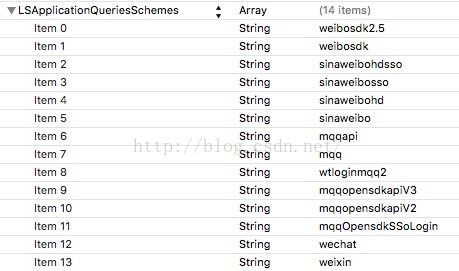
從IOS9.0後,涉及到平台客戶端的跳轉,系統會自動到info.plist下檢查是否設置Scheme。如果沒有相應的配置,就無法跳轉到相應的客戶端。因此如果客戶端集成有分享與授權,需要配置Scheme白名單。
在info.plist增加key:LSApplicationQueriesSchemes,類型為NSArray。添加需要支持的白名單,類型為String。
實現SSO授權(SSO授權登錄<無需用戶輸入密碼登錄>)
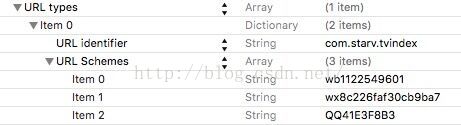
打開Info.plist,找到URL types配置項(如果沒有則新增),展開URL types – URL Schemes,在URL Schemes下分別各新增一項應用的Scheme。其填寫格式為:wb+appKey, 如:wb2279784657。如圖所示:
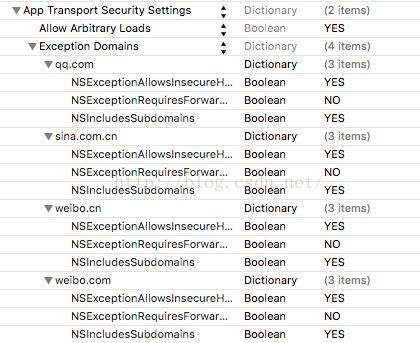
運行過程中還可能報如下錯誤:App Transport Security has blocked a cleartext HTTP (http://) resource load since it is insecure. Temporary exceptions can be configured via your app's Info.plist file.打開Info.plist,找到URL types配置項(如果沒有則新增),做如下配置:

相關文章
+
- IOS學習筆記(八)之UIActivityIndicatorView(活動指示器視圖)的基本概念和使用方法
- iOS_31_cocos2d_微信飛機
- iOS中 LGLAlertView 提醒框的實例代碼
- iOS多媒體播放音樂AVAudioPlayer和AVPlayer
- GitHub 上下載代碼運轉報錯 :The sandbox is not sync with the Podfile.lock\
- iOS開辟中應用SQL語句操作數據庫的根本用法指南
- iOS實現動態的開屏廣告示例代碼
- iOS開發-UI (一)補充 UIWindow UIView UIlabel
- IOS 集合視圖指南1:介紹
- iOS開發之Auto Layout入門