
iPhone 沙盒檔案結構與操作:Documents、tmp 與 NSFileManager
編輯:iOS 開發綜合
iPhone App 基於沙盒機制運行,每個 App 只能存取自己的目錄。常見目錄包括 Documents、tmp 與 Application Support 等,其中 Documents 最常用於保存使用者資料。
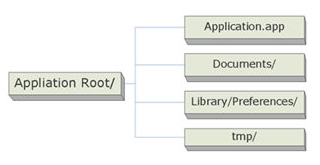
取得 Documents 與 tmp 路徑
NSArray *paths = NSSearchPathForDirectoriesInDomains(NSDocumentDirectory, NSUserDomainMask, YES);
NSString *documentsDirectory = [paths objectAtIndex:0];
NSString *tmpDirectory = NSTemporaryDirectory();
使用 NSFileManager 操作檔案
NSFileManager 是檔案操作的核心類別,可建立、讀取、刪除、移動與查詢檔案。
建立目錄或檔案
NSFileManager *fileManager = [NSFileManager defaultManager];
NSString *myDirectory = [documentsDirectory stringByAppendingPathComponent:@"test"];
BOOL ok = [fileManager createDirectoryAtPath:myDirectory withIntermediateDirectories:YES attributes:nil error:nil];
列出目錄內容
NSArray *files = [fileManager subpathsOfDirectoryAtPath:myDirectory error:nil];讀取與寫入檔案
NSData *data = [NSData dataWithContentsOfFile:myFilePath];
[data writeToFile:myFilePath atomically:YES];
刪除與移動
[fileManager removeItemAtPath:filePath error:nil];
[fileManager moveItemAtPath:filePath toPath:filePath2 error:nil];
若要重新命名檔案,本質上就是把檔案移動到同一目錄下的新檔名。官方 SDK 不允許 App 任意存取其他 App 的目錄,因此所有讀寫都應限定在沙盒內。
實務上建議把需要備份或可由 iTunes 使用者可見的檔案放在 Documents,把暫時性快取放在 tmp 或 Caches,並在不再需要時主動清理。