
在 iOS 上實作手勢解鎖(九宮格 Lock)功能
在涉及個人隱私的場景下,尤其當行動裝置裡存放了過多私密資訊時,為使用者的安全著想是有必要的。
桌面版的 QQ 很多年前就考慮到使用者離開電腦後隱私外洩的風險,提供了「離開電腦自動鎖定」或「閒置鎖定」之類的功能。而在 iPhone 版的 QQ 上,也提供了手勢鎖的功能:
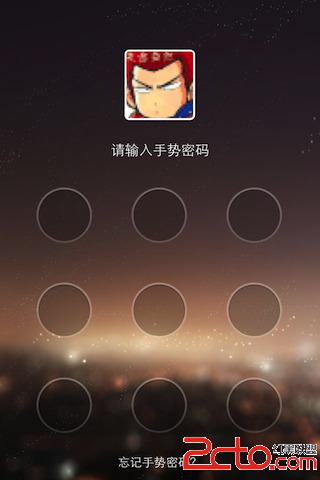
本文是先前「如何依手指移動軌跡畫線條」的延伸版本,實作一個可操作的九宮格解鎖原型:

實作程式碼
//
//  ViewController.m
//  GestureLock
//
#import "ViewController.h"

#define LOCK_POINT_TAG      1000

@interface ViewController ()

@property (nonatomic, strong) UIImageView *imageView;

@property (nonatomic, assign) CGPoint lineStartPoint;
@property (nonatomic, assign) CGPoint lineEndPoint;

@property (nonatomic, strong) NSMutableArray *buttonArray;
@property (nonatomic, strong) NSMutableArray *selectedButtons;

@property (nonatomic, assign) BOOL drawFlag;

@property (nonatomic, strong) UIImage *pointImage;
@property (nonatomic, strong) UIImage *selectedImage;

@end

@implementation ViewController

- (void)dealloc
{
    [super dealloc];
    [_imageView release];
    [_buttonArray release];
    [_selectedButtons release];
    [_pointImage release];
    [_selectedImage release];
}

- (void)viewDidLoad
{
    [super viewDidLoad];

    _imageView = [[UIImageView alloc] initWithFrame:self.view.bounds];
    [self.view addSubview:self.imageView];
    self.imageView.backgroundColor = [UIColor whiteColor];

    [self createLockPoints];
}

#pragma mark - Trace Touch Point

- (void)touchesBegan:(NSSet *)touches withEvent:(UIEvent *)event
{
    UITouch *touch = [touches anyObject];
    if (touch) {
        for (UIButton *btn in self.buttonArray) {
            CGPoint touchPoint = [touch locationInView:btn];
            if ([btn pointInside:touchPoint withEvent:nil]) {
                self.lineStartPoint = btn.center;
                self.drawFlag = YES;

                if (!self.selectedButtons) {
                    self.selectedButtons = [NSMutableArray arrayWithCapacity:9];
                }

                [self.selectedButtons addObject:btn];
                [btn setImage:self.selectedImage forState:UIControlStateNormal];
            }
        }
    }
}

- (void)touchesMoved:(NSSet *)touches withEvent:(UIEvent *)event
{
    UITouch *touch = [touches anyObject];
    if (touch && self.drawFlag) {
        self.lineEndPoint = [touch locationInView:self.imageView];

        for (UIButton *btn in self.buttonArray) {
            CGPoint touchPoint = [touch locationInView:btn];

            if ([btn pointInside:touchPoint withEvent:nil]) {
                BOOL btnContained = NO;

                for (UIButton *selectedBtn in self.selectedButtons) {
                    if (btn == selectedBtn) {
                        btnContained = YES;
                        break;
                    }
                }

                if (!btnContained) {
                    [self.selectedButtons addObject:btn];
                    [btn setImage:self.selectedImage forState:UIControlStateNormal];
                }
            }
        }

        self.imageView.image = [self drawUnlockLine];
    }
}

- (void)touchesEnded:(NSSet *)touches withEvent:(UIEvent *)event
{
    [self outputSelectedButtons];

    self.drawFlag = NO;
    self.imageView.image = nil;
    self.selectedButtons = nil;
}

#pragma mark - Create Lock Points

- (void)createLockPoints
{
    self.pointImage = [UIImage imageNamed:@"blue_circle"];
    self.selectedImage = [UIImage imageNamed:@"yellow_circle"];

    float marginTop = 100;
    float marginLeft = 45;

    float y;
    for (int i = 0; i < 3; ++i) {
        y = i * 100;
        float x;
        for (int j = 0; j < 3; ++j) {
            x = j * 100;
            UIButton *btn = [UIButton buttonWithType:UIButtonTypeCustom];
            [btn setImage:self.pointImage forState:UIControlStateNormal];
            [btn setImage:self.selectedImage forState:UIControlStateHighlighted];
            btn.frame = (CGRect){x + marginLeft, y + marginTop, self.pointImage.size};
            [self.imageView addSubview:btn];
            btn.userInteractionEnabled = NO;
            btn.tag = LOCK_POINT_TAG + i * 3 + j;

            if (!self.buttonArray) {
                self.buttonArray = [NSMutableArray arrayWithCapacity:9];
            }
            [self.buttonArray addObject:btn];
        }
    }
}

#pragma mark - Draw Line

- (UIImage *)drawUnlockLine
{
    UIImage *image = nil;

    UIColor *color = [UIColor yellowColor];
    CGFloat width = 5.0f;
    CGSize imageContextSize = self.imageView.frame.size;

    UIGraphicsBeginImageContext(imageContextSize);

    CGContextRef context = UIGraphicsGetCurrentContext();

    CGContextSetLineWidth(context, width);
    CGContextSetStrokeColorWithColor(context, [color CGColor]);

    CGContextMoveToPoint(context, self.lineStartPoint.x, self.lineStartPoint.y);
    for (UIButton *selectedBtn in self.selectedButtons) {
        CGPoint btnCenter = selectedBtn.center;
        CGContextAddLineToPoint(context, btnCenter.x, btnCenter.y);
        CGContextMoveToPoint(context, btnCenter.x, btnCenter.y);
    }
    CGContextAddLineToPoint(context, self.lineEndPoint.x, self.lineEndPoint.y);

    CGContextStrokePath(context);

    image = UIGraphicsGetImageFromCurrentImageContext();

    UIGraphicsEndImageContext();

    return image;
}

#pragma mark -

- (void)outputSelectedButtons
{
    for (UIButton *btn in self.selectedButtons) {
        [btn setImage:self.pointImage forState:UIControlStateNormal];
        NSLog(@"Selected-button's tag : %d\n", btn.tag);
    }
}

@end
幾個實作上的關鍵點
為什麼要關掉 button 的 userInteractionEnabled。九宮格的点位是用 UIButton 做的,但實際的觸控處理完全是自己接管 touchesBegan/Moved/Ended。若讓 button 自己接收事件,反而會與手勢判斷打架,所以統一關掉,只用它的 pointInside:withEvent: 做「手指是否落在這顆點上」的幾何判斷。
去重是核心邏輯。touchesMoved 會被呼叫非常多次,手指每次移動都可能壓在同一顆點上。所以進入 if 之後先遍歷 selectedButtons 檢查是否已包含這顆按鈕(btnContained),沒有的話才加入。少了這一步,同一顆點會被重複記錄,畫出的線也會錯。
為什麼用「畫一張圖再貼上去」而不是直接畫。drawUnlockLine 每次都建立一個新的 image context、把目前所有已選點連成折線、再加上到目前手指位置的那一段,最後輸出成 UIImage 設給 imageView。這種做法在原型階段很直觀,缺點是每次移動都重新配置一次圖形 context,效能不佳。正式產品應改用 CAShapeLayer 或自訂 UIView 的 drawRect: 即時繪製。
還缺少什麼。這個原型只示範了「畫得出來」與「知道選了哪些點」(最後用 NSLog 印出 tag)。要變成真正的解鎖功能,還需要:密碼的設定與儲存(可放 Keychain 而非 plist,較安全)、比對使用者軌跡與設定軌跡是否相符、錯誤次數過多時的冷卻時間、以及 outputSelectedButtons 之後的重置流程(目前只把圖片還原,未清空畫面上的線條殘留狀態)。
— Jason Lee, Hangzhou
- 上一篇文章: 為 iOS App 加入啟動畫面的漸變淡出效果
- 下一篇文章: iOS 圖文混排實作:用 CoreText 打造新聞式排版