
UIPopoverController 實作教學:打造顏色選擇器
編輯:iOS 開發綜合
在 iPad 上,popover 常用來展示小型設定或選擇清單。本文以顏色選擇器為例,說明如何建立 UITableViewController,並透過 UIPopoverController 呈現。
建立 ColorPickerController
新增 UITableViewController 子類別,命名為 ColorPickerController,並定義 delegate 通知外部哪個顏色被選取。列表資料可先放入 Red、Green、Blue 等項目。
設定 popover 尺寸
在 viewDidLoad 中設定 contentSizeForViewInPopover,避免 popover 占滿整個螢幕。表格只需回傳一個 section,列數與 colors 陣列數量一致,並在點選時呼叫 delegate。
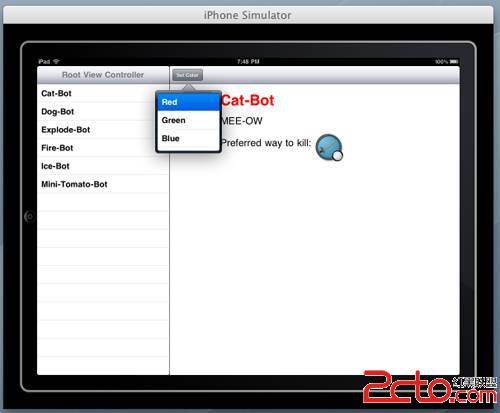
加入觸發按鈕
在 RightViewController 的工具列加入 Set Color 按鈕,並連到 action。點擊時建立 ColorPickerController,再用 UIPopoverController 包裝,最後呼叫 presentPopoverFromBarButtonItem 顯示。
處理選擇結果
當 delegate 收到顏色名稱,可設定文字顏色,並呼叫 dismissPopoverAnimated 關閉 popover。若使用者點擊 popover 外部,系統通常也會自動收起。
設計概念
popover 本質上是把既有 view controller 包在特定容器中,並指向某個 UI 元素。它適合 iPad 上需要少量空間即可完成設定的情境。
- 上一篇文章: iOS 6 時代 Objective-C 的十個實用新特性
- 下一篇文章: 一次 iOS 專案的 Git 活動統計與反思