點擊 Cell 展開與收合細節資訊的完整實作
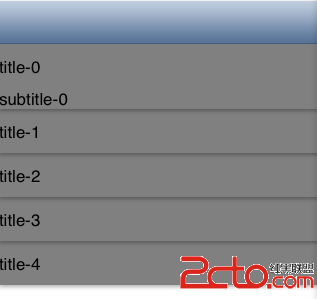
本文實作的功能是:點擊 Cell 顯示它的詳細資訊,再次點擊則收合。核心是透過一個陣列記錄每個 Cell 的展開狀態,並在回傳高度時依狀態回傳展開或收合後的高度。
先看自訂的 MyCell:
#import <UIKit/UIKit.h>
@interface MyCell : UITableViewCell {
UILabel *lab_info;
UILabel *lab_detailInfo;
CGFloat normalHeight;
}
@property (retain,nonatomic)UILabel *lab_info,*lab_detailInfo;
@property CGFloat normalHeight;
-(CGFloat)getMyCellHeight;
-(void)resetCellHeight;
@end
#import "MyCell.h"
@implementation MyCell
@synthesize lab_info,lab_detailInfo;
@synthesize normalHeight;
- (id)initWithStyle:(UITableViewCellStyle)style reuseIdentifier:(NSString *)reuseIdentifier {
self = [super initWithStyle:style reuseIdentifier:reuseIdentifier];
if (self) {
lab_info=[[UILabel alloc]init];
[self.contentView addSubview:lab_info];
self.normalHeight=self.frame.size.height;
lab_detailInfo=[[UILabel alloc]init];
lab_detailInfo.lineBreakMode=NSLineBreakByCharWrapping;
lab_detailInfo.numberOfLines=5;
[self.contentView addSubview:lab_detailInfo];
self.layer.shadowColor=[UIColor blackColor].CGColor;
self.layer.shadowOffset=CGSizeMake(0, 2);
self.layer.shadowOpacity=0.3;
self.layer.shadowRadius=2;
}
return self;
}
-(CGFloat)getDetailLabViewHeight {
[self.lab_detailInfo sizeToFit];
return self.lab_detailInfo.frame.size.height;
}
-(CGFloat)getMyCellHeight {
return normalHeight +[self getDetailLabViewHeight];
}
-(void)resetCellHeight {
[self layoutIfNeeded];
CGRect cellFrame=self.frame;
cellFrame.size.height=normalHeight+[self getDetailLabViewHeight];
[self setFrame:cellFrame];
}
-(void)layoutSubviews {
[super layoutSubviews];
//設定標題 label 的高度
CGRect lab_info_Frame=CGRectInset(self.frame, 0, 0);
lab_info_Frame.origin.x=lab_info_Frame.origin.y=0;
lab_info_Frame.size.height=normalHeight;
[lab_info setFrame:lab_info_Frame];
//設定詳細資訊的高度
CGRect lab_detailInfo_Frame=CGRectInset(self.frame, 0, 0);
lab_detailInfo_Frame.origin.x=0;
lab_detailInfo_Frame.origin.y=normalHeight;
lab_detailInfo_Frame.size.height=[self getDetailLabViewHeight];
[lab_detailInfo setFrame:lab_detailInfo_Frame];
}
-(void)drawRect:(CGRect)rect {
[super drawRect:rect];
self.contentView.backgroundColor=[UIColor grayColor];
lab_info.backgroundColor=[UIColor clearColor];
lab_detailInfo.backgroundColor=[UIColor clearColor];
}
@end
再看表格控制器,用 isItemSelected 陣列記錄每一列是否展開:
- (void)viewDidLoad {
[super viewDidLoad];
isItemSelected=[[NSMutableArray alloc]initWithCapacity:5];
for (int i=0; i<5; i++)
{
[isItemSelected insertObject:[NSNumber numberWithBool:NO] atIndex:i];
}
}
- (UITableViewCell *)tableView:(UITableView *)tableView cellForRowAtIndexPath:(NSIndexPath *)indexPath {
static NSString *CellIdentifier = @"Cell";
MyCell *cell = [tableView dequeueReusableCellWithIdentifier:CellIdentifier];
if (cell == nil) {
cell = (MyCell*)[[MyCell alloc] initWithStyle:UITableViewCellStyleSubtitle reuseIdentifier:CellIdentifier];
cell.selectionStyle=UITableViewCellSelectionStyleNone;
}
cell.lab_info.text=[NSString stringWithFormat:@"title-%d",indexPath.row];
cell.lab_detailInfo.text=[NSString stringWithFormat:@"subtitle-%d",indexPath.row];
if ([[isItemSelected objectAtIndex:indexPath.row]boolValue]==YES) {
cell.lab_detailInfo.hidden=NO;
}else{
cell.lab_detailInfo.hidden=YES;
}
return cell;
}
- (CGFloat)tableView:(UITableView *)tableView heightForRowAtIndexPath:(NSIndexPath *)indexPath {
MyCell *cell=(MyCell *)[self tableView:tableView cellForRowAtIndexPath:indexPath];
if ([[isItemSelected objectAtIndex:indexPath.row] boolValue]==YES) {
return [cell getMyCellHeight];
} else {
return cell.normalHeight;
}
}
- (void)tableView:(UITableView *)tableView didSelectRowAtIndexPath:(NSIndexPath *)indexPath {
BOOL b=[[isItemSelected objectAtIndex:indexPath.row]boolValue];
[isItemSelected replaceObjectAtIndex:indexPath.row withObject:[NSNumber numberWithBool:!b]];
[tableView reloadData];
}
效果是這樣的