
iOS 圖片倒影效果的兩種實作方式
本文提供兩種為圖片加上倒影效果的做法。
實作一:使用一個繼承自 UIView 的類別來承載要做倒影的圖片,重寫這個 UIView 子類別的繪圖方法以畫出圖片與倒影,然後把它加入畫面顯示。
程式碼:CKReflectionImage.h
#import <UIKit/UIKit.h>
@interface CKReflectionImage : UIView {
@private
UIImage *image_;
/** 倒影漸層起始值,會除以圖片高度。*/
CGFloat visibleReflectionHeight_;
/** 與頂部圖片之間的間距。*/
CGFloat paddingToTopImage_;
}
@property (nonatomic, readwrite, retain) UIImage *image;
@property (nonatomic, readwrite, assign) CGFloat visibleReflectionHeight;
@property (nonatomic, readwrite, assign) CGFloat paddingToTopImage;
@end
CKReflectionImage.m 的核心是在 drawRect: 中:先畫出原圖,再用灰階漸層產生遮罩(mask),把倒影部分套用漸層做出淡出效果,最後透過矩陣平移與垂直翻轉(CGContextScaleCTM(context, 1.0f, -1.0f))把倒影畫在圖片下方。關鍵步驟包括建立 CGBitmapContext、以 CGGradientCreateWithColorComponents 建立漸層、用 CGContextClipToMask 把漸層套到倒影上,並透過 CGContextTranslateCTM 與 CGContextScaleCTM 完成翻轉定位。屬性 image、visibleReflectionHeight、paddingToTopImage 的 setter 都會呼叫 setNeedsDisplay 觸發重繪。
使用方式:
CKReflectionImage *reflectionImage = [[CKReflectionImage alloc] initWithFrame:CGRectMake(96, 20, 128, 460)];
[reflectionImage setBackgroundColor:[UIColor clearColor]];
//設定頂部圖片與其倒影之間的間距
[reflectionImage setPaddingToTopImage:5.0f];
//隱藏 1/4,顯示 3/4
[reflectionImage setVisibleReflectionHeight:(CGRectGetWidth([reflectionImage frame]) / 4 * 3)];
[reflectionImage setImage:[UIImage imageNamed:@"1.png"]];
[[self view] addSubview:reflectionImage];
實現效果
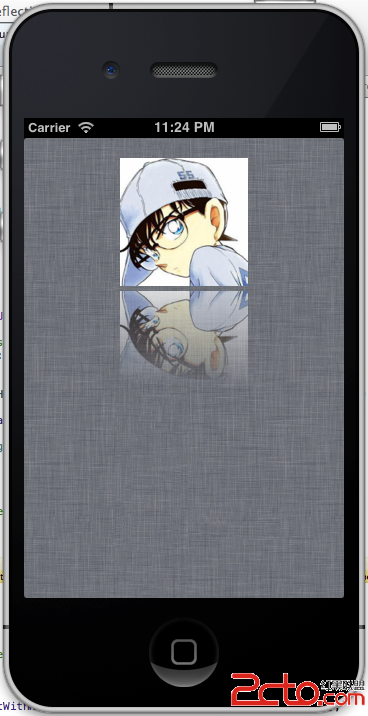
實作二:為 UIImage 加上一個關於倒影的 category,直接回傳帶倒影的圖片。核心同樣是建立灰階漸層遮罩(CreateGradientImage)、建立 RGB 的 bitmap context(MyCreateBitmapContext),再以 CGContextClipToMask 套用遮罩,並用 CGContextTranslateCTM 與 CGContextScaleCTM 翻轉,最後轉回 UIImage。它提供三個方法:reflectionWithHeight:(指定倒影高度)、reflectionWithAlpha:(指定倒影透明度比例)、reflectionRotatedWithAlpha:(旋轉後的倒影)。
使用非常簡單:
[refView setImage:[image reflectionWithAlpha:0.5]];
[imageView setImage:[image reflectionWithHeight:50]];
[topRefView setImage:[image reflectionRotatedWithAlpha:0.5]];
效果

- 上一篇文章: iOS 開發那些事:視圖生命週期與視圖控制器的關係
- 下一篇文章: iOS 自訂工具類:帶過期時間的緩存助手 CacheHelper