
用 MBProgressHUD 加入等待指示器並搭配網路請求
MBProgressHUD 是第三方提供的等待指示器框架。它提供的樣式大致可分為「未知結束時間」與「已知結束時間」兩大類,並可為指示器加上標題與詳細標題。
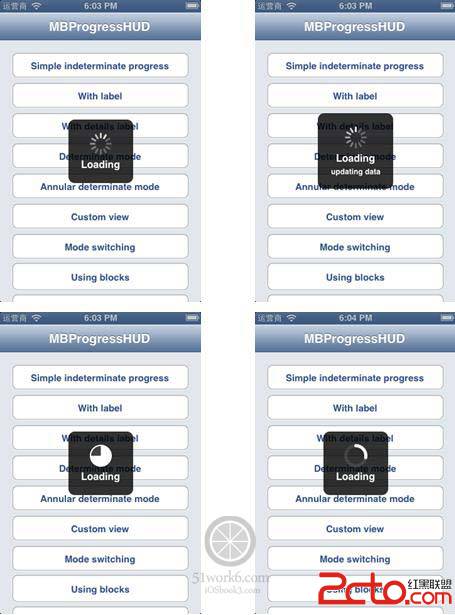
把下載的來源檔中的 MBProgressHUD.h 與 MBProgressHUD.m 複製到自己的專案裡。MBProgressHUD 依賴的框架有:Foundation.framework、UIKit.framework 與 CoreGraphics.framework,記得把這些框架加入專案。
接著我們在應用中加上 MBProgressHUD 等待指示器,修改主視圖控制器 MasterViewController.m 的 startRequest 方法,程式碼如下:
-(void)startRequest
{
//初始化 MBProgressHUD
MBProgressHUD *hud = [MBProgressHUD showHUDAddedTo:self.view animated:YES];
hud.mode = MBProgressHUDModeCustomView;
hud.labelText = @”Loading”;
NSString *strURL = [[NSString alloc]
initWithFormat:@”https://iosbook3/mynotes/webservice.php”];
NSURL *url = [NSURL URLWithString:[strURL URLEncodedString]];
NSString *post;
if (action == ACTION_QUERY) {//查詢處理
post = [NSString stringWithFormat:@"email=%@&type=%@&action=%@",
@"<你的 iosbook1.com 用戶郵箱>",@"JSON",@"query"];
} else if (action == ACTION_REMOVE) {//刪除處理
NSIndexPath *indexPath = [self.tableView indexPathForSelectedRow];
NSMutableDictionary* dict = self.listData[indexPath.row];
post = [NSString stringWithFormat:@"email=%@&type=%@&action=%@&id=%@",
@"<你的 iosbook1.com 用戶郵箱>",@"JSON",@"remove",[dict objectForKey:@"ID"]];
}
NSData *postData = [post dataUsingEncoding:NSUTF8StringEncoding];
NSMutableURLRequest *request = [NSMutableURLRequest requestWithURL:url];
[request setHTTPMethod:@"POST"];
[request setHTTPBody:postData];
NSURLConnection *connection = [[NSURLConnection alloc]
initWithRequest:request delegate:self];
if (connection) {
_datas = [NSMutableData new];
}
}
-(void) connection:(NSURLConnection *)connection didFailWithError: (NSError *)error {
NSLog(@”%@”,[error localizedDescription]);
[MBProgressHUD hideHUDForView:self.view animated:YES];
}
- (void) connectionDidFinishLoading: (NSURLConnection*) connection {
NSLog(@”請求完成…”);
NSDictionary* dict = [NSJSONSerialization JSONObjectWithData:_datas
options:NSJSONReadingAllowFragments error:nil];
if (action == ACTION_QUERY) {//查詢處理
[self reloadView:dict];
} else if (action == ACTION_REMOVE) {//刪除處理
NSString *message = @”操作成功。”;
NSNumber *resultCodeObj = [dict objectForKey:@"ResultCode"];
if ([resultCodeObj integerValue] < 0) {
message = [resultCodeObj errorMessage];
}
UIAlertView *alertView = [[UIAlertView alloc] initWithTitle:@”提示信息”
message:message
delegate:nil
cancelButtonTitle:@”OK”
otherButtonTitles: nil];
[alertView show];
//重新查詢
action = ACTION_QUERY;
[self startRequest];
}
[MBProgressHUD hideHUDForView:self.view animated:YES];
}
重點在於:發送請求前用 showHUDAddedTo: 顯示等待指示器,並在請求失敗或完成時呼叫 hideHUDForView: 將它隱藏,這樣使用者就能看到清楚的「Loading」提示了。
- 上一篇文章: 設計 iOS 應用前,設計師該牢記的 5 件事
- 下一篇文章: 在 iOS 中透過 URL Scheme 啟動 FaceTime