
iOS 後台網絡任務的三種實現方式
編輯:iOS 開發綜合
在 iOS 系統裡,App 的前台運行與後台運行行為是不同的。為了讓系統運行更順暢、更省電,iOS 對後台運行做了諸多限制。
App 的狀態如下圖:
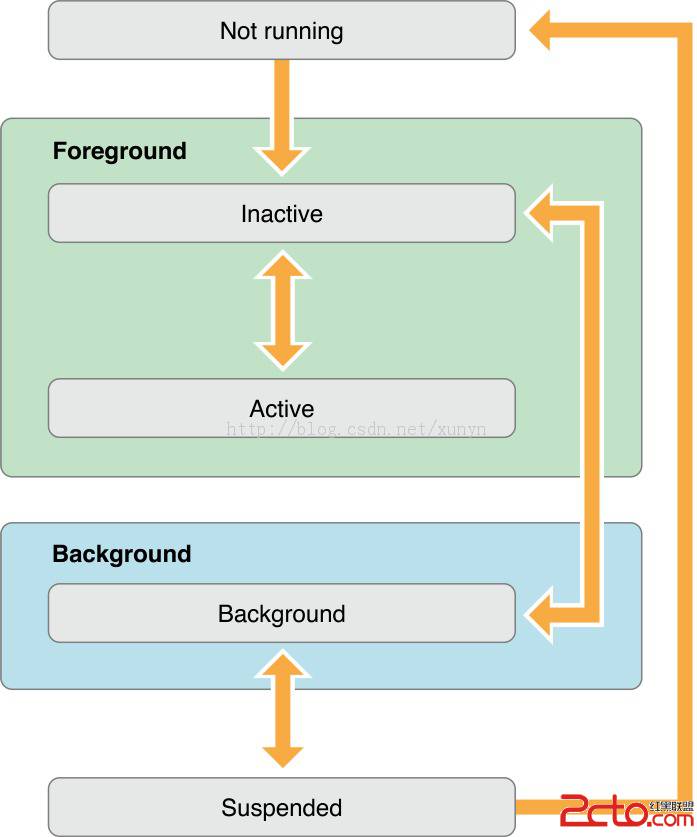
要處理後台運行,首先需要確認設備是否支援多任務。iOS 4.0 之前是無法實現多任務的,不過如今 iOS 4.0 的設備已經很少見了:
UIDevice* device = [UIDevice currentDevice];
BOOL backgroundSupported = NO;
if ([device respondsToSelector:@selector(isMultitaskingSupported)])
    backgroundSupported = device.multitaskingSupported;
總共有三種方式,能讓 App 切到後台後仍獲得執行機會:
第一種:有限時間的後台任務
在 applicationDidEnterBackground 裡呼叫 beginBackgroundTaskWithExpirationHandler::
- (void)applicationDidEnterBackground:(UIApplication *)application {
    bgTask = [application beginBackgroundTaskWithExpirationHandler:^{
        // 標記停止位置或直接結束任務
        [application endBackgroundTask:bgTask];
        bgTask = UIBackgroundTaskInvalid;
    }];

    // 立即啟動長任務並返回
    dispatch_async(dispatch_get_global_queue(DISPATCH_QUEUE_PRIORITY_DEFAULT, 0), ^{
        // 執行任務相關的工作,建議分塊進行
        NSLog(@"%f",application.backgroundTimeRemaining);
        [application endBackgroundTask:bgTask];
        bgTask = UIBackgroundTaskInvalid;
    });
}
第二種:本地系統通知
透過 UILocalNotification 排程定時任務:
- (void)scheduleAlarmForDate:(NSDate*)theDate {
    UIApplication* app = [UIApplication sharedApplication];
    NSArray* oldNotifications = [app scheduledLocalNotifications];
    // 排程新通知前先清掉舊的
    if ([oldNotifications count] > 0) {
        [app cancelAllLocalNotifications];
    }
    UILocalNotification* alarm = [[UILocalNotification alloc] init];
    if (alarm) {
        alarm.fireDate = theDate;
        alarm.timeZone = [NSTimeZone defaultTimeZone];
        alarm.repeatInterval = 0;
        alarm.soundName = @"alarmsound.caf";
        alarm.alertBody = @"Time to wake up!";
        [app scheduleLocalNotification:alarm];
    }
}
第三種:系統指定的長運行後台任務
呼叫系統預defined的後台運行類型,例如音樂播放、GPS 等,Apple 定義了以下幾種:
- 在後台持續播放聲音的 App,如音樂播放器。
- 在後台錄製聲音的 App。
- 需要隨時掌握使用者位置的 App,如導航。
- 支援 VoIP 的 App。
- 需要定期下載並處理新內容的 App。
- 需要接收外部配件定期更新的 App。
實戰中的一個坑
我在項目裡用的是第一種:每次 App 切到後台,就發送一些網路請求到 server。這裡遇到一個問題——若採用異步方式發送請求,还没等 App 收到回覆,程式就已切到後台,於是我把它改成同步請求:
NSURLRequest *request = [NSURLRequest requestWithURL:[NSURL URLWithString:@"https://www.baidu.com"]];
NSError *error;
NSURLResponse *response;
NSData *data = [NSURLConnection sendSynchronousRequest:request returningResponse:&response error:&error];
這樣就能正常收到 response,暫時解決了問題。但若是同時有多個請求,執行效率就成了新的隱憂。
- 上一篇文章: iOS 取得當前 WiFi 名稱的方法
- 下一篇文章: iOS 圓形旋轉托盤菜單的實現