
Objective-C 呼叫 JavaScript:傳入多個參數並取得回傳值
編輯:iOS 開發綜合
上一篇示範了無參數的呼叫,這次加上參數傳遞。整體結構相同,差別只在 JS 函式的簽名與字串拼接方式。
1. 準備 HTML 網頁
這次的 postStr 接受兩個參數,分別寫進兩個輸入框,再回傳第三個輸入框的值:
<html>
<head>
<meta http-equiv="content-type" content="text/html;charset=utf-8">
<title>js 呼叫 oc</title>
<script type="text/javaScript">
function postStr(str1, str2) {
    document.getElementById("text1").value = str1;
    document.getElementById("text2").value = str2;
    return document.getElementById("text3").value;
    // return "javaScript 回傳值啦";
}
</script>
</head>
<body>
<p><input type="text" id="text1" value="實參1"/></p>
<p><input type="text" id="text2" value="實參2"/></p>
<p><input type="text" id="text3" value="回傳值"/></p>
</body>
</html>
2. 加入專案
把檔案放進專案,並確認它在 Copy Bundle Resources 裡。
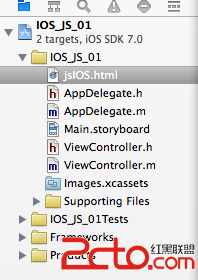
3. 畫面與連線
拖一個 UIWebView 與一個 UIButton 到 xib/storyboard,然後在 .h 中宣告並採用 UIWebViewDelegate:
#import <UIKit/UIKit.h>

@interface ViewController : UIViewController <UIWebViewDelegate>
@property (nonatomic, retain) IBOutlet UIWebView *webview;
@property (nonatomic, retain) IBOutlet UIButton *button;
- (IBAction)IOS_JS:(id)sender;
@end
4. 傳參數並取得回傳值
- (void)viewDidLoad {
    [super viewDidLoad];

    webview.backgroundColor = [UIColor clearColor];
    webview.delegate = self;

    NSString *basePath = [[NSBundle mainBundle] bundlePath];
    NSString *helpHtmlPath = [basePath stringByAppendingPathComponent:@"jsIOS.html"];
    NSURL *url = [NSURL fileURLWithPath:helpHtmlPath];
    [webview loadRequest:[NSURLRequest requestWithURL:url]];
}

/*
 * 點擊事件:呼叫 JS 的 postStr(str1, str2) 並取得回傳值
 */
- (IBAction)IOS_JS:(id)sender {
    NSString *str1 = @"我來自於 oc";
    NSString *str2 = @"我來自於地球";

    NSString *str = [self.webview stringByEvaluatingJavaScriptFromString:
        [NSString stringWithFormat:@"postStr('%@','%@');", str1, str2]];

    NSLog(@"JS 回傳值:%@", str);
}
這種字串拼接有安全風險
上面用 stringWithFormat 直接把參數塞進 JS 字串,是教學上最直觀的寫法,但不該用在正式專案。問題有兩個:
· 參數中若含有單引號 ',會直接破壞 JS 語法,導致執行錯誤。
· 參數若來自使用者輸入,就構成了典型的注入風險——對方可以輸入 '); 一段任意程式碼; (' 來執行非預期的 JS。
較穩妥的兩個做法:
做法一:先做 JS 字串轉義。把參數中的反斜線、單引號、雙引號、換行等字元替換成轉義序列後再拼接。
做法二(推薦):用 JSON 傳遞。把參數打包成 JSON 字串傳入,JS 端再用 JSON.parse 還原。因為 JSON 的格式由序列化器保證,不會有語法被破壞的問題:
// OC 端
NSDictionary *params = @{@"str1": str1, @"str2": str2};
NSData *jsonData = [NSJSONSerialization dataWithJSONObject:params
                                                   options:0
                                                     error:nil];
NSString *jsonStr = [[NSString alloc] initWithData:jsonData
                                          encoding:NSUTF8StringEncoding];

NSString *js = [NSString stringWithFormat:@"postStrFromJson('%@');", jsonStr];
NSString *result = [self.webview stringByEvaluatingJavaScriptFromString:js];
// JS 端
function postStrFromJson(jsonStr) {
    var params = JSON.parse(jsonStr);
    document.getElementById("text1").value = params.str1;
    document.getElementById("text2").value = params.str2;
    return document.getElementById("text3").value;
}
另外提醒,回傳值依然是字串。若 JS 回傳的是物件或陣列,記得在 JS 端用 JSON.stringify 序列化,OC 端再用 NSJSONSerialization 反序列化回來。