
iOS 本地通知 UILocalNotification 使用筆記與踩坑紀錄
編輯:iOS 開發綜合
做過提醒類 App 的人都知道,本地通知是個看似簡單、細節卻不少的功能。以下把常用寫法與幾個容易翻車的地方整理起來。
建立並排入一則本地通知
UILocalNotification *notification = [[UILocalNotification alloc] init];
if (notification) {
    NSDate *currentDate = [NSDate date];
    notification.timeZone = [NSTimeZone defaultTimeZone];              // 使用本地時區
    notification.fireDate = [currentDate dateByAddingTimeInterval:5.0]; // 5 秒後觸發
    notification.repeatInterval = kCFCalendarUnitDay;                  // 每日重複
    notification.alertBody = @"Wake up, man";
    notification.alertAction = NSLocalizedString(@"起床了", nil);
    notification.soundName = UILocalNotificationDefaultSoundName;
    notification.applicationIconBadgeNumber++;
    notification.userInfo = @{kLocalNotificationID: @"LocalNotificationID"};

    [[UIApplication sharedApplication] scheduleLocalNotification:notification];
}
幾個欄位的意義:
alertBody:橫幅或鎖機畫面上的主要文字。alertAction:鎖機時「滑開」按鈕上顯示的動作文字。
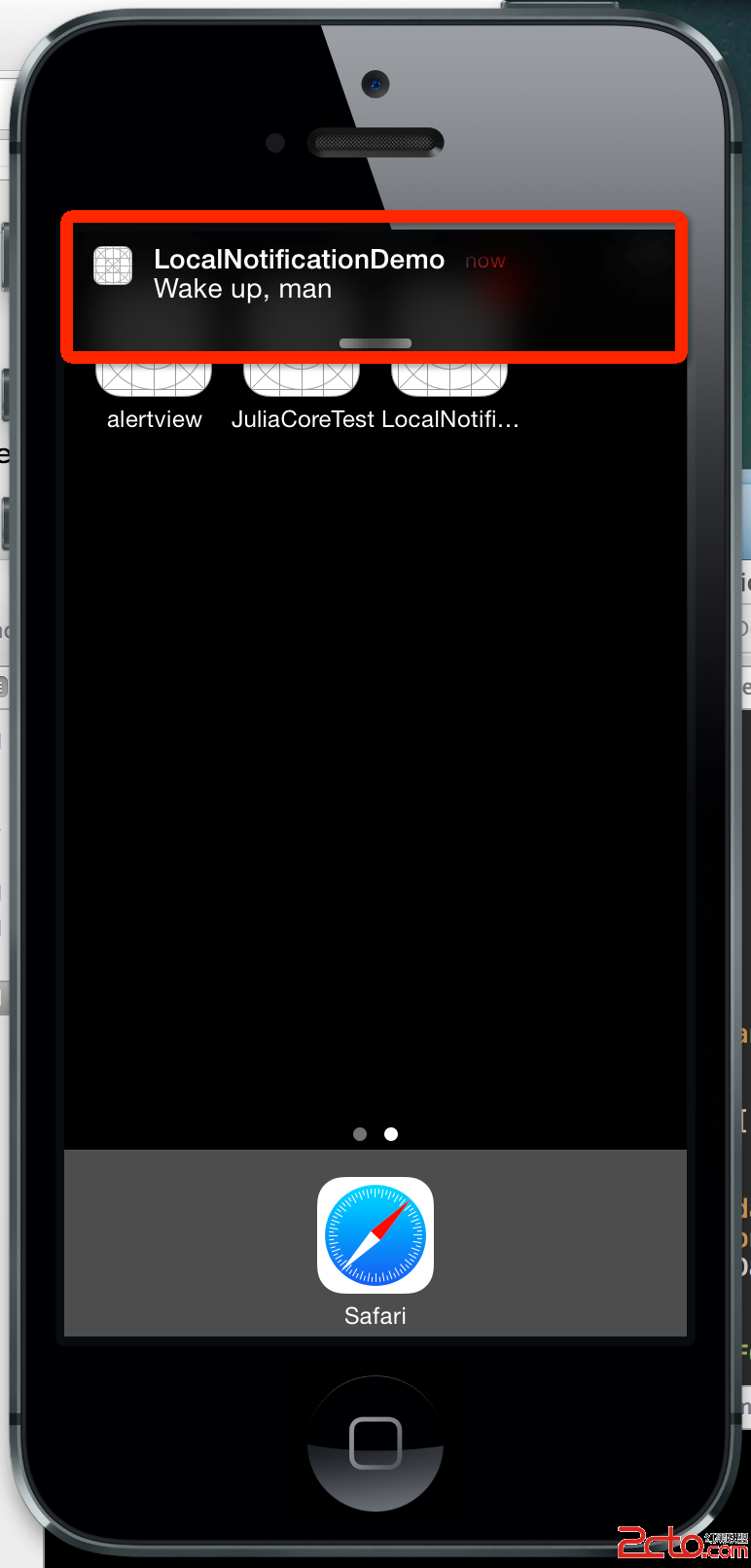

repeatInterval 的取值
@property(nonatomic) NSCalendarUnit repeatInterval; // 0 代表不重複
可用的值包含:
NSCalendarUnitEra,          NSCalendarUnitYear,       NSCalendarUnitMonth,
NSCalendarUnitDay,          NSCalendarUnitHour,       NSCalendarUnitMinute,
NSCalendarUnitSecond,       NSCalendarUnitWeekday,    NSCalendarUnitWeekdayOrdinal
分別代表一世紀、一年、一個月等等,0 表示不重複。
實務上有兩個限制要注意:
- 下限是分鐘。設成
NSCalendarUnitSecond不會每秒發送,而是完全不重複——iOS 不允許這種高頻通知。 - 不能自訂間隔。
NSCalendarUnit是列舉型別,你沒辦法塞一個 10 進去叫它每十秒重複一次。所以若想「每 20 分鐘通知一次、一小時共三次」,只能建立三則通知。
接收通知的處理
- (void)application:(UIApplication *)application
    didReceiveLocalNotification:(UILocalNotification *)notification {
    NSLog(@"Application did receive local notifications");
    UIAlertView *alert = [[UIAlertView alloc] initWithTitle:@"Hello"
                                                    message:@"welcome"
                                                   delegate:nil
                                          cancelButtonTitle:@"OK"
                                          otherButtonTitles:nil];
    [alert show];
}
注意這個方法只有在 App 處於前景時才會被呼叫。App 在背景時通知由系統直接呈現,進入背景不會觸發這段程式。
坑一:卸載重裝,舊通知還在
如果你排的是週期性通知,即使把 App 刪掉再重裝,之前排入的通知依然存在於系統中,並會繼續照表發送。可以這樣列出所有待發通知:
NSArray *localNotifications = [[UIApplication sharedApplication] scheduledLocalNotifications];
NSLog(@"%@", localNotifications);
輸出會看到一堆殘留項目:
2014-03-14 15:46:37.145 LocalNotificationDemo[4419:60b] (
"<UIConcreteLocalNotification: 0xa32ce30>{fire date = Friday, March 14, 2014 at 3:38:16 PM China Standard Time, time zone = Asia/Chongqing (GMT+8) offset 28800, repeat interval = NSDayCalendarUnit, repeat count = UILocalNotificationInfiniteRepeatCount, ... }",
"<UIConcreteLocalNotification: 0xa32dfc0>{fire date = ... 3:44:45 PM ..., repeat interval = NSDayCalendarUnit, ... }",
"<UIConcreteLocalNotification: 0xa32e470>{fire date = ... 3:44:55 PM ..., repeat interval = NSDayCalendarUnit, ... }"
)
這不只在模擬器發生,真機上一樣如此。所以 App 第一次啟動時,通常應該先清空舊通知再重新排程。
取消通知的兩種方式
方式一:全部取消
[[UIApplication sharedApplication] cancelAllLocalNotifications];
適合 App 首次啟動、或使用者還原預設設定的時機。
方式二:取消特定通知
- (void)cancelLocalNotification:(UILocalNotification *)notification;
要定位到哪一則通知,就得靠 userInfo 裡的識別碼:
- (void)application:(UIApplication *)application
    didReceiveLocalNotification:(UILocalNotification *)notification {
    for (UILocalNotification *noti in [[UIApplication sharedApplication] scheduledLocalNotifications]) {
        NSString *notiID = noti.userInfo[kLocalNotificationID];
        NSString *receiveNotiID = notification.userInfo[kLocalNotificationID];
        if ([notiID isEqualToString:receiveNotiID]) {
            [[UIApplication sharedApplication] cancelLocalNotification:notification];
            return;
        }
    }

    UIAlertView *alert = [[UIAlertView alloc] initWithTitle:@"Hello"
                                                    message:@"welcome"
                                                   delegate:nil
                                          cancelButtonTitle:@"OK"
                                          otherButtonTitles:nil];
    [alert show];
}
最後一個建議:節制
本地通知發得太頻繁,使用者只會有一個反應——把通知關掉,甚至把 App 刪掉。與其靠轟炸留住使用者,不如把通知次數控制在真正有價值的時機。
補充一點:這套 UILocalNotification 從 iOS 10 起已被 UNUserNotificationCenter 取代(舊 API 仍可用但已標記為 deprecated)。新專案請直接使用 UserNotifications 框架,它將「要求權限」、「建立內容」、「排程觸發條件」拆得更清楚,也支援通知擴充與自訂 UI。
- 上一篇文章: iOS 多執行緒核心:NSRunLoop 是什麼、怎麼用
- 下一篇文章: iOS 學習筆記:引用計數的運作與底層實現