
iOS 7 百度地圖 API 環境搭建:從靜態庫到授權初始化
編輯:iOS 開發綜合
百度地圖 SDK 是常見的第三方地圖方案之一。在 iOS 7 專案中整合時,除了加入靜態庫與標頭檔,還需要設定 Framework、Other Linker Flags,並完成授權初始化。
下載與解壓 SDK
從百度地圖官方下載 iOS SDK 後,解壓通常會看到 inc、libs 與 mapapi.bundle 等內容。
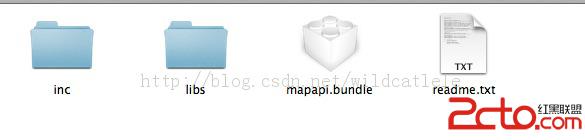
加入專案
把 inc 文件夾、mapapi.bundle 與 libs/Release-iphoneos 中的 libbaidumapapi.a 加入 Xcode 專案。建議將這些檔案放在專案根目錄或固定資料夾中,方便後續維護。
加入必要 Framework
百度地圖 SDK 通常依賴多個系統 Framework,例如:
- CoreLocation.framework
- QuartzCore.framework
- OpenGLES.framework
- SystemConfiguration.framework
- CoreGraphics.framework
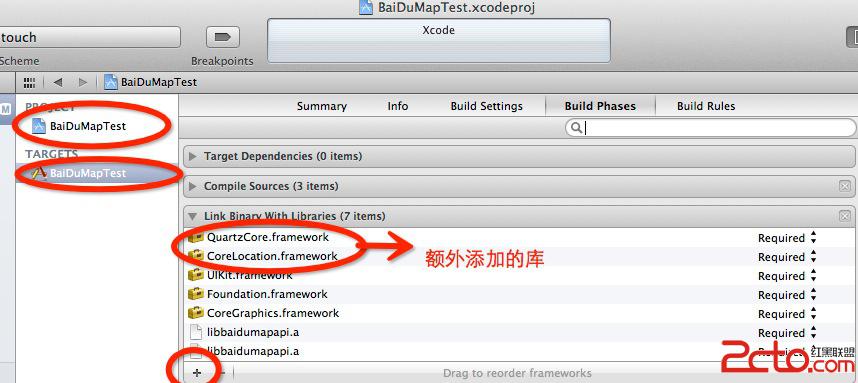
設定 Other Linker Flags
在 Build Settings 的 Other Linker Flags 中加入:
-ObjC
-all_load
同時設定 Library Search Paths,例如:
$(SRCROOT)/libs/Release$(EFFECTIVE_PLATFORM_NAME)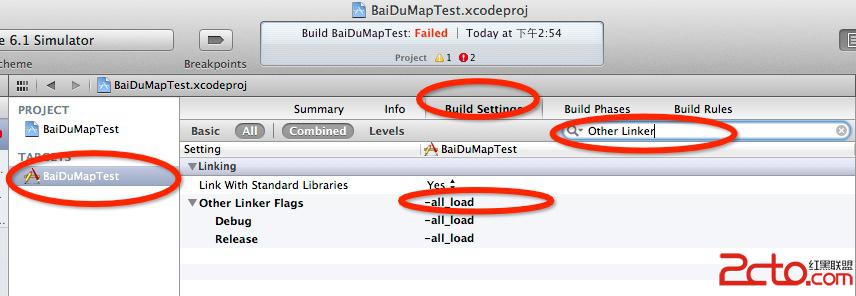
確保 Objective-C++ 支援
百度地圖靜態庫以 Objective-C++ 實作,因此專案中至少要有一個 .mm 檔案,或將 Compile Sources As 設為 Objective-C++。若沒有相關設定,編譯或執行時可能出現大量錯誤。
初始化 BMKMapManager
#import "BMapKit.h"

@interface AppDelegate : UIResponder <UIApplicationDelegate>

@property (nonatomic, strong) BMKMapManager *mapManager;

@end
- (BOOL)application:(UIApplication *)application
didFinishLaunchingWithOptions:(NSDictionary *)launchOptions {
self.mapManager = [[BMKMapManager alloc] init];
BOOL ret = [self.mapManager start:@"你的AK" generalDelegate:nil];
if (!ret) {
NSLog(@"manager start failed!");
}
return YES;
}顯示地圖
#import "BMKMapView.h"

- (void)viewDidLoad {
    [super viewDidLoad];

    BMKMapView *mapView =
        [[BMKMapView alloc] initWithFrame:CGRectMake(0, 0, 320, 460)];

    self.view = mapView;
}
若使用 2.0.0 之後的版本,還需在 viewWillAppear 與 viewWillDisappear 中呼叫 BMKMapView 的生命週期方法,並在離開時將 delegate 設為 nil。
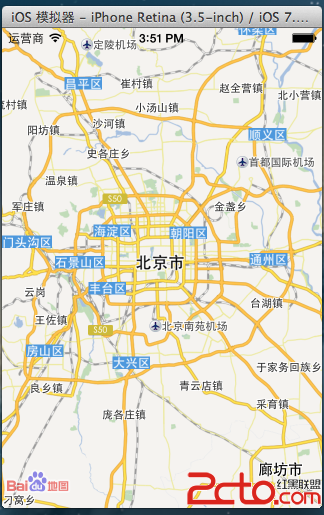
完成上述設定後,編譯執行即可看到百度地圖畫面。若出現授權或地圖空白問題,優先檢查 AK、Library Search Paths、Other Linker Flags 與 .mm 檔案設定。