
Cocos2d-x 接入 iOS 7 系統分享與 AirDrop
編輯:iOS 開發綜合
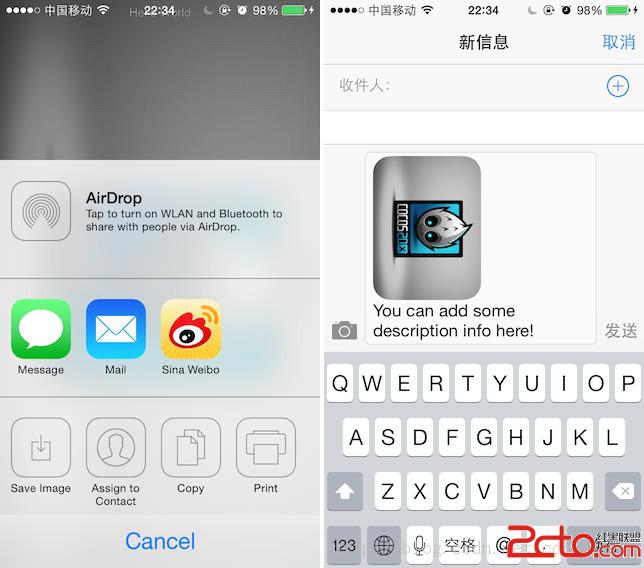
下午要加分享功能時,看著一堆第三方 SDK,我還是偏好 iOS 7 內建的分享面板——簡潔大方,而且會自動列出裝置上已安裝的社群 App。
以下說明如何在 Cocos2d-x 專案中使用它。整體架構是:Objective-C 單例負責實際的分享邏輯,再用一層 C++ 包裝類供 .cpp 程式碼呼叫。
一、IOSShareManager.h
//
//  IOSShareManager.h
//

#import <Foundation/Foundation.h>
#import <UIKit/UIKit.h>

@interface IOSShareManager : NSObject

+ (IOSShareManager *)getInstance;
- (void)share:(CGPoint)pos;

@property (nonatomic, readwrite, retain) id viewController;

@end
二、IOSShareManager.m
//
//  IOSShareManager.m
//

#import "IOSShareManager.h"

@interface IOSShareManager ()
@property (strong, nonatomic) UIPopoverController *activityPopover;
@end

@implementation IOSShareManager

+ (IOSShareManager *)getInstance {
    static IOSShareManager *gameMgr = nil;
    static dispatch_once_t onceToken;
    dispatch_once(&onceToken, ^{
        gameMgr = [[self alloc] init];
    });
    return gameMgr;
}

- (void)share:(CGPoint)pos {
    // 實務上可先截圖存到 Documents,這裡直接讀 bundle 內的圖片
    UIImage *image = [UIImage imageNamed:@"HelloWorld.png"];
    NSString *mesg = @"You can add some description info here!";

    UIActivityViewController *activityViewController = [[UIActivityViewController alloc]
        initWithActivityItems:@[image, mesg]
         applicationActivities:nil];

    if ([[UIDevice currentDevice] userInterfaceIdiom] == UIUserInterfaceIdiomPhone) {
        // iPhone:從底部滑出
        [self.viewController presentViewController:activityViewController animated:YES completion:nil];
    } else {
        // iPad:以 popover 形式彈出
        if (![self.activityPopover isPopoverVisible]) {
            self.activityPopover = [[UIPopoverController alloc]
                initWithContentViewController:activityViewController];
            [self.activityPopover presentPopoverFromRect:CGRectMake(pos.x, pos.y, 0, 0)
                                                inView:((UIViewController *)self.viewController).view
                              permittedArrowDirections:UIPopoverArrowDirectionAny
                                              animated:YES];
        } else {
            // 重複點擊時收起
            [self.activityPopover dismissPopoverAnimated:YES];
        }
    }
}
@end
三、C++ 中間層:IOSShare.h
//
//  IOSShare.h
//

#ifndef __IOS7ShareSample__IOSShare__
#define __IOS7ShareSample__IOSShare__

class IOSShare {
public:
    /*! @brief share
     *  顯示分享面板,iPad 下會從指定座標彈出
     *  @param posX
     *  @param posY
     */
    static void share(float posX, float posY);
};

#endif
四、IOSShare.mm
副檔名刻意使用 .mm,這樣才能在 Objective-C++ 環境中混用 Objective-C 語法:
//
//  IOSShare.mm
//

#include "IOSShare.h"
#import "IOSShareManager.h"

void IOSShare::share(float posX, float posY) {
    [[IOSShareManager getInstance] share:CGPointMake(posX, posY)];
}
五、使用方式
第一步:在 AppController.mm 中引入標頭,並設定 rootViewController。
#import "IOSShareManager.h"

- (BOOL)application:(UIApplication *)application
    didFinishLaunchingWithOptions:(NSDictionary *)launchOptions {
    // ...
    [[IOSShareManager getInstance] setViewController:viewController];
    return YES;
}
第二步:在 .cpp 中直接呼叫,座標參數在 iPad 上作為 popover 的彈出點。
IOSShare::share(300, 300);
幾個實務提醒
1、iOS 13 之後 UIActivityViewController 已 deprecated UIPopoverController。新版應改用 modalPresentationStyle = UIModalPresentationPopover 搭配 popoverPresentationController 的 sourceView / sourceRect,並記得 iOS 13 起 popover 必須有 sourceView,否則會崩潰。
2、分享項目要挑型別。UIActivityViewController 會依項目型別過濾可用服務,例如只傳 URL 時不會出現儲存到相簿的選項。若要支援 AirDrop,裝置需開啟 Wi-Fi 與藍牙。
3、記得處理 iPad 的 excludedActivityTypes。某些活動類型在 popover 呈現下體驗不佳,可透過這個參數排除。