
iOS 鍵盤處理總結:隱藏、焦點切換與自訂鍵盤
鍵盤相關的需求看似簡單,實作細節卻不少。這篇把四個常見情境整理在一起:隱藏鍵盤、輸入完成後自動跳下一格、輕觸背景收起鍵盤,以及自訂鍵盤。
一、點擊 Return 隱藏鍵盤
若頁面上有多個 UITextField,都想透過點擊鍵盤右下角的 Return 來收起鍵盤,最好的做法是使用 Did End on Exit 事件。點擊 Return 後會觸發這個事件,而它的 sender 參數就是當前文本框,因此可以寫成一個通用的事件處理方法。
- (IBAction)TextField_DidEndOnExit:(id)sender {
    // 隱藏鍵盤
    [sender resignFirstResponder];
}
標頭檔中補上宣告:
- (IBAction)TextField_DidEndOnExit:(id)sender;
回到 storyboard,按 command + option + enter 打開輔助視窗並顯示 .h 檔。選中一個 UITextField,右鍵點擊面板,按住 Did End on Exit 旁邊的圓圈拖曳到 TextField_DidEndOnExit 方法上,即完成連線。其餘文本框依同樣方式連接即可。
二、按 Return 自動跳到下一個輸入框
當頁面上有多個輸入框時,每次都手動點擊切換太繁瑣。以登入頁為例,上面有帳號框(nameTextField)、密碼框(passTextField)與登入按鈕(loginButton):希望按帳號框的 Return 跳到密碼框,按密碼框的 Return 直接登入。
因為兩者行為不同,不能像上一節那樣共用一個方法,必須各自建立事件處理。在 storyboard 中右鍵點擊帳號框,把 Did End on Exit 拖到空白處並命名為 nameTextField_DidEndOnExit,密碼框同理命名為 passTextField_DidEndOnExit。
- (IBAction)nameTextField_DidEndOnExit:(id)sender {
    // 將焦點移至下一個文本框
    [self.passTextField becomeFirstResponder];
}

- (IBAction)passTextField_DidEndOnExit:(id)sender {
    // 隱藏鍵盤
    [sender resignFirstResponder];
    // 觸發登入按鈕的點擊事件
    [self.loginButton sendActionsForControlEvents:UIControlEventTouchUpInside];
}
帳號框轉到密碼框時不需要收鍵盤,只要用 becomeFirstResponder 把焦點交給下一個即可。密碼框按完則要收起鍵盤,再觸發登入按鈕的 UIControlEventTouchUpInside 事件。
最後,把帳號框的 Return Key 屬性設為 Next、密碼框設為 Done,讓畫面提示與實際行為一致。
三、輕觸背景隱藏鍵盤
只能靠 Return 關閉太不靈活。在 storyboard 中點擊背景 View,把它的 Custom Class 設為 UIControl,這樣才會出現 Touch Down 事件;接著右鍵拖曳建立事件方法。
- (IBAction)View_TouchDown:(id)sender {
    // 送出 resignFirstResponder
    [[UIApplication sharedApplication] sendAction:@selector(resignFirstResponder)
                                            to:nil
                                          from:nil
                                        forEvent:nil];
}
四、自訂鍵盤
可以透過自訂鍵盤在鍵盤上方加入需要的功能列。原始碼下載:
https://github.com/colin1994/myKeyboard.git
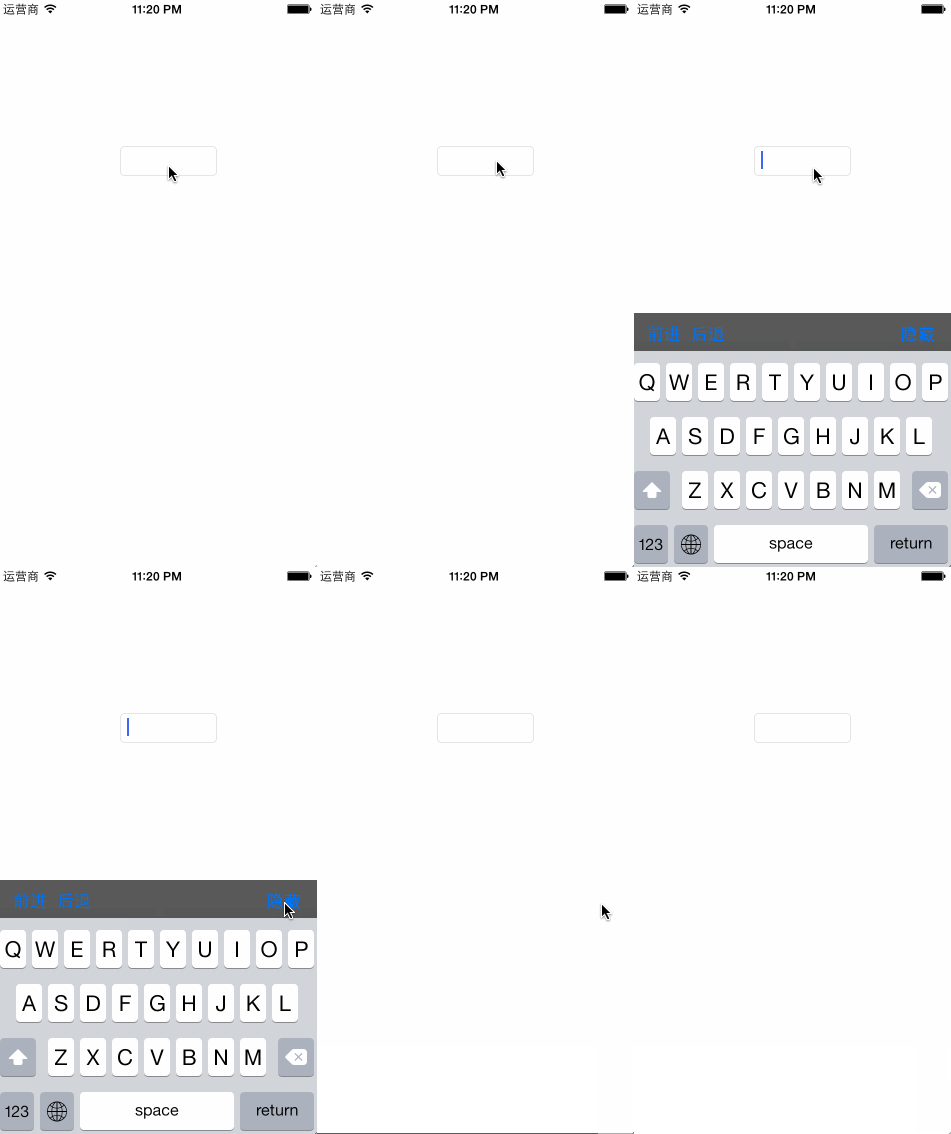
核心做法是建立一個 UIToolbar,掛到 inputAccessoryView 上:
- (void)viewDidLoad {
    [super viewDidLoad];

    if (self.keyboardToolbar == nil) {
        self.keyboardToolbar = [[UIToolbar alloc] initWithFrame:CGRectMake(0, 0, self.view.bounds.size.width, 38.0f)];
        self.keyboardToolbar.barStyle = UIBarStyleBlackTranslucent;

        UIBarButtonItem *previousBarItem = [[UIBarButtonItem alloc] initWithTitle:NSLocalizedString(@"前進", @"")
                                                                          style:UIBarButtonItemStyleBordered
                                                                         target:self
                                                                         action:@selector(previousField:)];

        UIBarButtonItem *nextBarItem = [[UIBarButtonItem alloc] initWithTitle:NSLocalizedString(@"後退", @"")
                                                                       style:UIBarButtonItemStyleBordered
                                                                      target:self
                                                                      action:@selector(nextField:)];

        UIBarButtonItem *spaceBarItem = [[UIBarButtonItem alloc] initWithBarButtonSystemItem:UIBarButtonSystemItemFlexibleSpace
                                                                                      target:nil
                                                                                      action:nil];

        UIBarButtonItem *doneBarItem = [[UIBarButtonItem alloc] initWithTitle:NSLocalizedString(@"隱藏", @"")
                                                                       style:UIBarButtonItemStyleDone
                                                                      target:self
                                                                      action:@selector(resignKeyboard:)];

        [self.keyboardToolbar setItems:[NSArray arrayWithObjects:previousBarItem, nextBarItem, spaceBarItem, doneBarItem, nil]];
    }

    self.myTextView.inputAccessoryView = self.keyboardToolbar;
}

#pragma mark - your code

- (void)resignKeyboard:(id)sender {
    [self.myTextView resignFirstResponder];
}

- (void)previousField:(id)sender {
}

- (void)nextField:(id)sender {
}
若要在鍵盤上做更進一步的自動化,還可以實作 UITextFieldDelegate 的 textFieldShouldReturn:,在回呼中依 returnKey 的型別決定下一步,這比依賴 Did End on Exit 更可控。
- 上一篇文章: iOS 安全攻防(二十四):敏感邏輯的保護方案(一)
- 下一篇文章: Objective-C 基礎語法筆記:BOOL、類別、集合與字串