
iOS UITableView 快速滾動:用索引列實作跳轉
當一個列表有幾百筆資料時,使用者想從頭滑到中段簡直是惡夢。系統自帶的 A–Z 索引列很好用,但它的前提是「資料本來就能按字母分組」。如果資料是成績、報表這類連續數值,就沒有現成的分組可以用。
思路
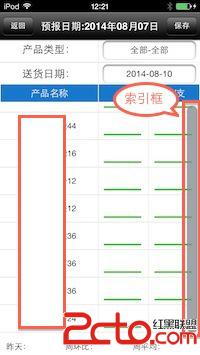
既然沒有真實分組,那就「假裝」有:在索引列放 20 個空字串當作刻度,使用者點第 n 格時,把 n 換算成 listArray.count 中的對應位置,再呼叫 scrollToRowAtIndexPath: 跳過去。這樣一條索引就能把任意長度列表的「秒跳」做出來。
缺點也很明確:索引列顯示期間會遮住右側的滾動條,而且分數是粗略的,不可能精準落在某一筆上。
主要程式碼
// 取得資料
- (void)getTableData {
    dispatch_async(dispatch_get_global_queue(DISPATCH_QUEUE_PRIORITY_DEFAULT, 0), ^{
        dispatch_async(dispatch_get_main_queue(), ^{
            self.listArray = [[ReportLogic sharedInstance] getProductByCategory];

            if ([self.listArray count] == 0) {
                [GlobalApplication Alert:@"提示" :@"暫無數據"];
            } else {
                // 建立 20 個空刻度
                NSMutableArray *stArray = [[NSMutableArray alloc] init];
                for (int i = 0; i < 20; i++) {
                    NSString *index = @"";
                    [stArray insertObject:index atIndex:i];
                }
                self.sectionTitles = stArray;
            }

            [self.fmTableView reloadData];
        });
    });
}

#pragma mark 索引

- (NSInteger)numberOfSectionsInTableView:(UITableView *)tableView {
    return 1;
}

// 提供索引列的標題(20 個空字串)
- (NSArray *)sectionIndexTitlesForTableView:(UITableView *)tableView {
    return self.sectionTitles;
}

// 點擊索引時,換算成真正的 row
- (NSInteger)tableView:(UITableView *)tableView
sectionForSectionIndexTitle:(NSString *)title
                 atIndex:(NSInteger)index {

    // 頭尾兩格做修正,中間按比例換算
    if (index == 0) {
        index = 1;
    } else if (index == self.sectionTitles.count - 1) {
        index = self.listArray.count - 1;
    } else {
        index = round(index * self.listArray.count / 20);
    }

    [self.fmTableView scrollToRowAtIndexPath:
        [NSIndexPath indexPathForRow:index inSection:0]
                    atScrollPosition:UITableViewScrollPositionBottom
                            animated:YES];
    return index;
}
幾個實作細節
為什麼要留 20 格而不是 5 格:格數決定跳躍的解析度。20 格在 500 筆資料上約等於每格 25 筆,體感已經接近「大概想到的位置」,再多格子會擠到難以點擊。
頭尾為什麼要特例處理:比例換算在 index 為 0 時會得到 0,而最底部那格按比例可能還不到最後一筆。手動夾住兩端,可以避免出現「點了最底下一格卻沒到底」的錯覺。
為什麼用 UITableViewScrollPositionBottom:跳完之後目標列會停在可視區域底部,使用者能立刻看到它下面的內容,比較容易判斷位置對不對。若改成 Middle 或 Top,長列表的體感會差很多。
更進一步的做法
如果資料量真的很大(例如幾萬筆),更好的方案是不要一次載入全部:改用 Core Data 的 NSFetchedResultsController 搭配 sectionNameKeyPath,索引列與分組都由資料庫即時產生,記憶體與捲動效能都會好得多。若只是想要「拖動右側時顯示目前位置」這種輔助回饋,實作 viewForSectionIndex 也好過放 20 個空字串——因為空字串的索引列在 iOS 7 之後的外觀完全由系統決定,你無法自訂樣式。
- 上一篇文章: 多媒體編程:iOS 影片級的畫面渲染工具類
- 下一篇文章: 多媒體編程:iOS 攝像頭主動抓帧工具類