
iOS 團購專案實作:城市選擇的拼音搜尋
編輯:iOS 開發綜合
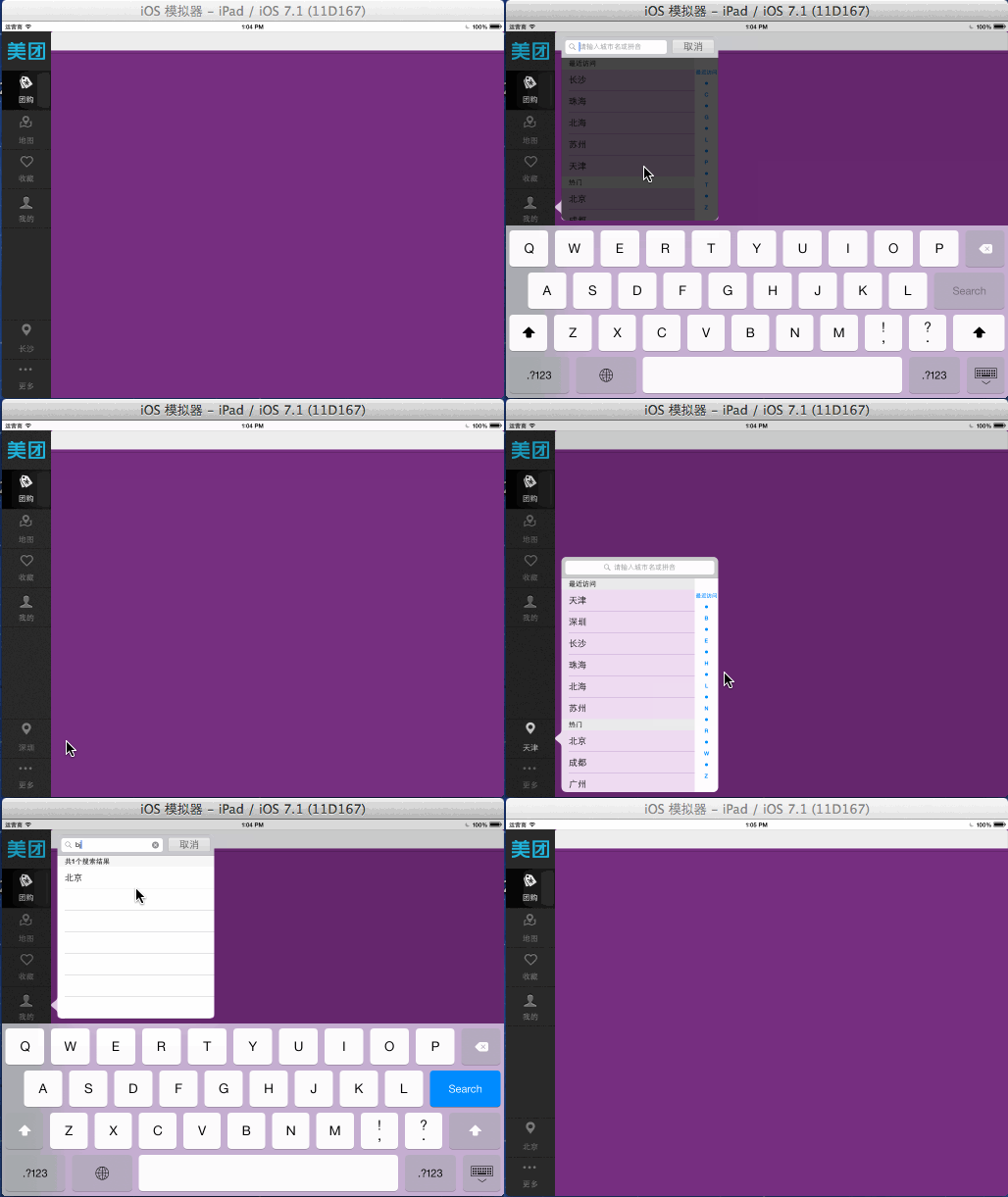
城市選擇器要做到好用,光有 A–Z 索引是不夠的,使用者往往直接打「bj」或「beijing」就期待看到北京。要支援這件事,需要把每個城市名稱轉成漢語拼音,再拿全拼與首字母兩份資料去比對。
整體結構
這個功能拆成四個角色:
CityLocationController:彈出的城市選擇面板,上方搜尋框、下方分組列表。SearchResultController:搜尋結果列表,唯一資料來源是搜尋框傳進來的文字。DockItemLocation:Dock 上的定位按鈕,負責彈出/關閉 Popover 並處理旋轉。MetaDataTool:元資料單例,負責城市、行政區、最近拜訪紀錄。
搜尋結果控制器
@interface SearchResultController ()
{
    // 存放所有符合條件的城市物件
    NSMutableArray *_resultCityArr;
}
@end

@implementation SearchResultController

- (void)viewDidLoad {
    [super viewDidLoad];
    self.view.backgroundColor = [UIColor whiteColor];
    _resultCityArr = [NSMutableArray array];
}

// 唯一的成員:由 CityLocationController 的 textDidChange: 傳入
- (void)setSearchText:(NSString *)searchText {
    _searchText = searchText;

    // 1. 清掉上一次的結果
    [_resultCityArr removeAllObjects];

    // 2. 準備拼音輸出格式
    HanyuPinyinOutputFormat *fmt = [[HanyuPinyinOutputFormat alloc] init];
    fmt.caseType = CaseTypeUppercase;          // 全大寫
    fmt.toneType = ToneTypeWithoutTone;        // 不帶音調
    fmt.vCharType = VCharTypeWithUUnicode;     // ü 的處理方式

    // 3. 三種比對條件,這是關鍵
    NSDictionary *citiesDict = [MetaDataTool sharedMetaDataTool].allCitiesDict;
    [citiesDict enumerateKeysAndObjectsUsingBlock:^(NSString *key, City *city, BOOL *stop) {

        // 例:SHI#JIA#ZHUANG
        NSString *pinyinStr = [PinyinHelper toHanyuPinyinStringWithNSString:city.name
                                                    withHanyuPinyinOutputFormat:fmt
                                                                withNSString:@"#"];

        // 2. 取每個字的拼音首字母,拼成 BJ 這種形式
        NSArray *wordsArr = [pinyinStr componentsSeparatedByString:@"#"];
        NSMutableString *pinyinInitial = [NSMutableString string];
        for (NSString *word in wordsArr) {
            [pinyinInitial appendString:[word substringToIndex:1]];
        }

        // 去掉分隔符號,例如 beijing
        pinyinStr = [pinyinStr stringByReplacingOccurrencesOfString:@"#" withString:@""];

        // 3. 三種命中任一種就算符合
        //    中文包含(北京)/全拼包含(BEIJING)/首字母包含(BJ)
        BOOL matchName    = ([city.name rangeOfString:searchText].length != 0);
        BOOL matchPinyin  = ([pinyinStr rangeOfString:searchText.uppercaseString].length != 0);
        BOOL matchInitial = ([pinyinInitial rangeOfString:searchText.uppercaseString].length != 0);

        if (matchName || matchPinyin || matchInitial) {
            [_resultCityArr addObject:city];
        }
    }];

    // 4. 刷新表格
    [self.tableView reloadData];
}

#pragma mark - 資料來源

- (NSInteger)tableView:(UITableView *)tableView numberOfRowsInSection:(NSInteger)section {
    return _resultCityArr.count;
}

- (UITableViewCell *)tableView:(UITableView *)tableView cellForRowAtIndexPath:(NSIndexPath *)indexPath {
    static NSString *CellIdentifier = @"SearchResultCell";
    UITableViewCell *cell = [tableView dequeueReusableCellWithIdentifier:CellIdentifier];
    if (cell == nil) {
        cell = [[UITableViewCell alloc] initWithStyle:UITableViewCellStyleDefault
                                     reuseIdentifier:CellIdentifier];
    }
    City *city = _resultCityArr[indexPath.row];
    cell.textLabel.text = city.name;
    return cell;
}

- (NSString *)tableView:(UITableView *)tableView titleForHeaderInSection:(NSInteger)section {
    return [NSString stringWithFormat:@"共%d個搜索結果", _resultCityArr.count];
}

#pragma mark - 代理方法

- (void)tableView:(UITableView *)tableView didSelectRowAtIndexPath:(NSIndexPath *)indexPath {
    City *city = _resultCityArr[indexPath.row];
    // 工具類內部會攔截 setter,更新最近拜訪清單
    [MetaDataTool sharedMetaDataTool].currentCity = city;
}
@end
城市選擇面板
面板上半部是搜尋框,下半部是按拼音分組的列表。搜尋框獲得焦點時,蓋上一層半透明蒙板並顯示取消鈕;文字一變,就用懶載入建立搜尋結果控制器疊在蒙板上。
#define kSearchBarH 44

@interface CityLocationController ()<UITableViewDataSource, UITableViewDelegate, UISearchBarDelegate>
{
    NSMutableArray *_sections;          // 所有城市分組
    UISearchBar *_searchBar;
    UITableView *_tableView;
    CoverOnTableView *_cover;           // 蒙板
    SearchResultController *_searchResultCtrl;
}
@end

@implementation CityLocationController

- (void)viewDidLoad {
    [super viewDidLoad];
    [self addSearchBar];
    [self addTableView];
    [self loadCitiesMetaData];
}

- (void)addSearchBar {
    _searchBar = [[UISearchBar alloc] init];
    _searchBar.autoresizingMask = UIViewAutoresizingFlexibleWidth;
    _searchBar.frame = CGRectMake(0, 0, self.view.frame.size.width, kSearchBarH);
    _searchBar.delegate = self;
    _searchBar.placeholder = @"請輸入城市名或拼音";
    [self.view addSubview:_searchBar];
}

- (void)addTableView {
    _tableView = [[UITableView alloc] init];
    CGFloat tableViewH = self.view.frame.size.height - kSearchBarH;
    _tableView.frame = CGRectMake(0, kSearchBarH, self.view.frame.size.width, tableViewH);
    _tableView.dataSource = self;
    _tableView.delegate = self;
    // 因為本控制器被包在 Popover 裡,尺寸固定 320x480,必須讓 table 跟著伸縮
    _tableView.autoresizingMask = UIViewAutoresizingFlexibleWidth | UIViewAutoresizingFlexibleHeight;
    [self.view addSubview:_tableView];
}

#pragma mark - 資料來源

- (NSInteger)numberOfSectionsInTableView:(UITableView *)tableView {
    return _sections.count;
}

- (NSInteger)tableView:(UITableView *)tableView numberOfRowsInSection:(NSInteger)section {
    Section *s = _sections[section];
    return s.cities.count;
}

- (UITableViewCell *)tableView:(UITableView *)tableView cellForRowAtIndexPath:(NSIndexPath *)indexPath {
    static NSString *CellIdentifier = @"CityListCell";
    UITableViewCell *cell = [tableView dequeueReusableCellWithIdentifier:CellIdentifier];
    if (cell == nil) {
        cell = [[UITableViewCell alloc] initWithStyle:UITableViewCellStyleDefault
                                     reuseIdentifier:CellIdentifier];
    }
    Section *s = _sections[indexPath.section];
    City *city = s.cities[indexPath.row];
    cell.textLabel.text = city.name;
    return cell;
}

- (NSString *)tableView:(UITableView *)tableView titleForHeaderInSection:(NSInteger)section {
    Section *s = _sections[section];
    return s.name;      // 組名,如 A、B、C、D
}

// 右側索引列:直接取每一組的 name
- (NSArray *)sectionIndexTitlesForTableView:(UITableView *)tableView {
    return [_sections valueForKeyPath:@"name"];
}

- (void)tableView:(UITableView *)tableView didSelectRowAtIndexPath:(NSIndexPath *)indexPath {
    Section *s = _sections[indexPath.section];
    City *city = s.cities[indexPath.row];
    [MetaDataTool sharedMetaDataTool].currentCity = city;
}
@end
搜尋框的焦點與蒙板
- (void)searchBarTextDidBeginEditing:(UISearchBar *)searchBar {
    [searchBar setShowsCancelButton:YES animated:YES];

    if (_cover == nil) {
        _cover = [CoverOnTableView coverWithTarget:self action:@selector(coverClick)];
    }
    _cover.frame = _tableView.frame;
    [self.view addSubview:_cover];
    _cover.alpha = 0.0;
    [UIView animateWithDuration:0.3 animations:^{
        [_cover alphaReset];        // 讓蒙板變黑
    }];
}

- (void)coverClick {
    [UIView animateWithDuration:0.3 animations:^{
        _cover.alpha = 0.0;
    } completion:^(BOOL finished) {
        [_cover removeFromSuperview];
    }];
    [_searchBar setShowsCancelButton:NO animated:YES];
    [_searchBar resignFirstResponder];
}

- (void)searchBarTextDidEndEditing:(UISearchBar *)searchBar {
    [self coverClick];
}

- (void)searchBarCancelButtonClicked:(UISearchBar *)searchBar {
    [self coverClick];
}

#pragma mark 監聽文字變化

- (void)searchBar:(UISearchBar *)searchBar textDidChange:(NSString *)searchText {
    if (searchText.length == 0) {
        [_searchResultCtrl.view removeFromSuperview];
    } else {
        // 懶載入,frame 與蒙板一致
        if (_searchResultCtrl == nil) {
            _searchResultCtrl = [[SearchResultController alloc] init];
            _searchResultCtrl.view.frame = _cover.frame;
            _searchResultCtrl.view.autoresizingMask = _cover.autoresizingMask;
            // 另一個控制器的 view 要放進本控制器時,官方建議設為子控制器
            [self addChildViewController:_searchResultCtrl];
        }
        _searchResultCtrl.searchText = searchText;
        [self.view addSubview:_searchResultCtrl.view];
    }
}
@end
Dock 上的定位按鈕
這個按鈕負責把 CityLocationController 包進 Popover,並在旋轉時重新定位。要注意 Popover 控制器必須用成員變數持有,寫成區域變數的話方法一結束就被回收,畫面根本彈不出來。
@interface DockItemLocation ()<UIPopoverControllerDelegate>
{
    UIPopoverController *_popoverCtrl;   // 必須是成員變數
}
@end

@implementation DockItemLocation

- (id)initWithFrame:(CGRect)frame {
    self = [super initWithFrame:frame];
    if (self) {
        [self setIcon:@"ic_district.png" selectedIcon:@"ic_district_hl.png"];
        self.autoresizingMask = UIViewAutoresizingFlexibleTopMargin;
        [self setTitle:@"定位中" forState:UIControlStateNormal];
        self.titleLabel.font = [UIFont systemFontOfSize:16];
        self.titleLabel.textAlignment = NSTextAlignmentCenter;

        [self addTarget:self action:@selector(locationBtnOnDockClicked)
       forControlEvents:UIControlEventTouchDown];

        [[NSNotificationCenter defaultCenter] addObserver:self
                                                selector:@selector(cityDidChanged)
                                                    name:kCityChangeNote
                                                  object:nil];
    }
    return self;
}

- (void)locationBtnOnDockClicked {
    self.enabled = NO;      // 節流,避免連點疊出多個 Popover

    CityLocationController *cityVC = [[CityLocationController alloc] init];
    _popoverCtrl = [[UIPopoverController alloc] initWithContentViewController:cityVC];
    _popoverCtrl.popoverContentSize = CGSizeMake(320, 480);
    _popoverCtrl.delegate = self;
    [self showPopoverCtrl];

    // 旋轉時 Popover 指向的位置會跑掉,要重新定位
    [[NSNotificationCenter defaultCenter] removeObserver:self
                                                   name:UIDeviceOrientationDidChangeNotification
                                                 object:nil];
    [[NSNotificationCenter defaultCenter] addObserver:self
                                            selector:@selector(screenDidRotated)
                                                name:UIDeviceOrientationDidChangeNotification
                                              object:nil];
}

- (void)showPopoverCtrl {
    // 目標 view 是 self 時用 bounds,因為 bounds 原點相對於自己
    [_popoverCtrl presentPopoverFromRect:self.bounds
                                  inView:self
                permittedArrowDirections:UIPopoverArrowDirectionAny
                                animated:YES];
}

- (void)screenDidRotated {
    if (_popoverCtrl.popoverVisible) {
        [_popoverCtrl dismissPopoverAnimated:NO];
        [self performSelector:@selector(showPopoverCtrl) withObject:nil afterDelay:0.5];
    }
}

// 城市被選定後:更新按鈕標題、關閉 Popover
- (void)cityDidChanged {
    City *city = [MetaDataTool sharedMetaDataTool].currentCity;
    [self setTitle:city.name forState:UIControlStateNormal];
    [_popoverCtrl dismissPopoverAnimated:YES];
    self.enabled = YES;
}

- (void)popoverControllerDidDismissPopover:(UIPopoverController *)popoverController {
    self.enabled = YES;
    [[NSNotificationCenter defaultCenter] removeObserver:self
                                                   name:UIDeviceOrientationDidChangeNotification
                                                 object:nil];
}

- (void)dealloc {
    [[NSNotificationCenter defaultCenter] removeObserver:self];
}
@end
元資料工具類
城市資料從 plist 讀進來後,整理成「熱門」「最近拜訪」「A–Z」三種分組,同時建立一份「城市名 → 城市物件」的字典供搜尋使用。最近拜訪的清單則用 NSKeyedArchiver 存到沙盒。
- (void)loadCitiesData {
    _allCitiesDict = [NSMutableDictionary dictionary];
    NSMutableArray *tempSectionsArr = [NSMutableArray array];

    // 1. 熱門組永遠排在最前面
    Section *hotSection = [[Section alloc] init];
    hotSection.name = @"熱門";
    hotSection.cities = [NSMutableArray array];
    [tempSectionsArr addObject:hotSection];

    // 2. 讀 plist,建立 A–Z 分組
    NSArray *sectionsArr = [NSArray arrayWithContentsOfFile:
        [[NSBundle mainBundle] pathForResource:@"Cities.plist" ofType:nil]];
    for (NSDictionary *dict in sectionsArr) {
        Section *section = [[Section alloc] init];
        [section setValuesWithDict:dict];
        [tempSectionsArr addObject:section];

        for (City *city in section.cities) {
            if (city.hot) {
                [hotSection.cities addObject:city];
            }
            [_allCitiesDict setObject:city forKey:city.name];
        }
    }

    // 3. 讀回上次拜訪過的城市名
    _visitedCityNamesArr = [NSKeyedUnarchiver unarchiveObjectWithFile:kFilePath];
    if (_visitedCityNamesArr == nil) {
        _visitedCityNamesArr = [NSMutableArray array];
    }

    // 4. 建立「最近拜訪」組
    _visitedSection = [[Section alloc] init];
    _visitedSection.name = @"最近訪問";
    _visitedSection.cities = [NSMutableArray array];

    for (NSString *name in _visitedCityNamesArr) {
        City *city = _allCitiesDict[name];
        [_visitedSection.cities addObject:city];
    }

    if (_visitedSection.cities.count) {
        [tempSectionsArr insertObject:_visitedSection atIndex:0];
    }
    _allSectionsArr = tempSectionsArr;
}

// 攔截 setter:更新最近拜訪並發出通知
- (void)setCurrentCity:(City *)currentCity {
    _currentCity = currentCity;

    [_visitedCityNamesArr removeObject:currentCity.name];
    [_visitedCityNamesArr insertObject:currentCity.name atIndex:0];

    [_visitedSection.cities removeObject:currentCity];
    [_visitedSection.cities insertObject:currentCity atIndex:0];

    [NSKeyedArchiver archiveRootObject:_visitedCityNamesArr toFile:kFilePath];

    // 通知 Dock 上的定位按鈕收起 Popover
    [[NSNotificationCenter defaultCenter] postNotificationName:kCityChangeNote object:nil];
}
@end
可以更好的地方
如果重寫一次,我會做三件事。第一,拼音轉換每次 keystroke 都對全部城市重算一遍,實在浪費;應該在啟動時預先算好全拼與首字母並存進 City 物件,搜尋時只做字串比對。第二,這裡用的是 UIPopoverController,只支援 iPad;現在應該改用 UIViewController 的 popoverPresentationController,並在 iPhone 上退回 present 樣式。第三,NSKeyedArchiver archiveRootObject: 已被標記為廢棄,改用 NSKeyedArchiver archivedDataWithRootObject: 搭配 writeToFile: 才是現行寫法。
- 上一篇文章: iOS 開發:用 UIWebView 做新聞類圖文混排
- 下一篇文章: iOS 常用正則表達式整理與 NSPredicate 實戰