
iOS 設計模式之 Target-Action:讓程式碼鬆耦合
編輯:iOS 開發綜合
什麼是 Target-Action 模式?
目標-行為(Target-Action)模式的核心目的在於降低程式碼之間的關聯性,達到解耦合,讓後期的開發與維護更輕鬆。它透過按鈕等控件,把使用者的互動行為轉化為程式碼,進而讓程式執行對應邏輯。
通俗地說,Target-Action 就是一個物件包含了能生成消息表達式的元素,當某個確定事件發生時,這些元素被組裝成訊息並發送出去。下面透過一個實例來詮釋這個抽象概念。
先看效果圖:
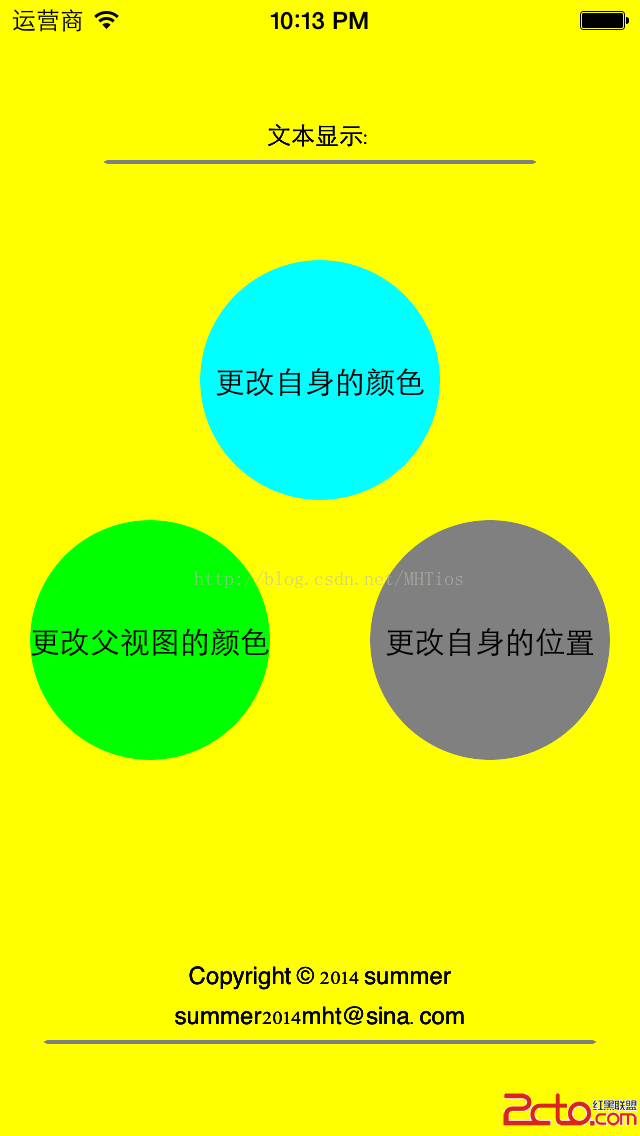
順帶一提,這裡還用到了一個便利的分類方法,用來生成隨機顏色:
+ (UIColor *)randomColor {
    return [self colorWithRed:arc4random() % 256 / 255.0 green:arc4random() % 256 / 255.0 blue:arc4random() % 256 / 255.0 alpha:1];
}
第一步:創建三個自訂視圖並綁定行為
在 MHTViewController 中創建三個 CustomView,分別綁定不同的事件與對應的 action 方法。
// MHTViewController.m
#import "MHTViewController.h"
#import "CustomView.h"
#import "UIColor+RandomColor.h"
#define kCyanView_Frame CGRectMake(100, 130, 120, 120)
#define kGreenView_Frame CGRectMake(15, 260, 120, 120)
#define kGrayView_Frame CGRectMake(185, 260, 120, 120)
@implementation MHTViewController
- (void)viewDidLoad {
    [super viewDidLoad];
    self.view.backgroundColor = [UIColor yellowColor];
    // view1
    CustomView *greenView = [[CustomView alloc] initWithFrame:kGreenView_Frame];
    greenView.backgroundColor = [UIColor greenColor];
    greenView.layer.cornerRadius = 60;
    [greenView addTarget:self action:@selector(changeSuperviewColor:) forControlEvents:UIControlEventTouchUpInside];
    greenView.layer.masksToBounds = YES;
    [self.view addSubview:greenView];
    [greenView release];
    // view2
    CustomView *cyanView = [[CustomView alloc] initWithFrame:kCyanView_Frame];
    cyanView.backgroundColor = [UIColor cyanColor];
    [self.view addSubview:cyanView];
    cyanView.layer.cornerRadius = 60;
    [cyanView addTarget:self action:@selector(changeSelfColor:) forControlEvents:UIControlEventTouchDown];
    cyanView.layer.masksToBounds = YES;
    [self.view addSubview:cyanView];
    [cyanView release];
    // view3
    CustomView *grayView = [[CustomView alloc] initWithFrame:kGrayView_Frame];
    grayView.backgroundColor = [UIColor grayColor];
    [self.view addSubview:grayView];
    [grayView addTarget:self action:@selector(changeSelfLocation:) forControlEvents:UIControlEventTouchUpInside];
    grayView.layer.cornerRadius = 60;
    grayView.layer.masksToBounds = YES;
    [self.view addSubview:grayView];
    [grayView release];
}
// 修改父視圖的顏色
- (void)changeSuperviewColor:(CustomView *)view {
    view.superview.backgroundColor = [UIColor randomColor];
}
// 修改自身的顏色
- (void)changeSelfColor:(CustomView *)view {
    view.backgroundColor = [UIColor randomColor];
}
// 修改自身的位置
- (void)changeSelfLocation:(CustomView *)view {
    view.center = CGPointMake(arc4random() % (260 - 60 + 1) + 60, arc4random() % (420 - 60 + 1) + 60);
}
@end
第二步:構建 Target-Action
自訂 CustomView,內部保存 target、action 與 controlEvents,並在觸摸事件中呼叫 target 的 action 方法。
// CustomView.h #import@interface CustomView : UIView - (void)addTarget:(id)target action:(SEL)action forControlEvents:(UIControlEvents)controlEvents; @end
// CustomView.m
#import "CustomView.h"
#import "UIColor+RandomColor.h"
@interface CustomView() {
    id _target;                     // 目標
    SEL _action;                    // 行為
    UIControlEvents _controlEvents; // 觸發時機
}
@end
@implementation CustomView
- (id)initWithFrame:(CGRect)frame {
    self = [super initWithFrame:frame];
    if (self) {
        // Initialization code
    }
    return self;
}
- (void)touchesBegan:(NSSet *)touches withEvent:(UIEvent *)event {
    if (UIControlEventTouchDown == _controlEvents) {
        // 當視圖接觸到觸摸事件後,交由target處理
        [_target performSelector:_action withObject:self];
    }
}
- (void)touchesEnded:(NSSet *)touches withEvent:(UIEvent *)event {
    if (UIControlEventTouchUpInside == _controlEvents) {
        [_target performSelector:_action withObject:self];
    }
}
// 為當前視圖指定:接收到事件後,由target通過action方法進行響應
- (void)addTarget:(id)target action:(SEL)action forControlEvents:(UIControlEvents)controlEvents {
    _target = target;
    _action = action;
    _controlEvents = controlEvents;
}
@end
透過這個模式,控件只負責偵測事件並觸發 action,具體的處理邏輯則交給 target 物件,兩者徹底解耦。這正是 UIKit 中 UIControl 家族背後的核心設計思想。