
iOS SplitViewController 實作教學:菜系列表與菜品詳情
編輯:iOS 開發綜合
SplitViewController 是 iPad 上非常經典的「主從」分割畫面設計,左側顯示列表、右側顯示對應內容。本文以一個菜系瀏覽 App 為例,完整示範 SplitViewController 的搭配用法,包含代理設計、資料傳遞與 WebView 詳情頁。
先看最終效果:
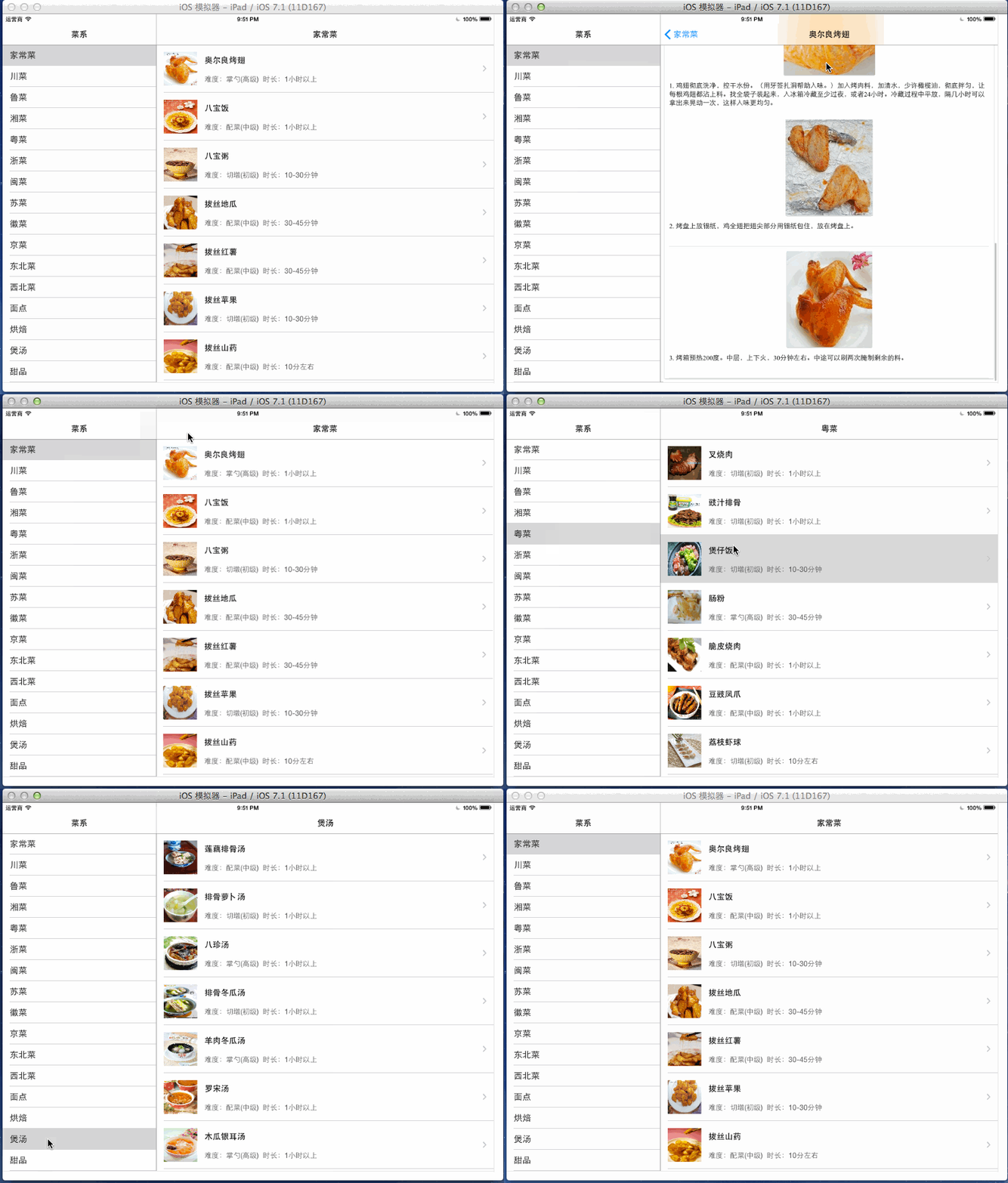
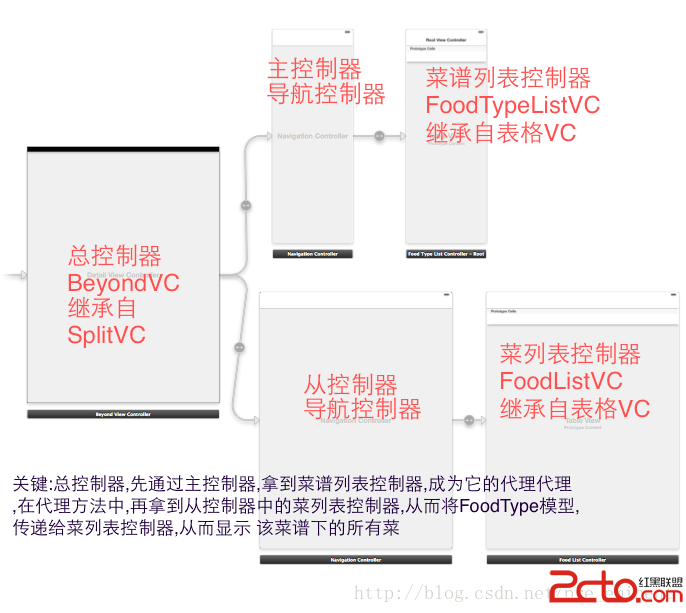
主控制器:BeyondViewController
繼承自 UISplitViewController,充當「中間人」:先取得左側的菜系列表控制器並成為其代理,收到某菜系被點擊後,再把該菜系傳遞給右側的菜品列表控制器。
// BeyondViewController.h
#import <UIKit/UIKit.h>
@interface BeyondViewController : UISplitViewController
@end
// BeyondViewController.m #import "BeyondViewController.h" #import "FoodTypeListController.h" #import "FoodListController.h" #import "FoodTypeListCtrlDelegate.h" @interface BeyondViewController ()@end @implementation BeyondViewController - (void)viewDidLoad { [super viewDidLoad]; // 1.先得到Master控制器,並成為它的代理 UINavigationController *foodTypeListNav = [self.childViewControllers firstObject]; FoodTypeListController *foodTypeListCtrl = [foodTypeListNav.childViewControllers firstObject]; foodTypeListCtrl.delegate = self; // 讓foodListCtrl監聽Master控制器的出現和隱藏 UINavigationController *foodListNav = [self.childViewControllers lastObject]; FoodListController *foodListCtrl = [foodListNav.childViewControllers firstObject]; self.delegate = foodListCtrl; } // 2.在代理方法中,把菜系傳遞給FoodListController - (void)foodTypeListController:(FoodTypeListController *)foodTypesVc didSelectedFoodType:(FoodType *)type { UINavigationController *foodListNavi = [self.childViewControllers lastObject]; FoodListController *foodListCtrl = [foodListNavi.childViewControllers firstObject]; foodListCtrl.foodType = type; [foodListNavi popToRootViewControllerAnimated:YES]; } @end
Master 主控制器:FoodTypeListController(菜系列表)
繼承自 UITableViewController,並定義代理,點擊某行時通知代理是哪個菜系。
// FoodTypeListController.h #import <UIKit/UIKit.h> @protocol FoodTypeListCtrlDelegate; @interface FoodTypeListController : UITableViewController @property (weak, nonatomic) iddelegate; @end
// FoodTypeListController.m
#import "FoodTypeListController.h"
#import "FoodType.h"
#import "FoodTypeListCtrlDelegate.h"
@interface FoodTypeListController ()
@property (strong, nonatomic) NSArray *foodTypesArr;
@end
@implementation FoodTypeListController
- (NSArray *)foodTypesArr {
    if (_foodTypesArr == nil) {
        _foodTypesArr = [FoodType objArrFromPlistName:@"food_types.plist"];
    }
    return _foodTypesArr;
}
- (void)viewDidLoad {
    [super viewDidLoad];
    self.title = @"菜系";
    [self.tableView selectRowAtIndexPath:kIndexPathZero animated:YES scrollPosition:UITableViewScrollPositionTop];
    [self tableView:self.tableView didSelectRowAtIndexPath:kIndexPathZero];
}
- (void)viewWillAppear:(BOOL)animated {
    // do nothing...
}
- (NSInteger)tableView:(UITableView *)tableView numberOfRowsInSection:(NSInteger)section {
    return self.foodTypesArr.count;
}
- (UITableViewCell *)tableView:(UITableView *)tableView cellForRowAtIndexPath:(NSIndexPath *)indexPath {
    static NSString *ID = @"FoodType";
    UITableViewCell *cell = [tableView dequeueReusableCellWithIdentifier:ID];
    if (cell == nil) {
        cell = [[UITableViewCell alloc] initWithStyle:UITableViewCellStyleDefault reuseIdentifier:ID];
    }
    FoodType *type = self.foodTypesArr[indexPath.row];
    cell.textLabel.text = type.name;
    return cell;
}
- (void)tableView:(UITableView *)tableView didSelectRowAtIndexPath:(NSIndexPath *)indexPath {
    if ([self.delegate respondsToSelector:@selector(foodTypeListController:didSelectedFoodType:)]) {
        FoodType *type = self.foodTypesArr[indexPath.row];
        [self.delegate foodTypeListController:self didSelectedFoodType:type];
    }
}
@end
定義好的協議
// FoodTypeListCtrlDelegate.h #import <Foundation/Foundation.h> @class FoodType; @protocol FoodTypeListCtrlDelegate@optional - (void)foodTypeListController:(FoodTypeListController *)ctrl didSelectedFoodType:(FoodType *)foodType; @end
從控制器:FoodListController(菜品列表)
展示某菜系下的所有菜品,並攔截 setter 方法以載入對應的 Plist 資料。
// FoodListController.m #import "FoodListController.h" #import "FoodDetailController.h" #import "Food.h" #import "FoodCell.h" #import "FoodType.h" @interface FoodListController ()@property (strong, nonatomic) NSArray *foodsArr; @end @implementation FoodListController - (void)setFoodType:(FoodType *)foodType { _foodType = foodType; NSString *filename = [NSString stringWithFormat:@"type_%@_foods.plist", foodType.idstr]; self.foodsArr = [Food objArrFromPlistName:filename]; self.title = foodType.name; if (self.isViewLoaded) { [self.tableView scrollToRowAtIndexPath:kIndexPathZero atScrollPosition:UITableViewScrollPositionTop animated:YES]; [self.tableView reloadData]; } } // 即將顯示 Master 主控制器 - (void)splitViewController:(UISplitViewController *)svc willShowViewController:(UIViewController *)aViewController invalidatingBarButtonItem:(UIBarButtonItem *)barButtonItem { self.navigationItem.leftBarButtonItem = nil; } // 即將隱藏 Master 主控制器 - (void)splitViewController:(UISplitViewController *)svc willHideViewController:(UIViewController *)aViewController withBarButtonItem:(UIBarButtonItem *)barButtonItem forPopoverController:(UIPopoverController *)pc { barButtonItem.title = @"菜系"; self.navigationItem.leftBarButtonItem = barButtonItem; } - (NSInteger)tableView:(UITableView *)tableView numberOfRowsInSection:(NSInteger)section { return self.foodsArr.count; } - (UITableViewCell *)tableView:(UITableView *)tableView cellForRowAtIndexPath:(NSIndexPath *)indexPath { FoodCell *cell = [FoodCell cellWithTableView:tableView]; cell.food = self.foodsArr[indexPath.row]; return cell; } - (CGFloat)tableView:(UITableView *)tableView heightForRowAtIndexPath:(NSIndexPath *)indexPath { return 100; } - (void)tableView:(UITableView *)tableView didSelectRowAtIndexPath:(NSIndexPath *)indexPath { Food *food = self.foodsArr[indexPath.row]; FoodDetailController *detailVc = [[FoodDetailController alloc] init]; detailVc.food = food; [self.navigationController pushViewController:detailVc animated:YES]; } @end
詳情頁:FoodDetailController
直接用 UIWebView 載入本地 HTML,展示某道菜的詳細資訊。
// FoodDetailController.m
#import "FoodDetailController.h"
#import "Food.h"
@interface FoodDetailController ()
@property (weak, nonatomic) UIWebView *webView;
@end
@implementation FoodDetailController
- (void)loadView {
    UIWebView *webView = [[UIWebView alloc] init];
    webView.frame = [UIScreen mainScreen].applicationFrame;
    webView.autoresizingMask = UIViewAutoresizingFlexibleWidth | UIViewAutoresizingFlexibleHeight;
    self.view = webView;
    self.webView = webView;
}
- (void)viewDidLoad {
    [super viewDidLoad];
    self.title = self.food.name;
    NSString *fileName = [NSString stringWithFormat:@"Html/food/%@.html", self.food.idstr];
    NSURLRequest *request = [NSURLRequest requestWithURL:[[NSBundle mainBundle] URLForResource:fileName withExtension:nil]];
    [self.webView loadRequest:request];
}
@end
模型與 Cell
資料模型 Food、FoodType 對應 Plist 中的字典,FoodCell 則封裝了 XIB 佈局,透過 SDWebImage 之類的元件非同步載入小圖示。
// Food.h
#import <Foundation/Foundation.h>
@interface Food : NSObject
@property (copy, nonatomic) NSString *idstr;     // id
@property (copy, nonatomic) NSString *name;      // 菜名
@property (copy, nonatomic) NSString *imageUrl;  // 小圖標url
@property (copy, nonatomic) NSString *url;       // 網頁的url
@property (copy, nonatomic) NSString *time;      // 耗時
@property (copy, nonatomic) NSString *diff;      // 難度
@end
// FoodType.h
#import <Foundation/Foundation.h>
@interface FoodType : NSObject
@property (copy, nonatomic) NSString *idstr;  // ID
@property (copy, nonatomic) NSString *name;   // 菜系名稱:如粵菜 川菜 家常菜
@end
// FoodCell.m
#import "FoodCell.h"
#import "Food.h"
#import "UIImageView+WebCache.h"
@interface FoodCell()
@property (weak, nonatomic) IBOutlet UIImageView *iconView;
@property (weak, nonatomic) IBOutlet UILabel *nameLabel;
@property (weak, nonatomic) IBOutlet UILabel *descLabel;
@end
@implementation FoodCell
+ (instancetype)cellWithTableView:(UITableView *)tableView {
    static NSString *cellID = @"FoodCell";
    FoodCell *cell = [tableView dequeueReusableCellWithIdentifier:cellID];
    if (cell == nil) {
        cell = [[[NSBundle mainBundle] loadNibNamed:cellID owner:nil options:nil] lastObject];
        cell.accessoryType = UITableViewCellAccessoryDisclosureIndicator;
    }
    return cell;
}
- (void)setFood:(Food *)food {
    _food = food;
    [self.iconView setImageWithURL:[NSURL URLWithString:food.imageUrl] placeholderImage:[UIImage imageNamed:@"timeline_image_placeholder"]];
    self.nameLabel.text = food.name;
    self.descLabel.text = [NSString stringWithFormat:@"難度:%@ 時長:%@", food.diff, food.time];
}
@end
XIB 佈局如下:
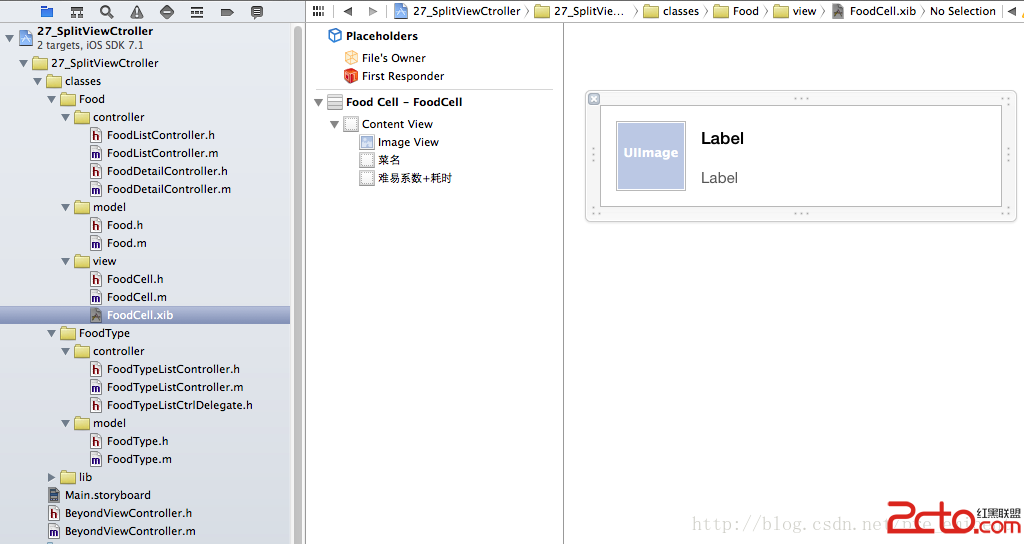
透過這樣的分工,SplitViewController 的左右兩側得以鬆耦合地協作,資料流經由代理與模型層層傳遞,結構清晰且易於擴充。
- 上一篇文章: 透視 iOS 應用程式的生命週期與狀態轉換
- 下一篇文章: iOS 圖展輪播實作:打造首頁廣告與頭條展示