
iOS 模仿微信聊天介面:自訂 Cell 與動態行高計算
編輯:iOS 開發綜合
即時通訊的聊天介面是許多 App 的核心。本文以模仿微信聊天為例,示範如何透過自訂 UITableViewCell、資料模型與 Frame 計算模型,實現左右氣泡、頭像與動態行高,讓對話列表既能效能優良又易於維護。
先看最終效果:
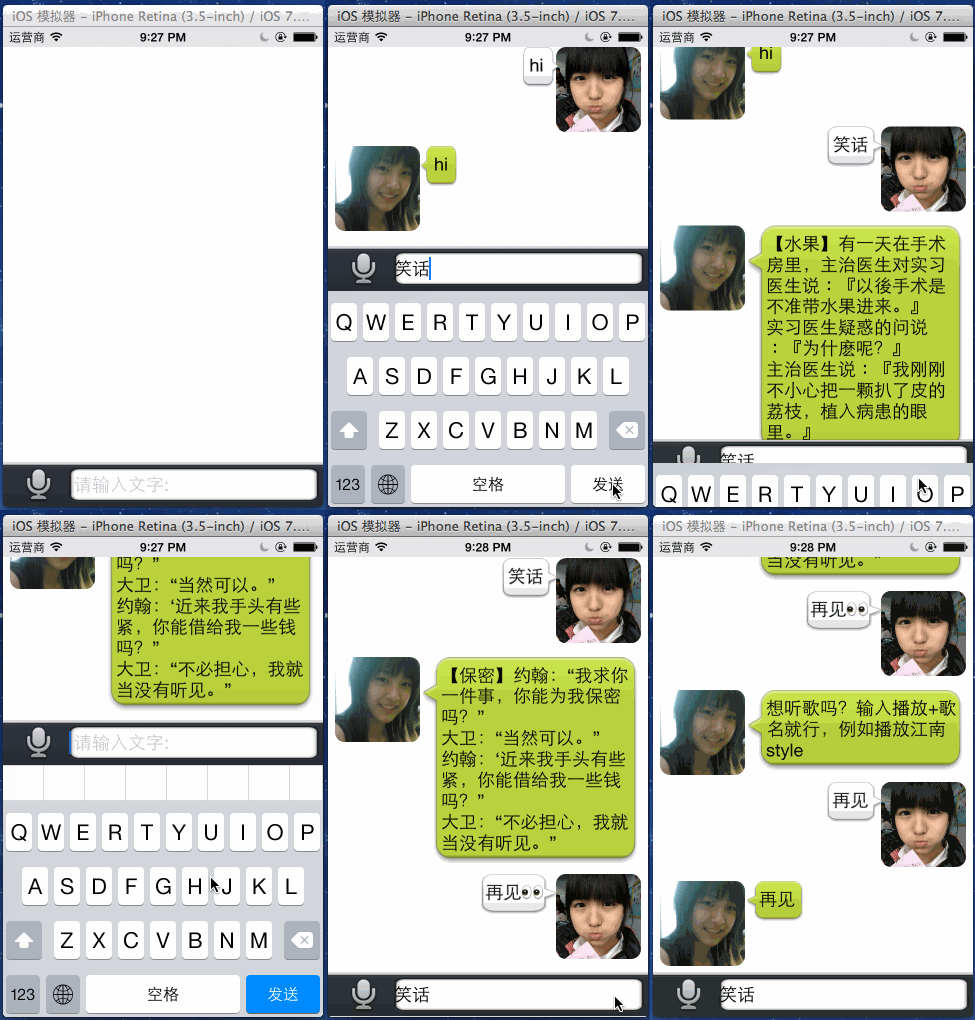
自訂 Cell:BeyondCell
設計思路是:初始化時一次建立所有子控件並加入 contentView,再由 cellWithCellFrame: 方法把 CellFrame(內含 Msg 資料)的 frame 與資料灌入各控件。
// BeyondCell.h
#import <UIKit/UIKit.h>
@class BeyondCellFrame;
@interface BeyondCell : UITableViewCell
// 返回xib界面上寫的重用cellID
+ (NSString *)cellID;
// 通過一個CellFrame模型對象,返回一個填充好數據的cell對象
- (BeyondCell *)cellWithCellFrame:(BeyondCellFrame *)cellFrame;
@end
// BeyondCell.m
#import "BeyondCell.h"
#import "BeyondCellFrame.h"
#import "Msg.h"

@interface BeyondCell() {
    UIImageView *_headImg;   // 1.頭像
    UILabel *_content;       // 2.正文內容
    UIImageView *_bgImg;     // 3.大圖片(氣泡背景)
}
@end
@implementation BeyondCell
+ (NSString *)cellID {
    return @"BeyondCell";
}
- (id)initWithStyle:(UITableViewCellStyle)style reuseIdentifier:(NSString *)reuseIdentifier {
    self = [super initWithStyle:style reuseIdentifier:reuseIdentifier];
    if (self) {
        self.selectionStyle = UITableViewCellSelectionStyleNone;
        self.backgroundColor = [UIColor clearColor];
        // 一次性建立所有子控件並加入contentView
        _headImg = [[UIImageView alloc] init];
        _headImg.layer.cornerRadius = 10;
        _headImg.layer.masksToBounds = YES;
        [self.contentView addSubview:_headImg];
        _bgImg = [[UIImageView alloc] init];
        [self.contentView addSubview:_bgImg];
        _content = [[UILabel alloc] init];
        _content.backgroundColor = [UIColor clearColor];
        _content.font = kContentFnt;
        _content.numberOfLines = 0;
        _content.lineBreakMode = NSLineBreakByWordWrapping;
        [_bgImg addSubview:_content];
    }
    return self;
}
- (BeyondCell *)cellWithCellFrame:(BeyondCellFrame *)cellFrame {
    Msg *msg = cellFrame.msg;
    // 頭像
    if ([msg.name isEqualToString:@"nana"]) {
        _headImg.image = [UIImage imageNamed:@"icon01.jpg"];
    } else {
        _headImg.image = [UIImage imageNamed:@"icon02.jpg"];
    }
    // 正文內容
    _content.text = msg.content;
    // 氣泡背景
    if ([msg.name isEqualToString:@"nana"]) {
        _bgImg.image = [UIImage imageStretchedWithName:@"chatfrom_bg_normal.png" xPos:0.5 yPos:0.6];
    } else {
        _bgImg.image = [UIImage imageStretchedWithName:@"chatto_bg_normal.png" xPos:0.5 yPos:0.6];
    }
    _headImg.frame = cellFrame.headImgFrame;
    _content.frame = cellFrame.contentFrame;
    _bgImg.frame = cellFrame.contentBgImgFrame;
    return self;
}
@end
資料模型:Msg
封裝單則訊息的資料源,並提供字典轉物件的便利建構子。
// Msg.h
#import <Foundation/Foundation.h>
#define kContentFnt [UIFont fontWithName:@"HelveticaNeue" size:18.0f]
@interface Msg : NSObject
@property (nonatomic, copy) NSString *headImg;      // 頭像圖片名
@property (nonatomic, copy) NSString *content;      // 消息內容
@property (nonatomic, copy) NSString *name;
@property (nonatomic, strong) NSString *recordFileFath;
+ (Msg *)msgWithDict:(NSDictionary *)dict;
- (Msg *)initWithDict:(NSDictionary *)dict;
+ (Msg *)msgWithName:(NSString *)name content:(NSString *)content recordFilePath:(NSString *)path;
@end
// Msg.m
#import "Msg.h"
@implementation Msg
+ (Msg *)msgWithDict:(NSDictionary *)dict {
    return [[self alloc] initWithDict:dict];
}
- (Msg *)initWithDict:(NSDictionary *)dict {
    if (self = [super init]) {
        for (NSString *key in dict) {
            [self setValue:dict[key] forKeyPath:key];
        }
    }
    return self;
}
+ (Msg *)msgWithName:(NSString *)name content:(NSString *)content recordFilePath:(NSString *)path {
    Msg *msg = [[self alloc] init];
    msg.name = name;
    msg.content = content;
    msg.recordFileFath = path;
    return msg;
}
@end
重點:根據資料計算 Frame
CellFrame 是整個方案的關鍵。它持有 Msg 物件,並在賦值時計算出頭像、氣泡、正文的所有 frame 以及行高(maxY)。
// BeyondCellFrame.h
#import <Foundation/Foundation.h>
@class Msg;
#define kMargin 7        // 控件與控件之間的外邊距
#define kHeadImgHW 85    // 頭像的高寬
@interface BeyondCellFrame : NSObject
@property (nonatomic, assign, readonly) CGFloat maxY;              // 行高
@property (nonatomic, strong) Msg *msg;                            // 資料模型
@property (nonatomic, assign, readonly) CGRect headImgFrame;       // 頭像frame
@property (nonatomic, assign, readonly) CGRect contentBgImgFrame;  // 氣泡背景frame
@property (nonatomic, assign, readonly) CGRect contentFrame;       // 正文frame
@end
// BeyondCellFrame.m
#import "BeyondCellFrame.h"
#import "Msg.h"
@implementation BeyondCellFrame
- (void)setMsg:(Msg *)msg {
    _msg = msg;
    if ([msg.name isEqualToString:@"nana"]) {
        [self standLeft:msg];
    } else {
        [self standRight:msg];
    }
}
// 靠右顯示
- (void)standRight:(Msg *)msg {
    CGFloat headImgX = 320 - kHeadImgHW - kMargin;
    CGFloat headImgY = 0;
    CGFloat headImgH = kHeadImgHW;
    CGFloat headImgW = kHeadImgHW;
    _headImgFrame = CGRectMake(headImgX, headImgY, headImgH, headImgW);
    CGFloat bgW = 320 - kHeadImgHW - kMargin;
    CGFloat bgX = 320 - bgW - kHeadImgHW - kMargin;
    CGFloat bgY = 0;
    CGFloat bgH = 300;
    _contentBgImgFrame = CGRectMake(bgX, bgY, bgW, bgH);
    CGFloat contentX = kMargin * 1.5;
    CGFloat contentY = kMargin;
    CGFloat contentW = bgW - contentX - kMargin;
    CGFloat contentH = 0;
    CGSize oneLineSize = [msg.content sizeWithAttributes:[NSDictionary dictionaryWithObjectsAndKeys:kContentFnt, NSFontAttributeName, nil]];
    CGFloat oneLineW = oneLineSize.width;
    if (oneLineW < contentW) { // 不夠一行
        CGFloat oneLineH = oneLineSize.height;
        contentX = kMargin * 1.2;
        _contentFrame = CGRectMake(contentX, contentY, oneLineW, oneLineH);
        contentH = oneLineH;
        contentW = oneLineW;
        CGRect frame = _contentBgImgFrame;
        frame.size.width = contentW + kMargin * 3.5;
        frame.size.height = contentH + kMargin * 3;
        frame.origin.x = 320 - contentW - headImgW - kMargin * 4;
        _contentBgImgFrame = frame;
    } else { // 超過一行
        CGRect tmpRect = [msg.content boundingRectWithSize:CGSizeMake(contentW, MAXFLOAT) options:NSStringDrawingUsesLineFragmentOrigin attributes:[NSDictionary dictionaryWithObjectsAndKeys:kContentFnt, NSFontAttributeName, nil] context:nil];
        contentH = tmpRect.size.height;
        _contentFrame = CGRectMake(contentX, contentY, contentW, contentH);
        CGRect frame = _contentBgImgFrame;
        frame.size.height = contentH + kMargin * 3;
        _contentBgImgFrame = frame;
    }
    if (headImgH > _contentBgImgFrame.size.height) {
        _maxY = CGRectGetMaxY(_headImgFrame) + kMargin;
    } else {
        _maxY = CGRectGetMaxY(_contentBgImgFrame) + kMargin;
    }
}
// 靠左顯示
- (void)standLeft:(Msg *)msg {
    CGFloat headImgX = kMargin;
    CGFloat headImgY = kMargin;
    CGFloat headImgH = kHeadImgHW;
    CGFloat headImgW = kHeadImgHW;
    _headImgFrame = CGRectMake(headImgX, headImgY, headImgH, headImgW);
    CGFloat bgX = _headImgFrame.size.width + kMargin;
    CGFloat bgY = _headImgFrame.origin.y;
    CGFloat bgW = 320 - bgX - kMargin;
    CGFloat bgH = 300;
    _contentBgImgFrame = CGRectMake(bgX, bgY, bgW, bgH);
    CGFloat contentX = kMargin * 3;
    CGFloat contentY = kMargin;
    CGFloat contentW = bgW - contentX - kMargin;
    CGFloat contentH = 0;
    CGSize oneLineSize = [msg.content sizeWithAttributes:[NSDictionary dictionaryWithObjectsAndKeys:kContentFnt, NSFontAttributeName, nil]];
    CGFloat oneLineW = oneLineSize.width;
    if (oneLineW < contentW) {
        CGFloat oneLineH = oneLineSize.height;
        contentX = kMargin * 2;
        _contentFrame = CGRectMake(contentX, contentY, oneLineW, oneLineH);
        contentH = oneLineH;
        contentW = oneLineW;
        CGRect frame = _contentBgImgFrame;
        frame.size.width = contentW + kMargin * 3.5;
        frame.size.height = contentH + kMargin * 3;
        _contentBgImgFrame = frame;
    } else {
        CGRect tmpRect = [msg.content boundingRectWithSize:CGSizeMake(contentW, MAXFLOAT) options:NSStringDrawingUsesLineFragmentOrigin attributes:[NSDictionary dictionaryWithObjectsAndKeys:kContentFnt, NSFontAttributeName, nil] context:nil];
        contentH = tmpRect.size.height;
        _contentFrame = CGRectMake(contentX, contentY, contentW, contentH);
        CGRect frame = _contentBgImgFrame;
        frame.size.height = contentH + kMargin * 3;
        _contentBgImgFrame = frame;
    }
    if (headImgH > _contentBgImgFrame.size.height) {
        _maxY = CGRectGetMaxY(_headImgFrame) + kMargin;
    } else {
        _maxY = CGRectGetMaxY(_contentBgImgFrame) + kMargin;
    }
}
@end
控制器:BeyondViewController
控制器負責從資料模型陣列取出對應的 CellFrame,並在 textFieldShouldReturn 中產生新訊息、刷新列表。
// BeyondViewController.m
#import "BeyondViewController.h"
#import "Msg.h"
#import "BeyondCellFrame.h"
#import "BeyondCell.h"
@interface BeyondViewController () {
    NSMutableArray *_msgFrames;
}
@end
@implementation BeyondViewController
- (void)viewDidLoad {
    [super viewDidLoad];
    _msgFrames = [NSMutableArray array];
}
#pragma mark - UITextField代理,發送請求
- (BOOL)textFieldShouldReturn:(UITextField *)textField {
    if (textField.text.length == 0) {
        return NO;
    }
    BeyondCellFrame *frame = [[BeyondCellFrame alloc] init];
    frame.msg = [Msg msgWithName:@"jackey" content:textField.text recordFilePath:@"NoRecord"];
    [_msgFrames addObject:frame];
    [self.tableView reloadData];
    return YES;
}
#pragma mark - UITableView代理方法
- (NSInteger)tableView:(UITableView *)tableView numberOfRowsInSection:(NSInteger)section {
    tableView.separatorStyle = UITableViewCellSeparatorStyleNone;
    return _msgFrames.count;
}
- (UITableViewCell *)tableView:(UITableView *)tableView cellForRowAtIndexPath:(NSIndexPath *)indexPath {
    BeyondCell *cell = [tableView dequeueReusableCellWithIdentifier:[BeyondCell cellID]];
    if (cell == nil) {
        cell = [[BeyondCell alloc] initWithStyle:UITableViewCellStyleDefault reuseIdentifier:[BeyondCell cellID]];
    }
    BeyondCellFrame *frame = [_msgFrames objectAtIndex:indexPath.row];
    cell = [cell cellWithCellFrame:frame];
    return cell;
}
- (CGFloat)tableView:(UITableView *)tableView heightForRowAtIndexPath:(NSIndexPath *)indexPath {
    BeyondCellFrame *frame = [_msgFrames objectAtIndex:indexPath.row];
    return frame.maxY;
}
- (void)exitKeyboard {
    [UIView animateWithDuration:0.2 animations:^{
        self.view.frame = CGRectMake(0, 0, self.view.frame.size.width, [[UIScreen mainScreen] bounds].size.height);
    } completion:^(BOOL finished){}];
    [_chatInput resignFirstResponder];
}
- (void)scrollToLastCell {
    if (_msgFrames.count > 1) {
        [self.chatTableView scrollToRowAtIndexPath:[NSIndexPath indexPathForRow:_msgFrames.count-1 inSection:0] atScrollPosition:UITableViewScrollPositionBottom animated:YES];
    }
}
@end
透過這種「資料模型 → Frame 模型 → Cell」三層架構,聊天列表的佈局邏輯被完整抽離,控制器變得輕薄,效能與可維護性都獲得兼顧。