
iOS 進階技巧:用 UICollectionView 實作瀑布流版面
UICollectionView 在 2012 年就被提出,如今已不算新技術,但作為自訂版面的基礎,仍值得完整走一遍。
先理解三個角色
UICollectionView:集合視圖。它與 UITableView 類似,同樣採用 datasource 與 delegate 的設計模式——datasource 提供資料、告訴 view 要顯示什麼;delegate 負責樣式細節與使用者互動的回應。
UICollectionViewLayout:佈局物件。集合視圖的 Cell 佈局比表格視圖複雜得多,因此蘋果特別抽出一個類別來描述集合視圖的佈局與行為。它是抽象基底類,使用時必須建立其子類。
UICollectionViewFlowLayout:最常用的子類(由 Apple 提供)。Flow Layout 本質上是一個「直線對齊」的佈局,一般的瀑布流樣式(如優酷客戶端那類)用它就能勝任。除此之外,UICollectionViewLayout 也有其他有趣的子類,例如堆疊佈局、圓形佈局、Cover Flow 佈局等。
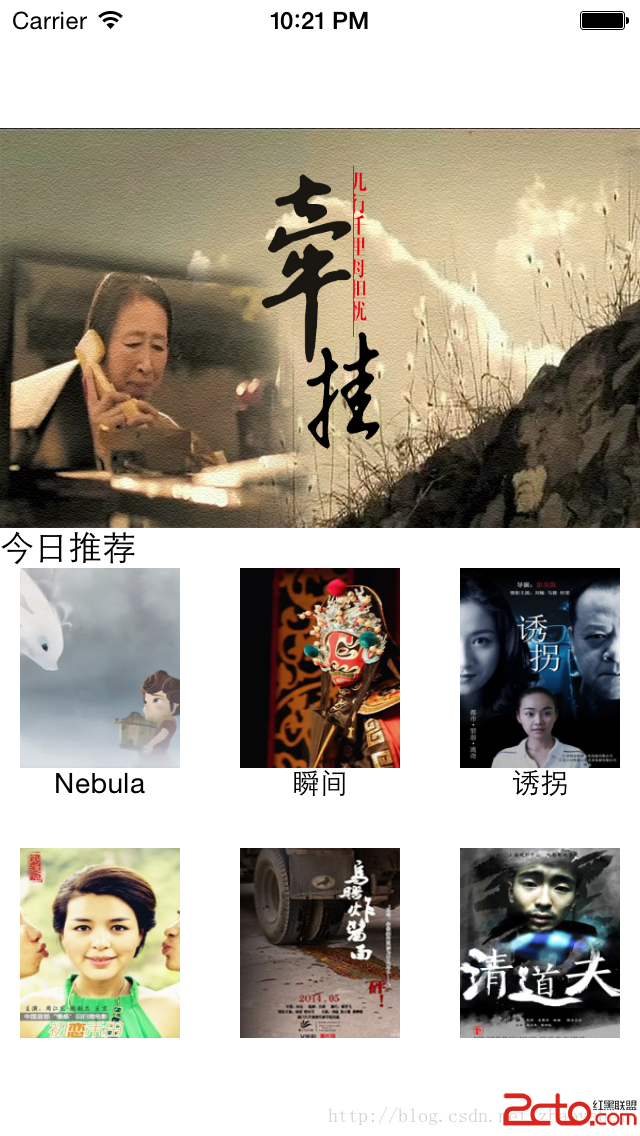
本文用 Flow Layout 實作一個影片播放器的版面。資料解析部分可以忽略或替換成自己的圖片,重點在於佈局如何成形。
環境:Xcode 6、ARC、純程式碼(不使用 Storyboard)。
viewDidLoad:註冊要用的類別
// 註冊 header 視圖
[_collectionView registerClass:[HeadView class]
    forSupplementaryViewOfKind:UICollectionElementKindSectionHeader
           withReuseIdentifier:@"header"];

// 具備橫向捲動能力的 item
[_collectionView registerClass:[ScrollCollectionViewCell class]
         forCellWithReuseIdentifier:@"scrollCell"];

// 單張圖片的 item
[_collectionView registerClass:[CustomCollectionViewCell class]
         forCellWithReuseIdentifier:@"cell"];
主要委派與資料來源方法
#pragma mark - 集合視圖

// 每個分區的 item 數量
- (NSInteger)collectionView:(UICollectionView *)collectionView
     numberOfItemsInSection:(NSInteger)section {
    if (section == 0) {
        return 1;
    }
    NSString *category = [_allCategory objectAtIndex:section];
    if ([_allVideoDic objectForKey:category]) {
        return [[_allVideoDic objectForKey:category] count];
    }
    return 0;
}

// 產生 item
- (UICollectionViewCell *)collectionView:(UICollectionView *)collectionView
                  cellForItemAtIndexPath:(NSIndexPath *)indexPath {
    // 第一個分區只有一個 item,且樣式與其他分區不同
    if (indexPath.section == 0) {
        ScrollCollectionViewCell *scrollCell =
            [collectionView dequeueReusableCellWithReuseIdentifier:@"scrollCell"
                                                     forIndexPath:indexPath];
        [scrollCell initWithArray:[_allVideoDic objectForKey:@"ad"]];
        return scrollCell;
    } else {
        CustomCollectionViewCell *cell =
            [collectionView dequeueReusableCellWithReuseIdentifier:@"cell"
                                                     forIndexPath:indexPath];
        VideoModel *video = [[_allVideoDic objectForKey:[_allCategory objectAtIndex:indexPath.section]]
                              objectAtIndex:indexPath.row];
        [cell initDataWith:video];
        return cell;
    }
    return nil;
}

// 每個 item 的尺寸
- (CGSize)collectionView:(UICollectionView *)collectionView
                  layout:(UICollectionViewLayout *)collectionViewLayout
  sizeForItemAtIndexPath:(NSIndexPath *)indexPath {
    if (indexPath.row == 0 && indexPath.section == 0) {
        return CGSizeMake(Width, 200);
    }
    return CGSizeMake(80, 130);
}

// 分區數量
- (NSInteger)numberOfSectionsInCollectionView:(UICollectionView *)collectionView {
    return [_allCategory count];
}

// header 的尺寸
- (CGSize)collectionView:(UICollectionView *)collectionView
                  layout:(UICollectionViewLayout *)collectionViewLayout
referenceSizeForHeaderInSection:(NSInteger)section {
    if (section == 0) {
        return CGSizeMake(Width, 0);
    }
    return CGSizeMake(Width, 20);
}

// 每個分區的 header
- (UICollectionReusableView *)collectionView:(UICollectionView *)collectionView
          viewForSupplementaryElementOfKind:(NSString *)kind
                        atIndexPath:(NSIndexPath *)indexPath {
    if (indexPath.section != 0 &&
        [kind isEqualToString:UICollectionElementKindSectionHeader]) {
        static NSString *reuseIdentifier = @"header";
        HeadView *view = [collectionView dequeueReusableSupplementaryViewOfKind:kind
                                                          withReuseIdentifier:reuseIdentifier
                                                                 forIndexPath:indexPath];
        NSString *title;
        switch (indexPath.section) {
            case 1: title = @"今日推薦"; break;
            case 2: title = @"國內微影"; break;
            case 3: title = @"國際微影"; break;
            default: break;
        }
        view.title = title;
        return view;
    }
    return nil;
}
效果圖:
如果要真正的瀑布流
上面這個版面之所以用 Flow Layout 就能完成,是因為每個 item 的尺寸是固定的。真正的瀑布流(各 item 高度不一、短的往空隙填)則必須自訂 UICollectionViewLayout 子類,核心實作是覆寫 prepareLayout 與 layoutAttributesForElementsInRect:,並自行維護「每一欄目前的高度」來決定下一個 item 放哪。
自訂佈局時有個關鍵建議:把計算出來的 layout attributes 快取起來,只在 invalidateLayoutWithContext: 或資料變動時重算。因為 layoutAttributesForElementsInRect: 會在捲動過程中被高頻呼叫,每次重算高度會嚴重影響流暢度。
- 上一篇文章: iOS APNS 遠端推送的四個關鍵回呼函式詳解
- 下一篇文章: iOS 開發之 FMDB:SQLite 資料庫操作完整指南