
iOS Core Data:儲存自訂物件(Save Custom NSObject)
編輯:iOS 開發綜合
思路:把 NSObject 轉化成 NSData,再把 NSData 存進 Core Data 中。
新增資料
AppDelegate *appDelegate = [[UIApplication sharedApplication] delegate];
NSManagedObjectContext *context = [appDelegate managedObjectContext];

NSManagedObject *newContact;
newContact = [NSEntityDescription insertNewObjectForEntityForName:@"Contact" inManagedObjectContext:context];

Person *person = [[Person alloc] init];
person.name = @"Xiaoming";
person.number = @"1008610086";

Birthday *birthday = [[Birthday alloc] init];
birthday.year = @"2000";
birthday.month = @"January";
birthday.day = @"1st";
person.birthday = birthday;

NSData *data = [NSKeyedArchiver archivedDataWithRootObject:person];
[newContact setValue:data forKey:@"person"];

NSError *error;
[context save:&error];
取得資料
AppDelegate *appDelegate = [[UIApplication sharedApplication] delegate];
NSFetchRequest *request = [[NSFetchRequest alloc] init];
NSManagedObjectContext *context = [appDelegate managedObjectContext];

NSEntityDescription *entityDesc = [NSEntityDescription entityForName:@"Contact" inManagedObjectContext:context];
[request setEntity:entityDesc];

NSManagedObject *matches = nil;
NSError *error;
NSArray *objects = [context executeFetchRequest:request error:&error];

if ([objects count] == 0) {
    NSLog(@"No matches");
} else {
    for (int i = 0; i < [objects count]; i++) {
        matches = objects[i];
        NSData *data = [matches valueForKey:@"person"];
        Person *person = [NSKeyedUnarchiver unarchiveObjectWithData:data];
        NSLog(@"My name is %@. I was born on %@ %@, %@. My phone number is %@",
            person.name, person.birthday.month, person.birthday.day, person.birthday.year, person.number);
    }
}
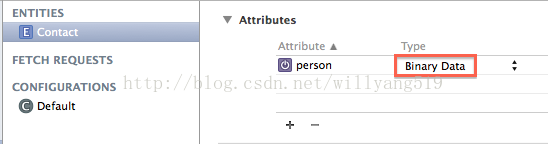
在 Model 檔案中,要把 person 的型別設為 Binary Data:
Person 與 Birthday 兩個自訂 NSObject
這兩個自訂的 NSObject 都需要採用 NSCoding 協定,實作 initWithCoder: 與 encodeWithCoder: 兩個方法。
Person.h
#import <Foundation/Foundation.h>
#import "Birthday.h"

@interface Person : NSObject<NSCoding>
@property (strong, nonatomic) NSString *name;
@property (strong, nonatomic) NSString *number;
@property (strong, nonatomic) Birthday *birthday;
- (id)init;
@end
Person.m
#import "Person.h"

@implementation Person
- (id)init{
    self.name = nil;
    self.number = nil;
    return self;
}
- (id)initWithCoder:(NSCoder *)decoder{
    if (self = [super init]){
        self.name = [decoder decodeObjectForKey:@"name"];
        self.number = [decoder decodeObjectForKey:@"number"];
        self.birthday = [decoder decodeObjectForKey:@"birthday"];
    }
    return self;
}
- (void)encodeWithCoder:(NSCoder *)encoder{
    [encoder encodeObject:self.name forKey:@"name"];
    [encoder encodeObject:self.number forKey:@"number"];
    [encoder encodeObject:self.birthday forKey:@"birthday"];
}
@end
Birthday.h
#import <Foundation/Foundation.h>

@interface Birthday : NSObject<NSCoding>
@property (strong, nonatomic) NSString *year;
@property (strong, nonatomic) NSString *month;
@property (strong, nonatomic) NSString *day;
- (id)init;
@end
Birthday.m
#import "Birthday.h"

@implementation Birthday
- (id)init{
    self.year = nil;
    self.month = nil;
    self.day = nil;
    return self;
}
- (id)initWithCoder:(NSCoder *)decoder{
    if (self = [super init]){
        self.year = [decoder decodeObjectForKey:@"year"];
        self.month = [decoder decodeObjectForKey:@"month"];
        self.day = [decoder decodeObjectForKey:@"day"];
    }
    return self;
}
- (void)encodeWithCoder:(NSCoder *)encoder{
    [encoder encodeObject:self.year forKey:@"year"];
    [encoder encodeObject:self.month forKey:@"month"];
    [encoder encodeObject:self.day forKey:@"day"];
}
@end
要注意的是,encodeWithCoder: 中編碼的 key 必須和 initWithCoder: 中解碼的 key 完全一致,否則還原出來的物件屬性會是 nil。另外,這種做法雖然方便,但把整包物件塞成一個 Binary Data 後就無法用 Core Data 對內部欄位做條件查詢了;若需要查詢 person 的 name,還是該把它拆成獨立的 attribute。
- 上一篇文章: iOS 常用設計模式——觀察者模式(iOS 開發)
- 下一篇文章: iOS 常用設計模式——單例模式(iOS 開發)