
iOS 總結:UIButton 圖文混排的第二種做法
編輯:iOS 開發綜合
很久沒寫部落格了。之前寫過一篇關於 UIButton 圖文混排的,但有點複雜,這次來個比較簡單的版本,相信大家都會用得上。
最基礎的做法就是同時設定 title 與 image,再這是加上邊框:
UIButton *button=[[UIButton alloc] initWithFrame:CGRectMake(60, 90, 100, 40)];

//加文字
[button setTitle:@"描述文字" forState:UIControlStateNormal];
[button setTitleColor:[UIColor redColor] forState:UIControlStateNormal];

//加圖片
[button setImage:[UIImage imageNamed:@"pulldown"] forState:UIControlStateNormal];

//加邊框
button.layer.borderColor=[UIColor redColor].CGColor;
button.layer.borderWidth=0.5;
這就是不改變位置的情況下混排的效果,依各自需求,大家一定會想調整它們的位置:
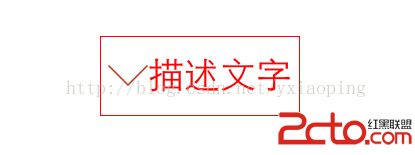
此時可以利用 titleEdgeInsets 與 imageEdgeInsets 來微調:
// 讓圖片往右移動一個圖片寬度
button.titleEdgeInsets = UIEdgeInsetsMake(0,
    -button.imageView.frame.size.width,
    0, button.imageView.frame.size.width);

// 讓文字往左移動一個文字寬度減 5
button.imageEdgeInsets = UIEdgeInsetsMake(0,
    button.titleLabel.frame.size.width - 5,
    0, 0);
說明:EdgeInsets 的值是相對位移,具體效果建議大家實際跑一下程式碼來體會。
最後別忘了把 button 加上去:
[self.view addSubview:button];
- 上一篇文章: iOS 開發手記:iOS 8 定位服務的相容處理
- 下一篇文章: iOS 上的應用如何相容 32 位與 64 位系統