
iOS 開發學習:提醒處理(二)動作表單的實作
編輯:iOS 開發綜合
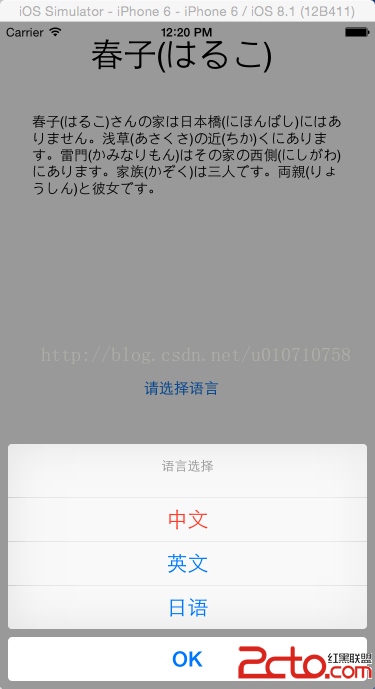
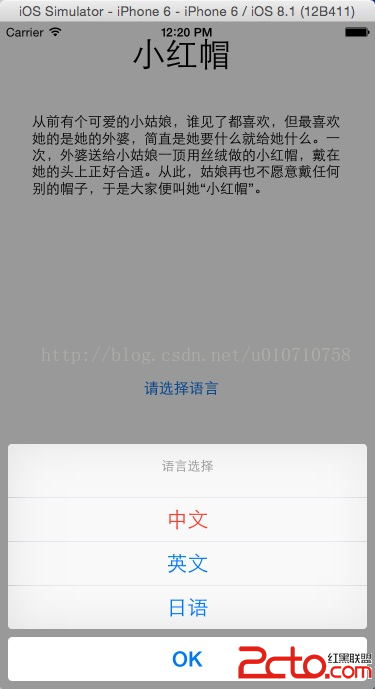
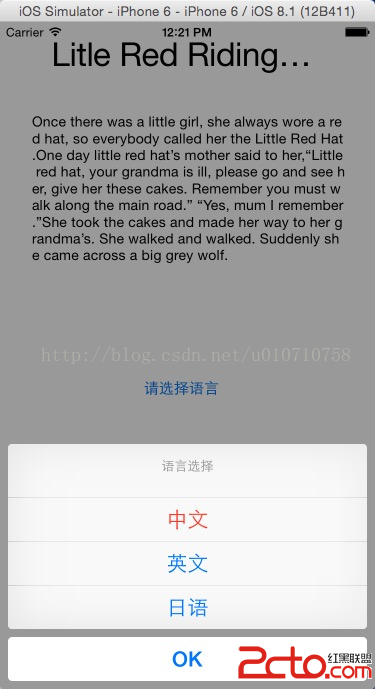
動作表單(Action Sheet)適合呈現多個並列選項。這裡透過 UIActionSheetDelegate 協定中的 actionSheet:clickedButtonAtIndex: 方法來接收使用者選擇,語法形式如下:
- (void)actionSheet:(UIActionSheet *)actionSheet
    clickedButtonAtIndex:(NSInteger)buttonIndex;
其中 (UIActionSheet *)actionSheet 用來指定是哪一個動作表單,(NSInteger)buttonIndex 則是被點擊按鈕的索引。
核心程式碼
ViewController.h
#import <UIKit/UIKit.h>

@interface ViewController : UIViewController <UIActionSheetDelegate> {
    IBOutlet UITextView *tv;
    IBOutlet UILabel *l;
}

- (IBAction)aa:(id)sender;

@end
ViewController.m
- (IBAction)aa:(id)sender {
    UIActionSheet *ac = [[UIActionSheet alloc] initWithTitle:@"語言選擇"
                                                   delegate:self
                                          cancelButtonTitle:@"OK"
                                     destructiveButtonTitle:@"中文"
                                          otherButtonTitles:@"英文", @"日語", nil];
    [ac showInView:self.view];
}

- (void)actionSheet:(UIActionSheet *)actionSheet
    clickedButtonAtIndex:(NSInteger)buttonIndex {
    NSString *t = [actionSheet buttonTitleAtIndex:buttonIndex];

    if ([t isEqualToString:@"中文"]) {
        tv.text = @"從前有個可愛的小姑娘,誰見了都喜歡,但最喜歡她的是她的外婆,簡直是她要什麼就給她什麼。一次,外婆送給小姑娘一頂用絲絨做的小紅帽,戴在她的頭上正好合適。從此,姑娘再也不願意戴任何別的帽子,於是大家便叫她「小紅帽」。";
        l.text = @"小紅帽";
    } else if ([t isEqualToString:@"英文"]) {
        tv.text = @"Once there was a little girl, she always wore a red hat, so everybody called her the Little Red Hat. One day little red hat's mother said to her, \"Little red hat, your grandma is ill, please go and see her, give her these cakes. Remember you must walk along the main road.\"";
        l.text = @"Little Red Riding Hood";
    } else if ([t isEqualToString:@"日語"]) {
        tv.text = @"春子さんの家は日本橋にはありません。浅草の近くにあります。雷門はその家の西側にあります。家族は三人です。両親と彼女です。";
        l.text = @"春子";
    }
}
幾個實作要點
我用 buttonTitleAtIndex: 反問表單要出被點的是哪一按鈕,再用文字比對決定分支。這種寫法直觀,但若按鈕文字日後被修改就會失效。比較穩健的做法是直接比對 buttonIndex,並用 NS_ENUM 為每個索引取有意義的名稱。
另外要注意 destructiveButtonTitle 與 cancelButtonTitle 的位置:destructive 按鈕會以紅字顯示在上方,cancel 則永遠在最底部並獨立隔開。這裡把「中文」設為 destructive 只是為了示範外觀差異,實際專案中破壞性操作才該用它。
最後別忘了,在沒有 ARC 的環境下 UIActionSheet 建立後需要 release;而在 iOS 8 之後,UIActionSheet 已被 UIAlertController 搭配 UIAlertControllerStyleActionSheet 取代,新專案建議直接採用後者。
- 上一篇文章: iOS:用 runtime 擴充 NSObject,讓字典直接灌進模型
- 下一篇文章: iOS:解決鍵盤遮住 UITextView 的問題