
iOS:集成 Game Center 排行榜(Leaderboard)全流程
Game Center 的排行榜功能本身不難,但步驟分散在 iTunes Connect、Xcode 設定與程式碼三處,隔一陣子不做就會忘記順序。這裡把整個流程完整走一遍,並附上一個具備離線重試機制的 PlayerModel 實作。
一、在 iTunes Connect 建立 App 並啟用 Game Center
建立 App 後(不需要提交版本),進入該 App 的 Game Center 分頁。
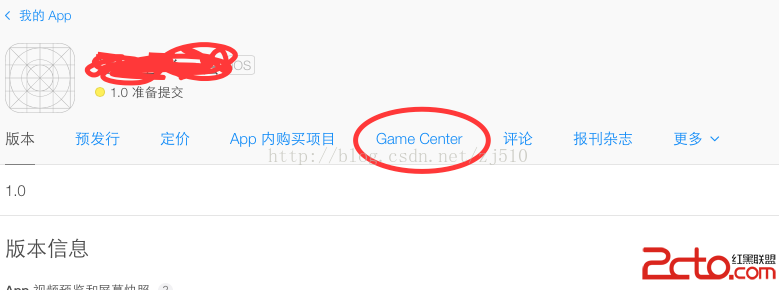
點進去後可以新增 Leaderboard、Achievement 等項目。介面本身有充分提示,唯一要特別注意的是 Leaderboard ID 必須唯一,這個 ID 稍後會在程式碼中用到。
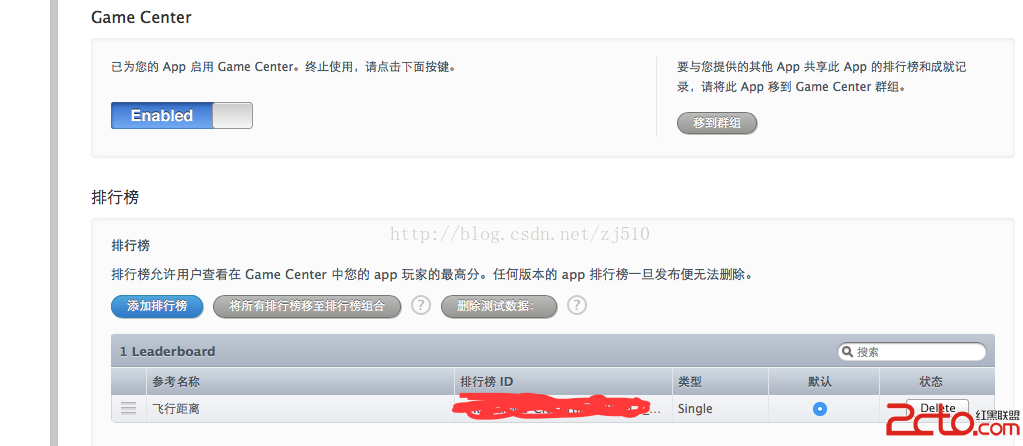
設定完成後,Game Center 即算啟用。
二、在 Xcode 中開啟 Game Center 能力
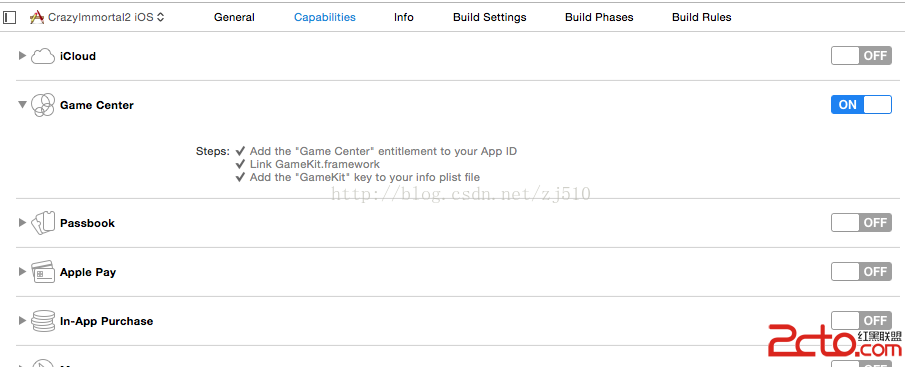
在專案設定的 Capabilities 中打開 Game Center,Xcode 會自動加入 GameKit.framework。同時請確認 Leaderboard ID 以常數形式定義在程式碼中:
// 與 iTunes Connect 設定的排行榜 ID 一致
static NSString *const LEADERBOARD_DISTANCE = @"你的排行榜ID";
三、驗證使用者身分
double ver = [[UIDevice currentDevice].systemVersion doubleValue];

if (ver < 6.0) {
    [[GKLocalPlayer localPlayer] authenticateWithCompletionHandler:^(NSError *error) { }];
} else {
    [[GKLocalPlayer localPlayer] setAuthenticateHandler:^(UIViewController *viewController, NSError *error) {
        // 需要顯示登入畫面時,系統會透過 viewController 傳回
    }];
}

// 監聽登入狀態變化
NSNotificationCenter *nc = [NSNotificationCenter defaultCenter];
[nc addObserver:self
       selector:@selector(authenticationChanged)
           name:GKPlayerAuthenticationDidChangeNotificationName
         object:nil];
由於註冊了觀察者,必須提供對應的回呼:
- (void)authenticationChanged {
    if ([GKLocalPlayer localPlayer].isAuthenticated) {
        NSLog(@"authenticationChanged, authenticated");
        [self updatePlayer];
    } else {
        NSLog(@"authenticationChanged, Not authenticated");
    }
}
使用者未登入時會走 else 分支,已登入則走 if 分支。
四、建立 PlayerModel 並載入待傳分數
@property (readwrite, retain) PlayerModel *player;
- (void)updatePlayer {
    if (!self.player ||
        ![self.player.currentPlayerID isEqualToString:[GKLocalPlayer localPlayer].playerID]) {
        [self.player release];
        self.player = [[PlayerModel alloc] init];
    }
    [[self player] loadStoredScores];
}
updatePlayer 是關鍵:它支援多使用者切換。若是第一次登入,就建立一個物件;若換了帳號,則釋放舊物件重新建立,然後呼叫 loadStoredScores。
loadStoredScores 會從本地檔案讀出先前傳送失敗的分數並重試上傳——這是為了對抗網路不穩(在部分地區尤其明顯)而設計的保護機制。
五、即時上傳分數
- (void)storeScore:(NSNumber *)distance {
    if (!self.player) return;

    int64_t score64 = [distance longLongValue];
    GKScore *submitScore = [[GKScore alloc] initWithCategory:LEADERBOARD_DISTANCE];
    [submitScore setValue:score64];
    [self.player submitScore:submitScore];
    [submitScore release];
}
有了這個方法,在遊戲結束或任何適當時機呼叫即可。
六、PlayerModel 的離線重試機制
核心邏輯是:先嘗試上傳,成功則順手重送之前失敗的;失敗則把分數寫入本地檔案,等下次連線再試。
- (void)submitScore:(GKScore *)score {
    if ([GKLocalPlayer localPlayer].authenticated) {
        if (!score.value) return;   // 資料無效,不上傳

        [score reportScoreWithCompletionHandler:^(NSError *error) {
            if (!error || (![error code] && ![error domain])) {
                [self resubmitStoredScores];   // 成功,順便重送舊的
            } else {
                [self storeScore:score];       // 失敗,存起來等下次
            }
        }];
    }
}
七、顯示排行榜
- (void)showGameCenter {
    if (gameCenterAuthenticationComplete) {
        GKLeaderboardViewController *vc = [[GKLeaderboardViewController alloc] init];
        [vc setCategory:LEADERBOARD_DISTANCE];
        [vc setLeaderboardDelegate:_viewController];
        [self.viewController presentModalViewController:vc animated:YES];
        [vc release];
    }
}
附:完整 PlayerModel 程式碼
// PlayerModel.h
#import <Foundation/Foundation.h>
#import <GameKit/GameKit.h>

@interface PlayerModel : NSObject {
    NSLock *writeLock;
}

@property (readonly, nonatomic) NSString *currentPlayerID;
@property (readonly, nonatomic) NSString *storedScoresFilename;
@property (readonly, nonatomic) NSMutableArray *storedScores;

- (void)storeScore:(GKScore *)score;
- (void)resubmitStoredScores;
- (void)writeStoredScore;
- (void)loadStoredScores;
- (void)submitScore:(GKScore *)score;

@end
// PlayerModel.m
#import "PlayerModel.h"

@implementation PlayerModel

@synthesize storedScores, currentPlayerID, storedScoresFilename;

- (id)init {
    self = [super init];
    if (self) {
        currentPlayerID = [[NSString stringWithFormat:@"%@", [GKLocalPlayer localPlayer].playerID] retain];

        NSString *path = [NSSearchPathForDirectoriesInDomains(NSDocumentDirectory, NSUserDomainMask, YES) objectAtIndex:0];
        storedScoresFilename = [[NSString alloc] initWithFormat:@"%@/%@.storedScores.plist",
                                path, currentPlayerID];

        writeLock = [[NSLock alloc] init];
    }
    return self;
}

- (void)dealloc {
    [storedScores release];
    [writeLock release];
    [storedScoresFilename release];
    [currentPlayerID release];
    [super dealloc];
}

#pragma mark - 重送先前失敗的分數

- (void)resubmitStoredScores {
    if (storedScores) {
        // 用索引倒序遍歷,避免新增元素影響迭代
        int index = (int)[storedScores count] - 1;
        while (index >= 0) {
            GKScore *score = [storedScores objectAtIndex:index];
            [self submitScore:score];
            [storedScores removeObjectAtIndex:index];
            index--;
        }
        [self writeStoredScore];
    }
}

#pragma mark - 讀寫本地檔案

- (void)loadStoredScores {
    NSArray *unarchivedObj = [NSKeyedUnarchiver unarchiveObjectWithFile:storedScoresFilename];
    if (unarchivedObj) {
        storedScores = [[NSMutableArray alloc] initWithArray:unarchivedObj];
        [self resubmitStoredScores];
    } else {
        storedScores = [[NSMutableArray alloc] init];
    }
}

- (void)writeStoredScore {
    [writeLock lock];
    NSData *archivedScore = [NSKeyedArchiver archivedDataWithRootObject:storedScores];
    NSError *error = nil;
    [archivedScore writeToFile:storedScoresFilename
                       options:NSDataWritingFileProtectionNone
                         error:&error];
    if (error) {
        NSLog(@"存檔失敗:%@", error);
    }
    [writeLock unlock];
}

- (void)storeScore:(GKScore *)score {
    [storedScores addObject:score];
    [self writeStoredScore];
}

#pragma mark - 上傳

- (void)submitScore:(GKScore *)score {
    if ([GKLocalPlayer localPlayer].authenticated) {
        if (!score.value) return;

        [score reportScoreWithCompletionHandler:^(NSError *error) {
            if (!error || (![error code] && ![error domain])) {
                [self resubmitStoredScores];
            } else {
                [self storeScore:score];
            }
        }];
    }
}

@end
八、現代化提醒
上面的程式碼保留了 MRC 語法(retain / release)與已廢棄的 API,這是原文的時代背景使然。若要在新專案中使用,請注意以下差異:
· ARC 取代 MRC:移除所有 retain / release,改用 strong 修飾。
· GKLeaderboardViewController 已於 iOS 7 廢棄:改用 GKGameCenterViewController 並設定 gameCenterDelegate,由 gameCenterViewControllerDidFinish: 負責關閉。
· category 改為 leaderboardIdentifier:initWithCategory: 與 setCategory: 已改名。
· presentModalViewController: 請改用 presentViewController:animated:completion:。
· iOS 17 之後 Game Center 的展示方式又有變動,建議直接參考 Apple 最新的 Game Center Programming Guide,並在真機上驗證登入流程。
離線重試的設計思路則完全不受影響,仍然值得沿用:任何依賴網路的服務,都應該具備「失敗先存本地、機會到了再重送」的能力。