
iOS 8 之後定位權限的變更:地圖定位失效怎麼修
編輯:iOS 開發綜合
從 iOS 8 開始,Core Location 的授權 API 有了根本性的改變。舊專案升級後發現地圖定位不動了,通常就是這個原因——不是程式壞了,而是權限請求的方式過時了。
第一步:在 Info.plist 補上說明文字
必須加入用途描述,系統才會在請求權限時顯示對話框。缺少這段文字,App 會直接崩潰而不是跳提示:
NSLocationWhenInUseUsageDescription:僅在使用 App 期間允許定位。NSLocationAlwaysUsageDescription:一律允許定位(包含在背景執行時)。
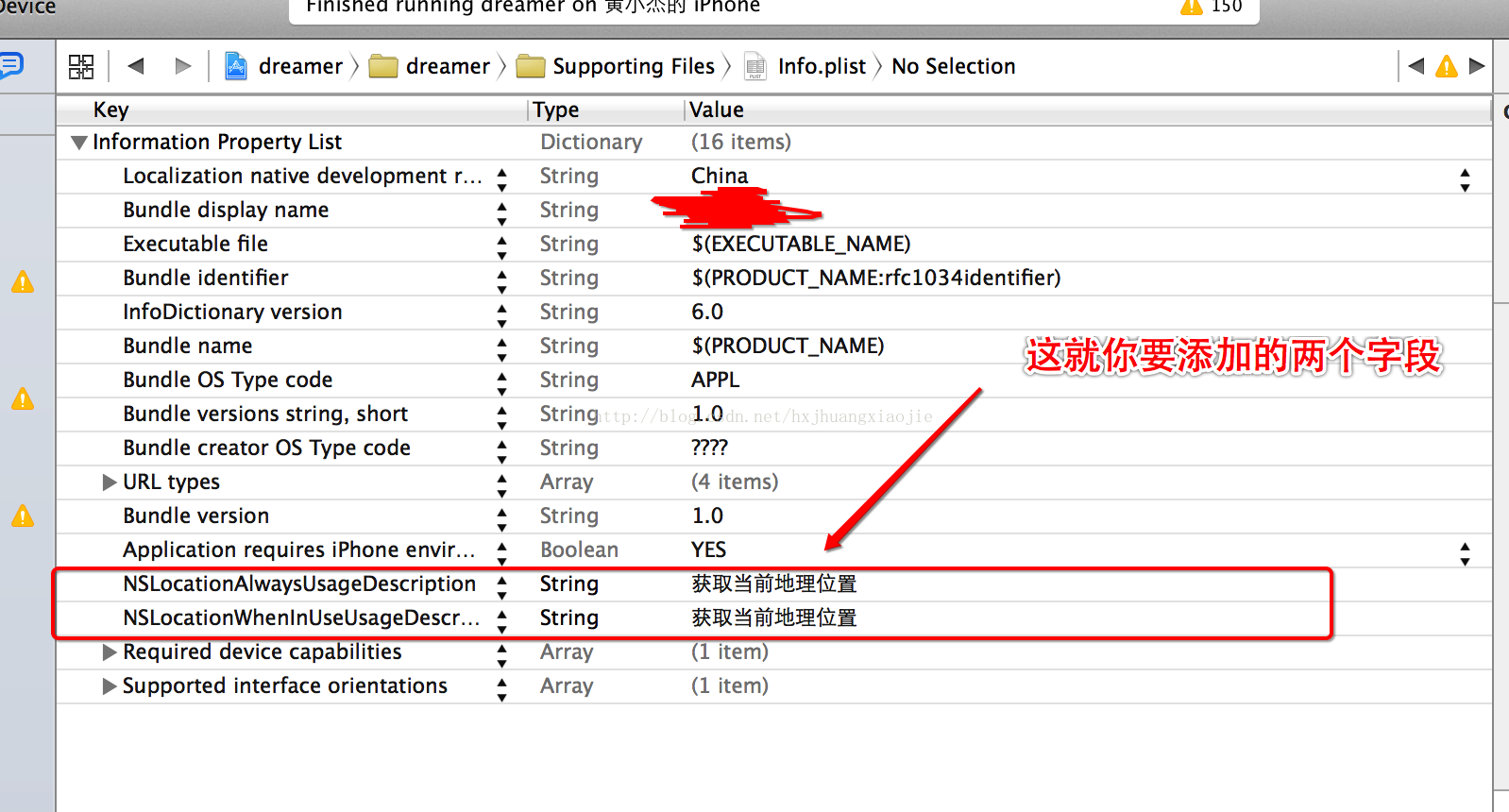
第二步:改為主動請求授權
iOS 8 起必須先呼叫 requestWhenInUseAuthorization 或 requestAlwaysAuthorization,系統才會跳出授權對話框;授權結果會透過 delegate 方法回報。
- (void)viewDidLoad {
    [super viewDidLoad];

    self.locationManager = [[CLLocationManager alloc] init];
    self.locationManager.delegate = self;

    // iOS 8 起必須主動請求授權
    if ([self.locationManager respondsToSelector:@selector(requestWhenInUseAuthorization)]) {
        [self.locationManager requestWhenInUseAuthorization];
    }

    [self.locationManager startUpdatingLocation];
}

- (void)locationManager:(CLLocationManager *)manager didChangeAuthorizationStatus:(CLAuthorizationStatus)status {
    if (status == kCLAuthorizationStatusAuthorizedWhenInUse
        || status == kCLAuthorizationStatusAuthorizedAlways) {
        [manager startUpdatingLocation];
    }
}
用第三方封裝簡化流程
若不只想自己處理授權與 timeout,可以借助 INTULocationManager 這類封裝,把精度、逾時都包好:
INTULocationManager *mgr = [INTULocationManager sharedInstance];

if (mgr.locationServicesAvailable == NO) {
    return;
}

// 請求位置:指定精度與逾時
[mgr requestLocationWithDesiredAccuracy:INTULocationAccuracyCity
                                timeout:10.0
                                  block:^(CLLocation *currentLocation,
                                          INTULocationAccuracy achievedAccuracy,
                                          INTULocationStatus status) {
    if (status == INTULocationStatusSuccess) {
        NSLog(@"%f %f", currentLocation.coordinate.latitude, currentLocation.coordinate.longitude);
    }
}];
這樣寫的好處是跨 iOS 版本行為一致,同時把「定位服務被關掉」「權限被拒」「逾時」等狀態收斂在同一個 callback 裡處理。
補充兩點現況:一是若要使用背景定位,除了 plist 描述外還必須開啟 Background Modes 的 Location updates,否則 App 進入背景後就會停止回報;二是 iOS 14 之後又多了「精確位置」開關與 requestTemporaryFullAccuracyAuthorization:,需要高精度的功能要另外處理降級情境。
- 上一篇文章: 在真機上模擬 iOS 的記憶體警告
- 下一篇文章: XML 與 NSDictionary 互相轉換:處理空節點的關鍵修正