
iOS 手勢入門:四方向滑動手勢的完整實作
編輯:iOS 開發綜合
UISwipeGestureRecognizer 是最容易上手的手勢類別之一,只支援「上、下、左、右」四個離散方向,常用於翻頁、切換卡片或觸發快捷操作。本文從建專案開始,示範如何同時掛上四個方向的手勢,並讓一個 Label 跟著移動、顯示當前方向。
步驟一:建立專案
在 Xcode 中新建 Single View Application,專案命名為 swipeGestureTest。
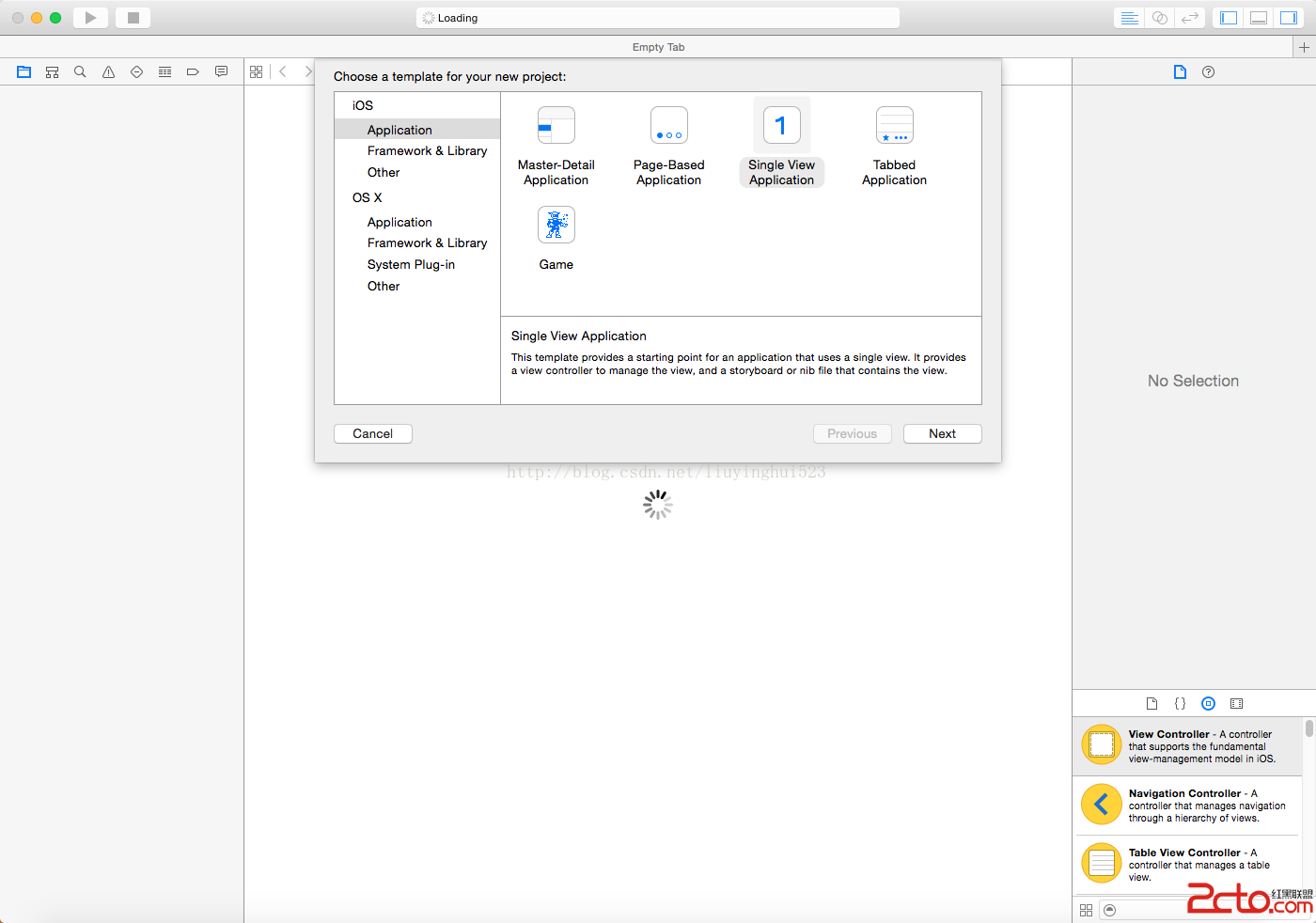

步驟二:宣告屬性
在 ViewController.h 中宣告四個手勢對象與一個用來顯示狀態的 Label:
@property (nonatomic, strong) UISwipeGestureRecognizer *left;
@property (nonatomic, strong) UISwipeGestureRecognizer *right;
@property (nonatomic, strong) UISwipeGestureRecognizer *up;
@property (nonatomic, strong) UISwipeGestureRecognizer *down;

@property (nonatomic, strong) UILabel *swipeLabel;
步驟三:在 viewDidLoad 中註冊
self.left = [[UISwipeGestureRecognizer alloc] initWithTarget:self
                                                     action:@selector(handleSwipes:)];
self.left.direction = UISwipeGestureRecognizerDirectionLeft;
[self.view addGestureRecognizer:self.left];

self.right = [[UISwipeGestureRecognizer alloc] initWithTarget:self
                                                      action:@selector(handleSwipes:)];
self.right.direction = UISwipeGestureRecognizerDirectionRight;
[self.view addGestureRecognizer:self.right];

self.up = [[UISwipeGestureRecognizer alloc] initWithTarget:self
                                                   action:@selector(handleSwipes:)];
self.up.direction = UISwipeGestureRecognizerDirectionUp;
[self.view addGestureRecognizer:self.up];

self.down = [[UISwipeGestureRecognizer alloc] initWithTarget:self
                                                    action:@selector(handleSwipes:)];
self.down.direction = UISwipeGestureRecognizerDirectionDown;
[self.view addSubview:self.view];   // 註:此處應為 addGestureRecognizer
[self.view addGestureRecognizer:self.down];

self.swipeLabel = [[UILabel alloc] initWithFrame:CGRectMake(50, 50, 200, 20)];
self.swipeLabel.text = @"Label";
[self.swipeLabel setBackgroundColor:[UIColor greenColor]];
[self.view addSubview:self.swipeLabel];
四個手勢共用同一個 action 方法,靠 sender.direction 分辨方向,這樣能把重複代碼降到最少。
步驟四:手勢響應
- (void)handleSwipes:(UISwipeGestureRecognizer *)sender {
    if (sender.direction == UISwipeGestureRecognizerDirectionLeft) {
        CGPoint p = CGPointMake(self.swipeLabel.frame.origin.x - 10.0,
                                self.swipeLabel.frame.origin.y);
        self.swipeLabel.frame = CGRectMake(p.x, p.y,
                                           self.swipeLabel.frame.size.width,
                                           self.swipeLabel.frame.size.height);
        self.swipeLabel.text = @"你在往左邊滑動....";
    }
    if (sender.direction == UISwipeGestureRecognizerDirectionRight) {
        CGPoint p = CGPointMake(self.swipeLabel.frame.origin.x + 10.0,
                                self.swipeLabel.frame.origin.y);
        self.swipeLabel.frame = CGRectMake(p.x, p.y,
                                           self.swipeLabel.frame.size.width,
                                           self.swipeLabel.frame.size.height);
        self.swipeLabel.text = @"你在往右邊滑動....";
    }
    if (sender.direction == UISwipeGestureRecognizerDirectionUp) {
        CGPoint p = CGPointMake(self.swipeLabel.frame.origin.x,
                                self.swipeLabel.frame.origin.y - 10.0);
        self.swipeLabel.frame = CGRectMake(p.x, p.y,
                                           self.swipeLabel.frame.size.width,
                                           self.swipeLabel.frame.size.height);
        self.swipeLabel.text = @"你在往上邊滑動....";
    }
    if (sender.direction == UISwipeGestureRecognizerDirectionDown) {
        CGPoint p = CGPointMake(self.swipeLabel.frame.origin.x,
                                self.swipeLabel.frame.origin.y + 10.0);
        self.swipeLabel.frame = CGRectMake(p.x, p.y,
                                           self.swipeLabel.frame.size.width,
                                           self.swipeLabel.frame.size.height);
        self.swipeLabel.text = @"你在往下邊滑動....";
    }
}
步驟五:執行結果

原始碼下載:https://download.csdn.net/detail/liuyinghui523/8491405
實務提醒
UISwipeGestureRecognizer 是離散型手勢,觸發門檻由系統的 minimumNumberOfSwipes(預設 1)與 maximumNumberOfSwipes 控制。若滑動會與 scrollView 的滾動衝突,記得實作 gestureRecognizer:shouldRecognizeSimultaneouslyWithGestureRecognizer: 回傳 YES 讓兩者共存。
- 上一篇文章: iOS 輸入框限制:只允許輸入 6 位數字
- 下一篇文章: iOS Core Graphics 繪圖入門:路徑、矩形、漸層、文字與貝茲曲線