
iOS UIPasteboard 與 UIMenuController 剪貼板實作
編輯:iOS 開發綜合
UILabel 剪貼板
自訂 UILabel 若要支援複製,需允許成為第一回應者,並在 canPerformAction:withSender: 中回傳可支援的動作。加入點擊手勢後,以 UIMenuController 顯示選單。
複製時將文字寫入 UIPasteboard;貼上時從 UIPasteboard 讀取字串並更新內容。


UITableView 剪貼板
在自訂 Cell 中也可實作 canPerformAction 與 copy 方法,並於高亮或長按時顯示選單。

若使用 iOS 5 以後的 UITableViewDelegate 方法,也可直接實作 shouldShowMenuForRowAtIndexPath、canPerformAction 與 performAction,讓列表更容易支援複製。
自訂選單
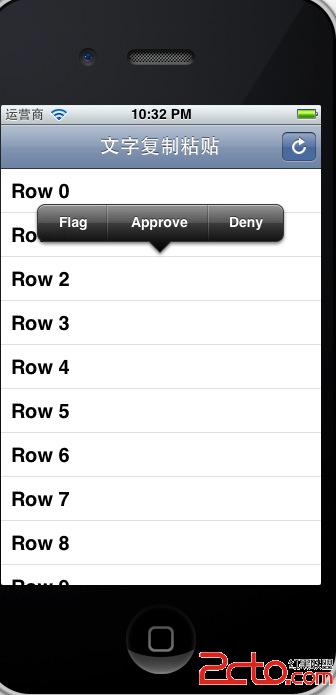
透過 UIMenuItem 可加入自訂項目,例如 Flag、Approve、Deny。別忘了讓 Cell 或自訂視圖可成為第一回應者,否則選單不會出現。
- 上一篇文章: iOS 呼叫系統通訊錄選擇介面
- 下一篇文章: iOS Socket 傳輸中文的編碼問題