
iOS SDK 詳解:NSFileManager 檔案操作入門
NSFileManager 提供了一套相當順手的檔案操作介面,包含檔案與目錄的創建、拷貝、移動、刪除等。以下把這些最基礎的操作逐一走過。
幾個要先知道的觀念
使用 defaultManager 時,取到的其實是一個單例,也就是同一個物件,而且是執行緒安全的,絕大多數情況下用它就足夠。但如果你在不同執行緒中操作,同時又需要 delegate 方法來監聽事件,那就應該改用 init 為每個執行緒建立各自獨立的 fileManager 實例。
定位:取得系統目錄
主要就是兩個方法。第一個只做定位:
- URLsForDirectory:inDomains:
例如取得永遠存在的 Library 目錄:
NSFileManager *fileManager = [NSFileManager defaultManager];
NSArray *searchResult = [fileManager URLsForDirectory:NSLibraryDirectory inDomains:NSUserDomainMask];
NSURL *documentPath = [searchResult firstObject];
NSLog(@"%@", documentPath);
第二個可以在定位的同時順手把目錄建出來:
- URLForDirectory:inDomain:appropriateForURL:create:error:
例如取得預設並不存在的 Application Support:
NSFileManager *fileManager = [NSFileManager defaultManager];
NSURL *path = [fileManager URLForDirectory:NSApplicationSupportDirectory
                                   inDomain:NSUserDomainMask
                          appropriateForURL:nil
                                      create:YES
                                       error:nil];
NSLog(@"%@", path);
幾個常用參數記一下:NSLibraryDirectory 對應 Library;NSApplicationSupportDirectory 對應 Library/Application Support;NSDocumentDirectory 對應 Document;NSUserDomainMask 代表使用者域。至於各個域該放什麼東西,屬於沙盒結構的基礎知識。
判斷檔案或目錄是否存在
- fileExistsAtPath:
- fileExistsAtPath:isDirectory:
第二個方法多一個輸出參數:如果檔案存在,會順帶告訴你它是不是目錄。
NSFileManager *fileManager = [NSFileManager defaultManager];
NSURL *documentPath = [[fileManager URLsForDirectory:NSLibraryDirectory inDomains:NSUserDomainMask] firstObject];
NSString *newPath = [documentPath.path stringByAppendingPathComponent:@"Demo/Wenchen"];

if ([fileManager fileExistsAtPath:newPath] == false) {
    NSLog(@"路徑不存在");
}
BOOL isDic;
if ([fileManager fileExistsAtPath:documentPath.path isDirectory:&isDic] == false) {
    NSLog(@"路徑不存在");
}
NSLog(@"%d", isDic);
創建目錄
- createDirectoryAtURL:withIntermediateDirectories:attributes:error:
- createDirectoryAtPath:withIntermediateDirectories:attributes:error:
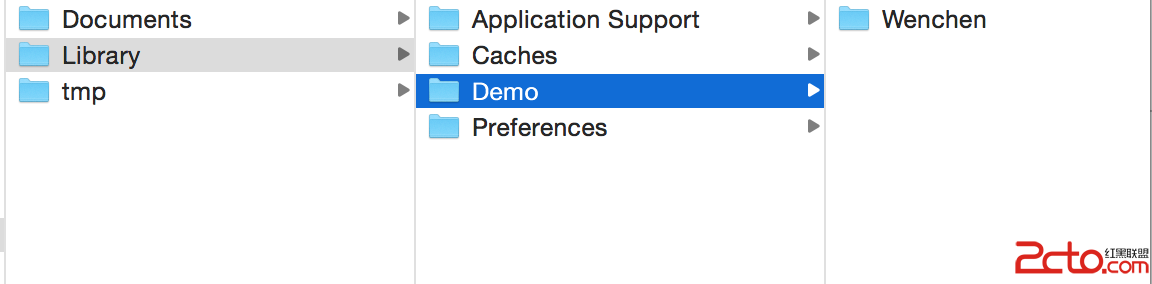
兩個方法參數類似,只是首參數型別不同。回傳 Bool 反映是否成功,出錯時細節在 error 裡。第二個參數決定是否自動補建不存在的父目錄,也就是一次建立多層結構;第三個參數用來設定存取權限,通常給 nil 即可。
NSString *newPath = [documentPath.path stringByAppendingPathComponent:@"Demo/Wenchen"];
if ([fileManager fileExistsAtPath:newPath] == false) {
    [fileManager createDirectoryAtPath:newPath withIntermediateDirectories:YES attributes:nil error:nil];
}
創建檔案
- createFileAtPath:contents:attributes:
attributes 除非你要設定讀寫權限,否則給 nil 就好,回傳值一樣是成敗的 Bool。下面這段示範先確保目錄存在,再把資料寫成檔案:
NSString *filePath = [newPath stringByAppendingPathComponent:@"file.txt"];
NSData *data = [NSKeyedArchiver archivedDataWithRootObject:@"blog.csdn.net/hello_hwc"];
[fileManager createFileAtPath:filePath contents:data attributes:nil];

順帶一提,像
writeToFile:這類方法在檔案不存在時會自動幫你建立。
拷貝與移動
- copyItemAtURL:toURL:error:
- copyItemAtPath:toPath:error:
- moveItemAtURL:toURL:error:
- moveItemAtPath:toPath:error:
一樣以 Bool 回報結果,錯誤資訊放在 error 參數。
NSURL *libraryPath = [[fileManager URLsForDirectory:NSLibraryDirectory inDomains:NSUserDomainMask] firstObject];
NSURL *documentPath = [[fileManager URLsForDirectory:NSDocumentDirectory inDomains:NSUserDomainMask] firstObject];
NSString *oldPath = [libraryPath.path stringByAppendingPathComponent:@"Demo/Wenchen/file.txt"];
NSString *newPath = [documentPath.path stringByAppendingPathComponent:@"file.txt"];
[fileManager copyItemAtPath:oldPath toPath:newPath error:nil];

刪除
NSURL *documentPath = [[fileManager URLsForDirectory:NSDocumentDirectory inDomains:NSUserDomainMask] firstObject];
NSString *newPath = [documentPath.path stringByAppendingPathComponent:@"file.txt"];
BOOL success = [fileManager removeItemAtPath:newPath error:nil];
以上就是 NSFileManager 最常派上用場的一批操作。實際專案中,建議一律把 error 參數接好並處理失敗分支,因為沙盒讀寫失敗的原因往往比想像中多。