
iOS 技巧:讓同一行文字顯示不同顏色
編輯:iOS 開發綜合
產品稿上經常出現「前段用灰色說明、後段用紅色數字」這種需求。做法是用 NSAttributedString 為特定範圍指定屬性,而不是硬拆成多個 Label。
基礎寫法
NSString *contentStr = @"簡介:hello world";
NSMutableAttributedString *str = [[NSMutableAttributedString alloc] initWithString:contentStr];

// 把 0~3 這段設為紅色
[str addAttribute:NSForegroundColorAttributeName
            value:[UIColor redColor]
            range:NSMakeRange(0, 3)];

label.attributedText = str;
效果如下:

進階:標題數字要變紅,但位數不固定
實務上更常遇到的狀況是這種:

數字可能是兩位、三位甚至更多,寫死 NSRange 一定出錯。與其算位置,不如反過來做:先切出數字字串,量出它的長度,再依此決定 range。
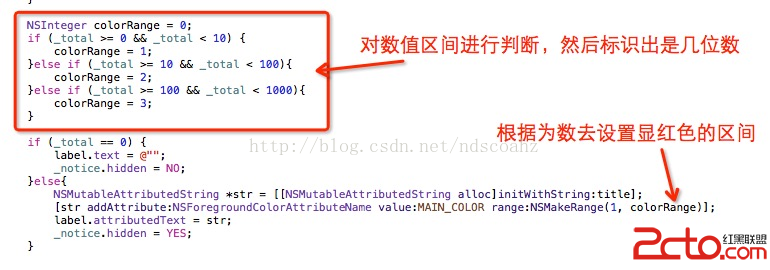
- (NSMutableAttributedString *)attributedTitleWithPrice:(NSString *)price {
    NSString *full = [NSString stringWithFormat:@"限時優惠 %@ 元起", price];
    NSMutableAttributedString *attr = [[NSMutableAttributedString alloc] initWithString:full];

    // 從整串中找出數字部分的範圍,位數再長也不怕
    NSRange priceRange = [full rangeOfString:price];
    if (priceRange.location != NSNotFound) {
        [attr addAttribute:NSForegroundColorAttributeName
                     value:[UIColor redColor]
                     range:priceRange];
    }
    return attr;
}
可以搭配的其他屬性
除了前景色,NSAttributedString 還能同時設定字型、底線、刪除線、背景色與字距。若需要多段不同樣式,就重複呼叫 addAttribute:value:range:,或改用 addAttributes:range: 一次帶入字典。記得整段都要有完整屬性時,可先用 enumerateAttribute:inRange:options:usingBlock: 檢查哪些範圍還沒被設定。