
iOS 會員中心頁面的設計與實作
編輯:iOS 開發綜合
會員中心這類頁面的共同特徵是:同一套版面,要依會員狀態呈現不同內容,並在按鈕上導向不同的後續流程(開通或續費)。本文示範用一份資料字典驅動整個畫面,避免寫出兩套幾乎重複的 UI 程式碼。
設計思路
- 頁面進入時檢查登入狀態與 VIP 狀態,組裝一份「狀態字典」。
- 版面結構固定,只替換圖示、文案與按鈕標題。
- 用
_needRefresh標記避免重複請求,並在登入後觸發刷新。
標頭檔
//  MATMemberCenterViewController.h
//  會員中心頁面,依 VIP 狀態顯示不同內容。
//  VIP 狀態由 AutoLoginManager 的 queryUsableService 設定。

#import "CYModelViewController.h"

@interface MATMemberCenterViewController : CYModelViewController
@end
實作檔
#import "MATMemberCenterViewController.h"
#import "VIPAlipayViewController.h"   // 支付頁面
#import "UserLoginViewController.h"   // 登入頁面

#define kViewRatio (viewWidth() / 320)  // 寬度比例單位

@implementation MATMemberCenterViewController {
    UIImageView *_memberStateIcon;      // 會員狀態圖示
    UILabel     *_memberStateText;      // 會員狀態文字
    UILabel     *_serviceOfOwnership;   // 已擁有服務標題
    UILabel     *_noserviceOfOwnership; // 未擁有服務標題
    UIView      *_healthDataItem;       // 健康數據
    UIView      *_selfExaminationItem;  // 自我檢查
    UIView      *_infiniteTimesItem;    // 不限次數諮詢
    FilledColorButton *_processButton;  // 主要行動按鈕
    BOOL _needRefresh;                  // 是否需要刷新
}

#pragma mark - 生命週期

- (id)initWithNavigatorURL:(NSURL *)URL query:(NSDictionary *)query {
    self = [super initWithNavigatorURL:URL query:query];
    if (self) {
        [self resetData];
    }
    return self;
}

- (void)resetData {
    _needRefresh = YES;
}

- (void)viewDidLoad {
    [super viewDidLoad];
    self.title = @"會員中心";
}

- (void)viewWillAppear:(BOOL)animated {
    [super viewWillAppear:animated;

    if (_needRefresh && [User hasLoggedIn]) {
        _needRefresh = NO;

        NSMutableDictionary *access = [[NSMutableDictionary alloc] init];
        if ([[User currentUser] matIsVip] == 1) {
            [access setObject:@"icon_mat_isvip"      forKey:@"memberStateIcon"];
            [access setObject:@"已開通會員包月服務"   forKey:@"memberStateText"];
            [access setObject:@"1"                  forKey:@"noserviceOfOwnership"];
            [access setObject:@"icon_mat_checked"   forKey:@"infiniteTimesItem"];
            [access setObject:@"立即續費"            forKey:@"processButton"];
        } else {
            [access setObject:@"icon_mat_notvip"    forKey:@"memberStateIcon"];
            [access setObject:@"暫未開通會員優惠"     forKey:@"memberStateText"];
            [access setObject:@"0"                  forKey:@"noserviceOfOwnership"];
            [access setObject:@"icon_mat_notcheck"  forKey:@"infiniteTimesItem"];
            [access setObject:@"立即開通"            forKey:@"processButton"];
        }

        [self createModelWithDict:access];
    }
}

#pragma mark - 版面建構

- (void)createModelWithDict:(NSMutableDictionary *)access {
    self.view.backgroundColor = [UIColor whiteColor];

    // 會員狀態圖示
    _memberStateIcon = [CYResource loadImageView:access[@"memberStateIcon"]
        andFrame:CGRectMake(viewWidth() / 2 - 36 * kViewRatio, 36 * kViewRatio,
                            72 * kViewRatio, 72 * kViewRatio)];
    [self.view addSubview:_memberStateIcon];

    // 會員狀態文字
    _memberStateText = [UILabel labelWithFrame:
        CGRectMake(0, _memberStateIcon.bottom + 8 * kViewRatio,
                   viewWidth(), 36 * kViewRatio)
        fontSize:20 * kViewRatio
        fontColor:[UIColor blackColor]
        text:access[@"memberStateText"]];
    [_memberStateText setAdjustsFontSizeToFitWidth:YES];
    [_memberStateText setTextAlignment:NSTextAlignmentCenter];
    [self.view addSubview:_memberStateText];

    // 已享有服務標題
    _serviceOfOwnership = [UILabel labelWithFrame:
        CGRectMake(12 * kViewRatio, _memberStateText.bottom,
                   viewWidth(), 48 * kViewRatio)
        fontSize:18 * kViewRatio
        fontColor:[UIColor blackColor]
        text:@"已享有服務"];
    [_serviceOfOwnership setAdjustsFontSizeToFitWidth:YES];
    [_serviceOfOwnership setTextAlignment:NSTextAlignmentLeft];
    [self.view addSubview:_serviceOfOwnership];

    // 健康數據追蹤
    _healthDataItem = [[UIView alloc] initWithFrame:
        CGRectMake(12 * kViewRatio, _serviceOfOwnership.bottom,
                   viewWidth(), 32 * kViewRatio)];
    [self.view addSubview:[self viewOfCombinationWithView:_healthDataItem
        image:@"icon_mat_checked" text:@"健康數據跟蹤記錄"]];

    // 自我檢查分析
    _selfExaminationItem = [[UIView alloc] initWithFrame:
        CGRectMake(12 * kViewRatio, _healthDataItem.bottom,
                   viewWidth(), 32 * kViewRatio)];
    [self.view addSubview:[self viewOfCombinationWithView:_selfExaminationItem
        image:@"icon_mat_checked" text:@"自我檢查全面分析"]];

    // 開通可享有服務標題(非會員才顯示)
    BOOL showNoService = ([access[@"noserviceOfOwnership"] intValue] == 0);
    _noserviceOfOwnership = [UILabel labelWithFrame:
        CGRectMake(12 * kViewRatio, _selfExaminationItem.bottom,
                   viewWidth(), showNoService ? 48 * kViewRatio : 0)
        fontSize:18 * kViewRatio
        fontColor:[UIColor blackColor]
        text:showNoService ? @"開通可享有服務" : @""];
    [_noserviceOfOwnership setAdjustsFontSizeToFitWidth:YES];
    [_noserviceOfOwnership setTextAlignment:NSTextAlignmentLeft];
    [self.view addSubview:_noserviceOfOwnership];

    // 不限次數諮詢
    _infiniteTimesItem = [[UIView alloc] initWithFrame:
        CGRectMake(12 * kViewRatio, _noserviceOfOwnership.bottom,
                   viewWidth(), 32 * kViewRatio)];
    [self.view addSubview:[self viewOfCombinationWithView:_infiniteTimesItem
        image:access[@"infiniteTimesItem"] text:@"在線問診不限次數"]];

    // 主要行動按鈕
    _processButton = [[FilledColorButton alloc]
        initWithFrame:CGRectMake(12 * kViewRatio, _infiniteTimesItem.bottom,
                                 viewWidth() - 24 * kViewRatio, 40 * kViewRatio)
        type:kFilledBtnGreen
        title:access[@"processButton"]];
    [_processButton addTarget:self
                       action:@selector(onSubmitBtnPressedAfterLogin:)
             forControlEvents:UIControlEventTouchUpInside];
    [self.view addSubview:_processButton];
}

#pragma mark - 元件組合

// 左圖示 + 右文字的組合控件
- (UIView *)viewOfCombinationWithView:(UIView *)view
                                image:(NSString *)imageName
                                 text:(NSString *)text {
    UIImageView *iv = [CYResource loadImageView:imageName
        andFrame:CGRectMake(0, 0, 16 * kViewRatio, 16 * kViewRatio)];
    [iv setContentMode:UIViewContentModeScaleToFill];
    [view addSubview:iv];

    UILabel *tv = [UILabel labelWithFrame:
        CGRectMake(32 * kViewRatio, 0, viewWidth(), 16 * kViewRatio)
        fontSize:16 * kViewRatio
        fontColor:[UIColor grayColor]
        text:text];
    [view addSubview:tv];

    return view;
}

#pragma mark - 互動

- (void)onSubmitBtnPressedAfterLogin:(UIButton *)sender {
    if (![User hasLoggedIn]) {
        _needRefresh = YES;
        UserLoginViewController *controller = [UserLoginViewController new];
        [self cyPresentModalViewController:controller animated:YES];
    } else {
        NSDictionary *fakeData = @{
            @"source":      @"vip",
            @"problem_id":  ENSURE_NOT_NULL(@1234),
            @"ignore_tel":  @(YES)
        };
        VIPAlipayViewController *controller =
            [[VIPAlipayViewController alloc] initWithNavigatorURL:nil
                                                           query:fakeData];
        [self.navigationController pushViewController:controller animated:YES];
    }
}

@end
畫面
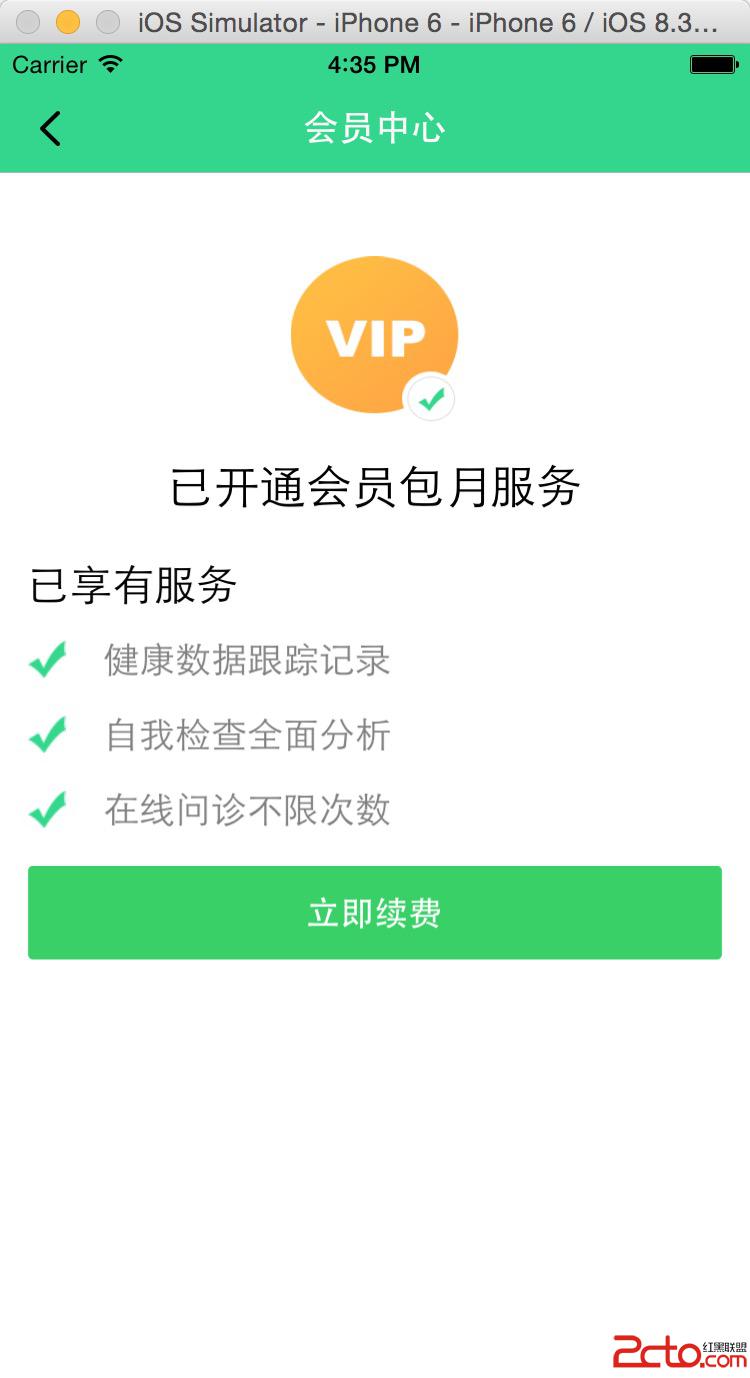
這個寫法值得學的地方
整個頁面沒有一處 if (isVip) 直接寫在版面程式碼中。狀態判斷集中在 viewWillAppear: 裡轉成一份字典,版面建構只負責讀字典。這樣的拆分帶來兩個好處:一是新增會員等級時只需擴充字典內容,版面程式碼不動;二是版面邏輯與狀態邏輯可以分開測試。