
iOS 自訂進度條:兩顆小球繞圓心旋轉的載入動畫
編輯:iOS 開發綜合
這個動畫由兩顆半徑不同的小球沿同一條水平軸反向穿梭,同時搭配縮放與透明度變化,看起來就像繞著圓心旋轉。用到的技術不難:兩個 CAShapeLayer 加上組合動畫。
效果
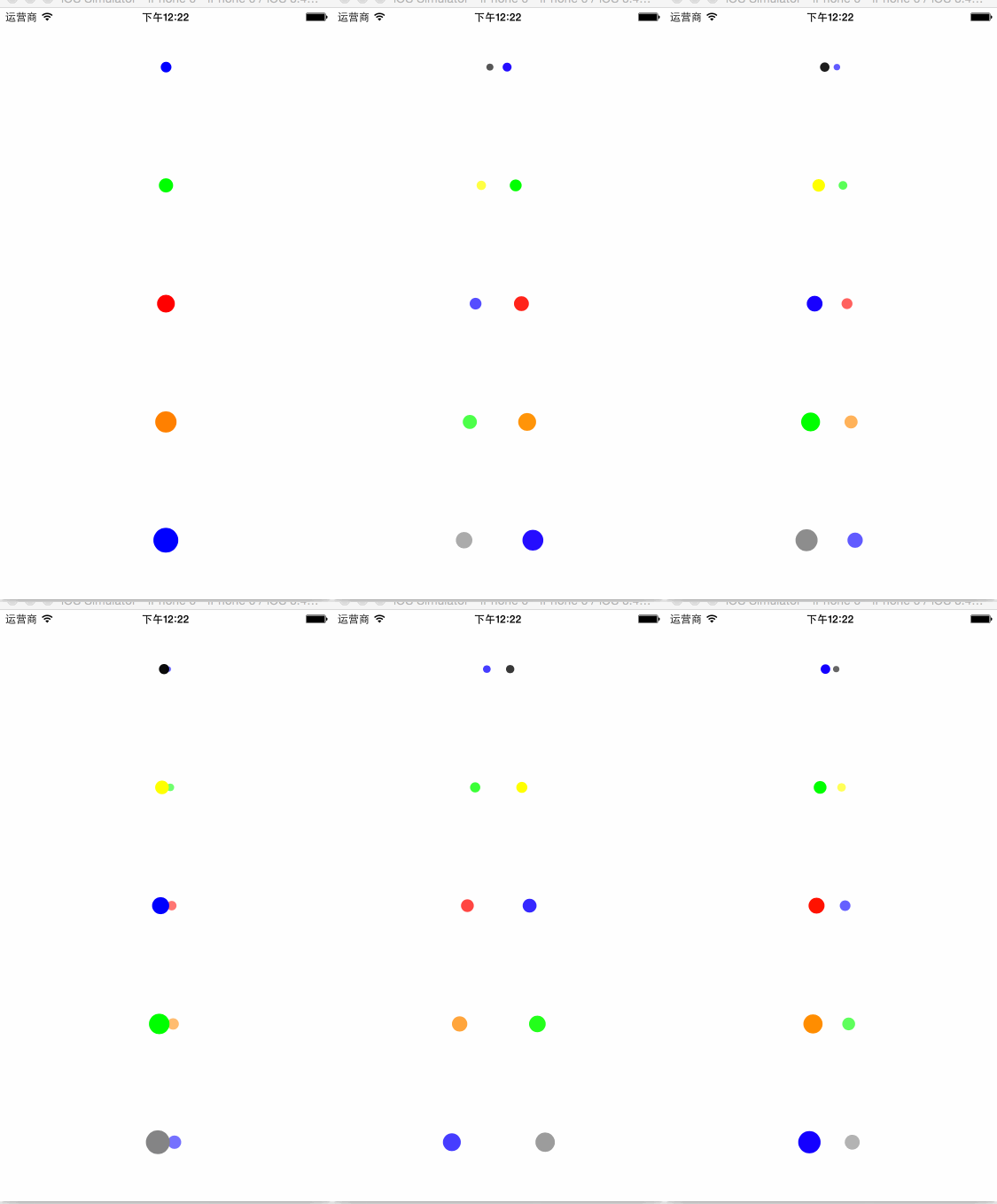
實作原理
自訂一個 UIView,內部放兩個 CAShapeLayer,用 UIBezierPath 畫出兩顆圓;「動起來」則靠 CAAnimation——位移用 CAKeyframeAnimation 沿路徑跑,縮放與透明度用 CABasicAnimation,最後用 CAAnimationGroup 全部組合起來同時播放。
另外還有一個小細節:用 NSTimer 週期性地交換兩個 layer 的 zPosition(改寫 sublayer 的插入順序),讓兩顆球在交會時有正確的前後關係,否則會看起來像其中一顆永遠蓋在另一顆上面。
標頭:對外只暴露設定介面
#import <UIKit/UIKit.h>

@interface TwoBallRotationProgressBar : UIView

- (void)setBallMaxRadius:(CGFloat)radius;   // 大球半徑
- (void)setBallMinRadius:(CGFloat)radius;   // 小球半徑
- (void)setOneBallColor:(UIColor *)oneColor twoBallColor:(UIColor *)twoColor;
- (void)setAnimatorDuration:(CGFloat)duration;
- (void)setAnimatorDistance:(CGFloat)distance;   // 移動軌跡半徑
- (void)startAnimator;
- (void)stopAnimator;

@end
實作:預設值與 layer 建立
#define DEFAULT_MAX_RADIUS 10
#define DEFAULT_MIN_RADIUS 5
#define DEFAULT_DISTANCE   15
#define DEFAULT_DURATION   1.2

#import "TwoBallRotationProgressBar.h"

@interface TwoBallRotationProgressBar ()
@property (nonatomic, assign) CGFloat maxRadius;
@property (nonatomic, assign) CGFloat minRadius;
@property (nonatomic, assign) CGFloat duration;
@property (nonatomic, assign) CGFloat distance;
@property (nonatomic, strong) CAShapeLayer *oneLayer;
@property (nonatomic, strong) CAShapeLayer *twoLayer;
@property (nonatomic, assign) Boolean isTwoAbove;
@property (nonatomic, strong) NSTimer  *mTimer;
@property (nonatomic, assign) CGPoint   centerPoint;
@end

@implementation TwoBallRotationProgressBar

- (instancetype)initWithFrame:(CGRect)frame {
    if (self == [super initWithFrame:frame]) {
        self.backgroundColor = [UIColor whiteColor];
        [self initProgressBar];
    }
    return self;
}

// 懶載入大球
- (CAShapeLayer *)oneLayer {
    if (!_oneLayer) {
        _oneLayer = [CAShapeLayer layer];
        _oneLayer.frame = CGRectMake(0, 0, self.frame.size.width, self.frame.size.height);
        _oneLayer.fillColor = [UIColor redColor].CGColor;
        _oneLayer.path = [UIBezierPath bezierPathWithArcCenter:self.centerPoint
                                                       radius:self.maxRadius
                                                   startAngle:0
                                                     endAngle:M_PI * 2
                                                    clockwise:YES].CGPath;
    }
    return _oneLayer;
}

// 懶載入小球
- (CAShapeLayer *)twoLayer {
    if (!_twoLayer) {
        _twoLayer = [CAShapeLayer layer];
        _twoLayer.frame = CGRectMake(0, 0, self.frame.size.width, self.frame.size.height);
        _twoLayer.anchorPoint = CGPointMake(0.5, 0.5);
        _twoLayer.fillColor = [UIColor greenColor].CGColor;
        _twoLayer.path = [UIBezierPath bezierPathWithArcCenter:self.centerPoint
                                                       radius:self.minRadius
                                                   startAngle:0
                                                     endAngle:M_PI * 2
                                                    clockwise:YES].CGPath;
    }
    return _twoLayer;
}

- (void)initProgressBar {
    self.isTwoAbove = YES;
    self.duration   = DEFAULT_DURATION;
    self.maxRadius  = DEFAULT_MAX_RADIUS;
    self.minRadius  = DEFAULT_MIN_RADIUS;
    self.distance   = DEFAULT_DISTANCE;
    self.centerPoint = CGPointMake(self.bounds.size.width * 0.5,
                                   self.bounds.size.height * 0.5);

    [self.layer addSublayer:self.oneLayer];
    [self.layer addSublayer:self.twoLayer];
}
對外介面的實作
- (void)setBallMaxRadius:(CGFloat)radius {
    self.maxRadius = radius;
    self.oneLayer.path = [UIBezierPath bezierPathWithArcCenter:self.centerPoint
                                                        radius:self.maxRadius
                                                    startAngle:0
                                                      endAngle:M_PI * 2
                                                     clockwise:YES].CGPath;
}

- (void)setBallMinRadius:(CGFloat)radius {
    self.minRadius = radius;
    self.twoLayer.path = [UIBezierPath bezierPathWithArcCenter:self.centerPoint
                                                        radius:self.minRadius
                                                    startAngle:0
                                                      endAngle:M_PI * 2
                                                     clockwise:YES].CGPath;
}

- (void)setOneBallColor:(UIColor *)oneColor twoBallColor:(UIColor *)twoColor {
    self.oneLayer.fillColor = oneColor.CGColor;
    self.twoLayer.fillColor = twoColor.CGColor;
}

- (void)setAnimatorDuration:(CGFloat)duration {
    self.duration = duration;
}

- (void)setAnimatorDistance:(CGFloat)distance {
    self.distance = distance;
    if (distance > self.bounds.size.width * 0.5) {
        self.distance = self.bounds.size.width * 0.5;   // 不要超出自身寬度
    }
}

- (void)startAnimator {
    [self startOneBallAnimator];
    [self startTwoBallAnimator];
}
大球的動畫:位移 + 縮放 + 透明度
- (void)startOneBallAnimator {
    // 1. 位移:沿著一條「中點 → 右 → 中點 → 左 → 中點」的路徑跑
    CAKeyframeAnimation *oneFrameAnimation = [CAKeyframeAnimation animationWithKeyPath:@"position"];
    CGMutablePathRef path = CGPathCreateMutable();
    CGPathMoveToPoint(path, NULL, self.centerPoint.x, self.centerPoint.y);
    CGPathAddLineToPoint(path, NULL, self.centerPoint.x + self.distance, self.centerPoint.y);
    CGPathAddLineToPoint(path, NULL, self.centerPoint.x, self.centerPoint.y);
    CGPathAddLineToPoint(path, NULL, self.centerPoint.x - self.distance, self.centerPoint.y);
    CGPathAddLineToPoint(path, NULL, self.centerPoint.x, self.centerPoint.y);
    [oneFrameAnimation setPath:path];

    // 2. 縮放:前半段變小,後半段回來(靠 beginTime 串接)
    CABasicAnimation *oneScaleAnimation1 = [CABasicAnimation animationWithKeyPath:@"transform.scale"];
    oneScaleAnimation1.fromValue = @1.0;
    oneScaleAnimation1.toValue   = @0.5;
    oneScaleAnimation1.duration  = self.duration * 0.5;

    CABasicAnimation *oneScaleAnimation2 = [CABasicAnimation animationWithKeyPath:@"transform.scale"];
    oneScaleAnimation2.fromValue  = @0.5;
    oneScaleAnimation2.toValue    = @1.0;
    oneScaleAnimation2.beginTime  = self.duration * 0.5;
    oneScaleAnimation2.duration   = self.duration * 0.5;

    // 3. 透明度:與縮放同步
    CABasicAnimation *oneOpacityAnimation1 = [CABasicAnimation animationWithKeyPath:@"opacity"];
    oneOpacityAnimation1.fromValue = @1.0;
    oneOpacityAnimation1.toValue   = @0.5;
    oneOpacityAnimation1.duration  = self.duration * 0.5;

    CABasicAnimation *oneOpacityAnimation2 = [CABasicAnimation animationWithKeyPath:@"opacity"];
    oneOpacityAnimation2.fromValue = @0.5;
    oneOpacityAnimation2.toValue   = @1.0;
    oneOpacityAnimation2.beginTime = self.duration * 0.5;
    oneOpacityAnimation2.duration  = self.duration * 0.5;

    CAAnimationGroup *oneScaleGroup = [CAAnimationGroup animation];
    [oneScaleGroup setAnimations:@[oneScaleAnimation1, oneScaleAnimation2,
                                   oneOpacityAnimation1, oneOpacityAnimation2]];

    // 4. 全部組合
    CAAnimationGroup *oneGroup = [CAAnimationGroup animation];
    [oneGroup setAnimations:@[oneFrameAnimation, oneScaleGroup]];
    oneGroup.duration    = self.duration;
    oneGroup.repeatCount = HUGE_VALF;
    oneGroup.delegate    = self;

    [self.oneLayer addAnimation:oneGroup forKey:@"oneGroup"];
}
小球的動畫:方向與幅度都相反
- (void)startTwoBallAnimator {
    // 位移路徑與大球反向
    CAKeyframeAnimation *twoFrameAnimation = [CAKeyframeAnimation animationWithKeyPath:@"position"];
    CGMutablePathRef path = CGPathCreateMutable();
    CGPathMoveToPoint(path, NULL, self.centerPoint.x, self.centerPoint.y);
    CGPathAddLineToPoint(path, NULL, self.centerPoint.x - self.distance, self.centerPoint.y);
    CGPathAddLineToPoint(path, NULL, self.centerPoint.x, self.centerPoint.y);
    CGPathAddLineToPoint(path, NULL, self.centerPoint.x + self.distance, self.centerPoint.y);
    CGPathAddLineToPoint(path, NULL, self.centerPoint.x, self.centerPoint.y);
    [twoFrameAnimation setPath:path];

    // 縮放:小球放大到 2 倍再縮回
    CABasicAnimation *twoScaleAnimation1 = [CABasicAnimation animationWithKeyPath:@"transform.scale"];
    twoScaleAnimation1.fromValue = @1.0;
    twoScaleAnimation1.toValue   = @2.0;
    twoScaleAnimation1.duration  = self.duration * 0.5;

    CABasicAnimation *twoScaleAnimation2 = [CABasicAnimation animationWithKeyPath:@"transform.scale"];
    twoScaleAnimation2.fromValue  = @2.0;
    twoScaleAnimation2.toValue    = @1.0;
    twoScaleAnimation2.beginTime  = self.duration * 0.5;
    twoScaleAnimation2.duration   = self.duration * 0.5;

    // 透明度:與大球互補(一大一小、一淡一濃)
    CABasicAnimation *twoOpacityAnimation1 = [CABasicAnimation animationWithKeyPath:@"opacity"];
    twoOpacityAnimation1.fromValue = @0.5;
    twoOpacityAnimation1.toValue   = @1.0;
    twoOpacityAnimation1.duration  = self.duration * 0.5;

    CABasicAnimation *twoOpacityAnimation2 = [CABasicAnimation animationWithKeyPath:@"opacity"];
    twoOpacityAnimation2.fromValue = @1.0;
    twoOpacityAnimation2.toValue   = @0.5;
    twoOpacityAnimation2.beginTime = self.duration * 0.5;
    twoOpacityAnimation2.duration  = self.duration * 0.5;

    CAAnimationGroup *scaleGroup = [CAAnimationGroup animation];
    [scaleGroup setAnimations:@[twoScaleAnimation1, twoScaleAnimation2,
                                twoOpacityAnimation1, twoOpacityAnimation2]];

    CAAnimationGroup *twoGroup = [CAAnimationGroup animation];
    [twoGroup setAnimations:@[twoFrameAnimation, scaleGroup]];
    twoGroup.duration    = self.duration;
    twoGroup.repeatCount = HUGE_VALF;

    [self.twoLayer addAnimation:twoGroup forKey:@"twoGroup"];
}
讓兩顆球有正確的前後關係
- (void)animationDidStart:(CAAnimation *)anim {
    [self performSelector:@selector(startNSTimer)
               withObject:self
               afterDelay:self.duration * 0.25];
}

- (void)startNSTimer {
    self.mTimer = [NSTimer scheduledTimerWithTimeInterval:self.duration * 0.5
                                                  target:self
                                                selector:@selector(animationUpdateListener)
                                                userInfo:nil
                                                 repeats:YES];
}

// 週期性交換兩個 layer 的層級
- (void)animationUpdateListener {
    if (self.isTwoAbove) {
        [self.layer insertSublayer:self.twoLayer below:self.oneLayer];
    } else {
        [self.layer insertSublayer:self.oneLayer below:self.twoLayer];
    }
    _isTwoAbove = !_isTwoAbove;
}
怎麼用
TwoBallRotationProgressBar *progressBar1 = [[TwoBallRotationProgressBar alloc]
    initWithFrame:CGRectMake(0, 0, screen_width, screen_height / 5)];
[self.view addSubview:progressBar1];

[progressBar1 setOneBallColor:[UIColor blueColor] twoBallColor:[UIColor blackColor]];
[progressBar1 setBallMaxRadius:6];   // 大球半徑
[progressBar1 setBallMinRadius:3];   // 小球半徑
[progressBar1 setAnimatorDuration:1.5];
[progressBar1 startAnimator];
幾點值得改進的地方
- stopAnimator 是空的:動畫啟動了卻沒有真正停止的方法。實作上應該
[self.oneLayer removeAllAnimations]、[self.twoLayer removeAllAnimations],並且[self.mTimer invalidate]——否則 timer 會一直跑,且animationDidStart:裡的performSelector:afterDelay:也會殘留。 - 記憶體洩漏風險:NSTimer 會 retain target。在
dealloc(或改用NSProxy包裝 target)之前 invalidate,否則這個 view 永遠不會被釋放。 - 用 timer 換 z 序並非必要:直接把
zPosition做成動畫的一部分會更乾淨,也少一個 timer。 - CGPath 沒有釋放:
CGPathCreateMutable()產生的物件在 MRC 下必須CGPathRelease;ARC 不會自動管理 Core Graphics 物件,這裡確實漏了。 - 進入背景要暫停:App 回到前台時動畫與 timer 的狀態需要重新同步,建議在
NSNotification監聽UIApplicationDidBecomeActive時重啟動畫。