
iPhone 照片裡藏著地址:iOS 地理位置中繼資料的讀取與外洩風險
編輯:iOS 開發綜合
某天滑著手機,突然意識到一件事:分享到社群平台的照片,是否正在悄悄替自己「報地址」?事實上,iPhone 拍下的影像檔通常不只包含畫面,還夾帶了拍攝時間、設備資訊,以及最敏感的一項——GPS 座標。本文先示範如何把這些隱藏資料讀出來,接著再談談分享時的實際暴露風險。
為什麼照片會「自帶地址」
iOS 相機在寫入影像的同時,會把拍攝參數塞進 EXIF 中繼資料區塊。其中 GPS 字典(kCGImagePropertyGPSDictionary)保存了經緯度,一旦流入地圖服務,就能反推出拍攝地點,精度好的時候甚至能定位到某棟建築、某家店門口。
讀取相簿照片的中繼資料
想驗證這件事,最直接的方式是從相簿選一張照片,透過 ALAssetsLibrary 取出它的原始表示法,再把 metadata 攤開來看:
#import <AssetsLibrary/AssetsLibrary.h>
#import <ImageIO/ImageIO.h>

@interface ViewController () <UIImagePickerControllerDelegate, UINavigationControllerDelegate>
@end

@implementation ViewController

- (void)viewDidLoad {
    [super viewDidLoad];

    UIImagePickerController *picker = [[UIImagePickerController alloc] init];
    picker.sourceType = UIImagePickerControllerSourceTypePhotoLibrary;
    picker.delegate = self;
    [self presentViewController:picker animated:YES completion:nil];
}

- (void)imagePickerController:(UIImagePickerController *)picker
didFinishPickingMediaWithInfo:(NSDictionary *)info {

    if (picker.sourceType != UIImagePickerControllerSourceTypePhotoLibrary) return;

    NSURL *assetURL = info[UIImagePickerControllerReferenceURL];
    ALAssetsLibrary *library = [[ALAssetsLibrary alloc] init];

    [library assetForURL:assetURL resultBlock:^(ALAsset *asset) {
        NSDictionary *meta = asset.defaultRepresentation.metadata;
        NSDictionary *gps  = meta[(NSString *)kCGImagePropertyGPSDictionary];
        NSLog(@"GPS 資訊:%@", gps);
        NSLog(@"完整中繼資料:%@", meta);
    } failureBlock:^(NSError *error) {
        NSLog(@"讀取失敗:%@", error);
    }];

    [picker dismissViewControllerAnimated:YES completion:nil];
}
@end
執行後,若該照片確實帶有定位資訊,主控台會印出一組包含緯度、經度、海拔與方向的字典。
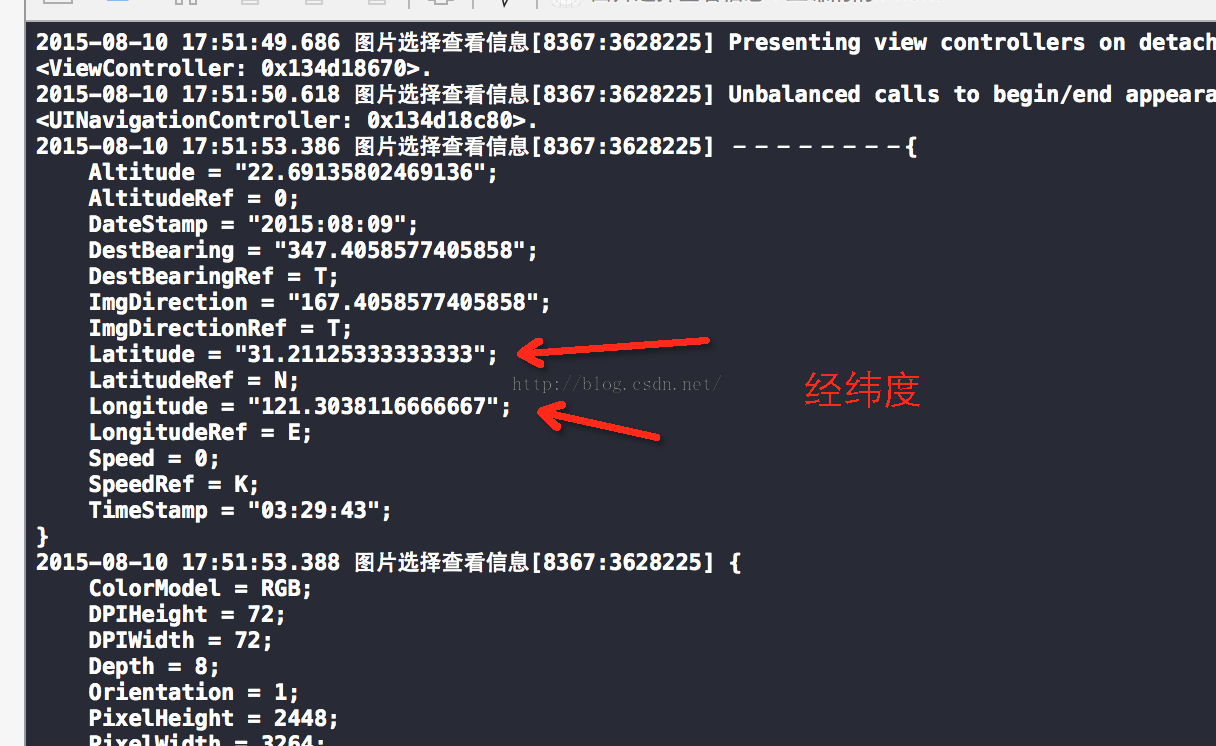
分享出去的照片,位置還在嗎
實測後可以整理出幾點結論:
- 以「原圖」傳輸的照片:中繼資料完整保留,對方存檔後用上述方式就能讀出 GPS 座標。
- 經過壓縮的傳輸:多數即時通訊軟體在非原圖模式下會重新編碼影像,EXIF 中的定位欄位通常被一併抹除。
- 分享到朋友圈、微博等公開平台:平台伺服器普遍會重新處理圖片,位置資訊多半不會外露,這部分可以比較放心。
實用建議
想更穩妥,可以在 iOS「設定 → 隱私權 → 定位服務 → 相機」中把權限關掉,日後拍攝的照片就不會寫入座標。若臨時需要保留地點資訊,再手動開回即可。另外,把照片傳給不熟的人時,避免勾選「原圖」也是一個簡單有效的習慣。
至於是否存在繞過手段、能從壓縮後的圖檔還原出原始中繼資料,筆者目前沒有找到可行做法。若有人知道相關技巧,歡迎分享。