
控制器的 view 父子關係:解決螢幕旋轉時事件無法傳遞的問題
實作「一個畫面內切換多個子 view」時,我們常直接把某個控制器的 view 加到目前的畫面上。這看起來可行,但卻藏著兩個坑:控制器的生命週期,以及旋轉事件不會往下傳。
一、先看效果
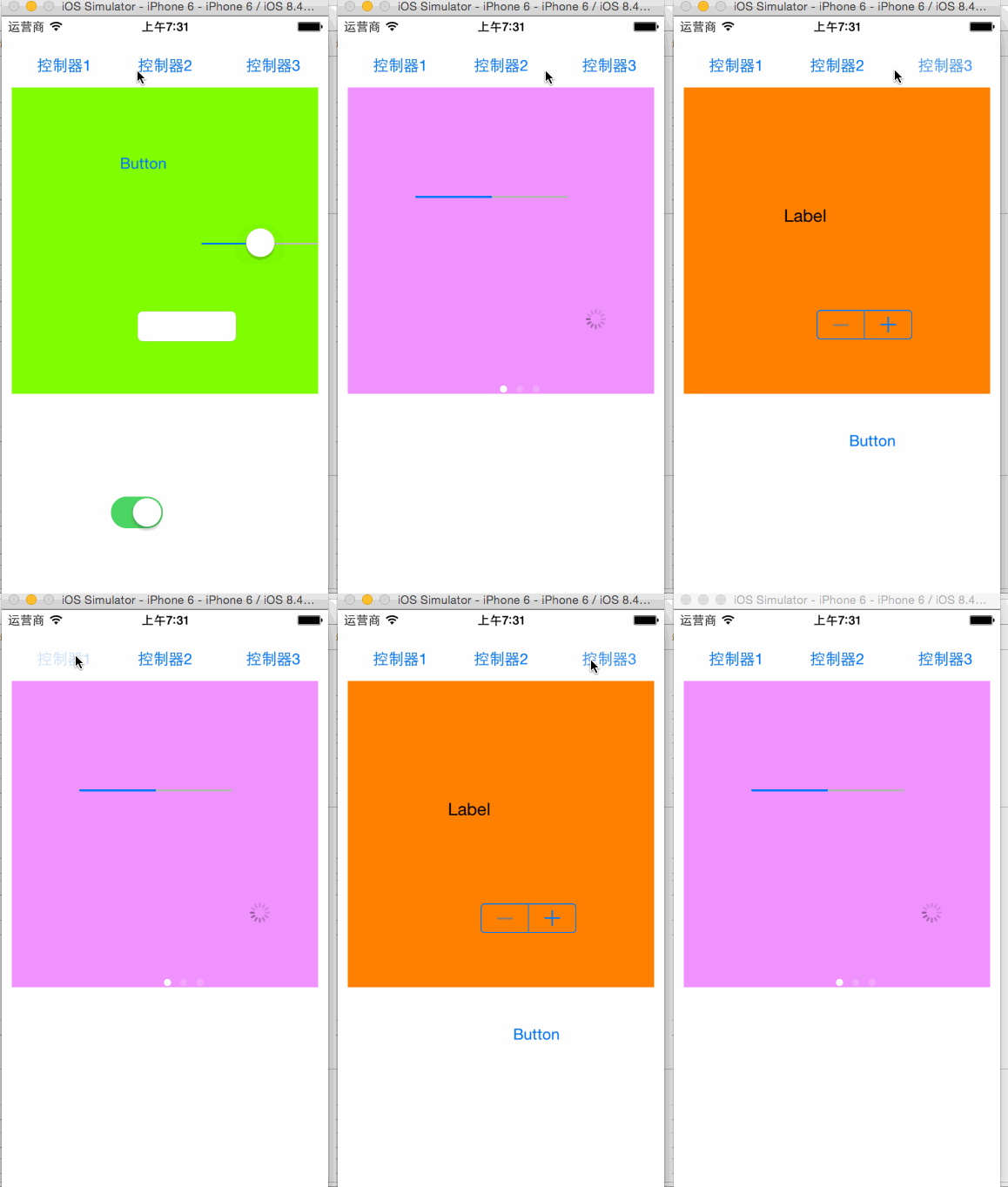
二、基本寫法
這個 Demo 用了幾個控制器,各自搭配不同的 xib,畫面上隨意擺了幾個按鈕做切換。主要程式碼如下:
#import "NYViewController.h"
#import "NYTestViewController.h"
#import "NYOneViewController.h"
#import "NYTwoViewController.h"
#import "NYThreeViewController.h"

@interface NYViewController ()
- (IBAction)vc1;
- (IBAction)vc2;
- (IBAction)vc3;
@property (nonatomic, strong) NYTestViewController *test;
@property (nonatomic, strong) NYOneViewController *one;
@property (nonatomic, strong) NYTwoViewController *two;
@property (nonatomic, strong) NYThreeViewController *three;
@end

@implementation NYViewController

- (NYOneViewController *)one {
    if (!_one) {
        self.one = [[NYOneViewController alloc] init];
        self.one.view.frame = CGRectMake(10, 70, 300, 300);
    }
    return _one;
}

- (NYTwoViewController *)two {
    if (!_two) {
        self.two = [[NYTwoViewController alloc] init];
        self.two.view.frame = CGRectMake(10, 70, 300, 300);
    }
    return _two;
}

- (NYThreeViewController *)three {
    if (!_three) {
        self.three = [[NYThreeViewController alloc] init];
        self.three.view.frame = CGRectMake(10, 70, 300, 300);
    }
    return _three;
}

- (void)viewDidLoad {
    [super viewDidLoad];
    // 如果發現:控制器的 view 還在,但 view 上的資料不顯示,
    // 極有可能是因為控制器被提前銷毀了。
    // 1. 一個控制器的 view 可以自由調整尺寸與位置
    // 2. 一個控制器的 view 可以自由加入到其他 view 中
    // 3. 若把某控制器的 view 加進其他 view,就必須想辦法保住這個控制器
    // 4. 原則:只要 view 還在,對應的控制器就必須還在
}

- (IBAction)vc1 {
    [self.two.view removeFromSuperview];
    [self.three.view removeFromSuperview];
    [self.view addSubview:self.one.view];
}

- (IBAction)vc2 {
    [self.one.view removeFromSuperview];
    [self.three.view removeFromSuperview];
    [self.view addSubview:self.two.view];
}

- (IBAction)vc3 {
    [self.two.view removeFromSuperview];
    [self.one.view removeFromSuperview];
    [self.view addSubview:self.three.view];
}

@end這裡有一個容易忽略的觀念:view 存在,並不代表它的控制器一定存在。如果控制器只是區域變數,方法一結束就可能被回收,此時畫面上雖然還有 view,但 view 內的資料與業務邏輯都會失效。用 strong 屬性把控制器留著,是比較保險的做法。
三、旋轉事件的問題
以上寫法足以應付多數切換需求,但很快就會遇到怪事:螢幕旋轉時,子控制器的旋轉回呼完全沒被觸發。
- (void)willRotateToInterfaceOrientation:(UIInterfaceOrientation)toInterfaceOrientation
                                duration:(NSTimeInterval)duration {
    NSLog(@"NYViewController---willRotateToInterfaceOrientation");
}

- (void)didRotateFromInterfaceOrientation:(UIInterfaceOrientation)fromInterfaceOrientation {
    NSLog(@"NYViewController---didRotateFromInterfaceOrientation");
}
把這兩個方法同時寫進 one、two、three 三個控制器後你會發現,旋轉時只有主控制器印出了 log,其他三個一句都沒有。原因很單純:它們的 view 雖然是父子關係,但控制器彼此是平級的, UIKit 的事件鏈只沿著 controller 階層往下傳,view 階層不算。
四、解法:建立控制器的父子關係
原則一句話:view 之間是父子關係時,控制器之間也應該是父子關係。用 addChildViewController: 即可:
NYOneViewController *one = [[NYOneViewController alloc] init];
[self addChildViewController:one];
呼叫 addChildViewController: 之後,這個子控制器會被放進 childViewControllers 陣列。只要 self 還活著,陣列還在,裡面的子控制器自然也都在——生命週期問題與事件傳遞問題一次解決。
完整的修正版程式碼:
@implementation NYViewController

- (void)willRotateToInterfaceOrientation:(UIInterfaceOrientation)toInterfaceOrientation
                                duration:(NSTimeInterval)duration {
    NSLog(@"NYViewController---willRotateToInterfaceOrientation");
}

- (void)didRotateFromInterfaceOrientation:(UIInterfaceOrientation)fromInterfaceOrientation {
    NSLog(@"NYViewController---didRotateFromInterfaceOrientation");
}

- (void)viewDidLoad {
    [super viewDidLoad];

    // view 互為父子關係時,控制器也應互為父子關係
    NYOneViewController *one = [[NYOneViewController alloc] init];
    [self addChildViewController:one];   // index 0

    NYTwoViewController *two = [[NYTwoViewController alloc] init];
    [self addChildViewController:two];   // index 1

    NYThreeViewController *three = [[NYThreeViewController alloc] init];
    [self addChildViewController:three]; // index 2
}

- (IBAction)vc1 {
    NYOneViewController *one   = self.childViewControllers[0];
    NYTwoViewController *two   = self.childViewControllers[1];
    NYThreeViewController *three = self.childViewControllers[2];
    [two.view removeFromSuperview];
    [three.view removeFromSuperview];
    [self.view addSubview:one.view];
}

- (IBAction)vc2 {
    NYOneViewController *one   = self.childViewControllers[0];
    NYTwoViewController *two   = self.childViewControllers[1];
    NYThreeViewController *three = self.childViewControllers[2];
    [one.view removeFromSuperview];
    [three.view removeFromSuperview];
    [self.view addSubview:two.view];
}

- (IBAction)vc3 {
    NYOneViewController *one   = self.childViewControllers[0];
    NYTwoViewController *two   = self.childViewControllers[1];
    NYThreeViewController *three = self.childViewControllers[2];
    [two.view removeFromSuperview];
    [one.view removeFromSuperview];
    [self.view addSubview:three.view];
}

@end
補充一點:如果你只是想在畫面裡換一塊內容,其實用 Child View Controller 容器模式(搭配 addChildViewController 加上 didMoveToParentViewController:)就是 Apple 官方推薦的做法,UINavigationController、UITabBarController 內部都是這樣實作的。理解這層關係,之後自訂容器控制器就不容易出錯。
- 上一篇文章: iOS 如何判斷使用者手上的裝置型號
- 下一篇文章: Swift 實作:用 GCD 延時任務讓 Splash 頁面停留兩秒後跳轉