
iOS 開發:SQLite 資料庫 CRUD 完整實作
一、iOS 的資料儲存方式
- Plist(NSArray、NSDictionary)
- Preference(偏好設定,NSUserDefaults)
- NSCoding(NSKeyedArchiver / NSKeyedUnarchiver)
- SQLite3
- Core Data
二、SQLite 簡介
SQLite 是一款輕量的嵌入式資料庫:佔用資源極低,在嵌入式環境中可能只需要幾百 K 的記憶體;處理速度在許多場景下比 MySQL、PostgreSQL 這類大型資料庫更快。它最適合放在手機這類資源受限的裝置上。
資料庫(Database)則是按照資料結構來組織、儲存與管理資料的倉庫,大致分為關聯式(主流)與物件式兩大類。PC 端常見的關聯式資料庫有 Oracle、MySQL、SQL Server、Access、DB2、Sybase。
三、資料庫如何儲存資料
儲存結構與 Excel 很相似,以「表(table)」為單位。操作步驟是:
- 新建一張表
- 加入多個欄位(column,也就是屬性)
- 加入多筆紀錄(row,每列存放各欄位對應的值)
四、SQL 語句基礎
SQL(Structured Query Language)是結構化查詢語言,用來對關聯式資料庫進行定義與操作。語法簡潔、好學好用。用 SQL 寫出來的句子就是 SQL 語句,程式運行過程中要對資料做增刪改查(CRUD),一律得靠它。
兩個基本慣例:不區分大小寫(user 與 UsEr 相同);每條語句必須以分號結尾。常用關鍵字包括 select、insert、update、delete、from、create、where、desc、order、by、group、table、alter、view、index 等,命名表與欄位時不可使用這些關鍵字。
SQL 語句的三個分類
- DDL(資料定義語言):create、drop,用來建表與刪表。
- DML(資料操作語言):insert、update、delete,用來增、改、刪資料。
- DQL(資料查詢語言):select 是用得最多的操作,常搭配 where、order by、group by、having。
五、常用語句速查
建表
create table t_student (id integer, name text, age integer, score real);
create table if not exists t_student (...);   -- 已存在時不報錯
欄位型別
SQLite 劃分為 integer(整數)、real(浮點)、text(文字)、blob(二進位資料,例如檔案)。實際上 SQLite 是無型別的,宣告為 integer 也仍能存字串(主鍵除外)。不過為了可讀性與團隊溝通,建表時最好還是標明型別。
刪表
drop table t_student;
drop table if exists t_student;
插入
insert into t_student (name, age) values ('mj', 10);
注意:字串內容要用單引號包住。
更新與刪除
update t_student set name = 'jack', age = 20;   -- 會影響「所有」紀錄
delete from t_student;                          -- 會刪掉「所有」紀錄
條件語句
where 欄位 = 值        -- 不能用兩個等號
where 欄位 is 值       -- is 等同 =
where 欄位 != 值
where 欄位 is not 值   -- is not 等同 !=
where 欄位1 = 值 and 欄位2 > 值   -- and 等同 C 語言的 &&
where 欄位1 = 值 or 欄位2 = 值    -- or  等同 C 語言的 ||
範例:把年齡大於 10 且姓名不是 jack 的紀錄年齡改為 5:
update t_student set age = 5 where age > 10 and name != 'jack';
delete from t_student where age <= 10 or age > 30;
查詢
select name, age from t_student;
select * from t_student;                    -- 全部欄位
select * from t_student where age > 10;     -- 條件查詢
別名
select name myname, age as myage from t_student;
select s.name, s.age from t_student s;      -- 為表取別名
計算筆數
select count(age) from t_student;
select count(*) from t_student where score >= 60;
排序與分頁
select * from t_student order by age;             -- 預設升冪
select * from t_student order by age desc;        -- 降冪
select * from t_student order by age asc, height desc;  -- 多欄位排序

select * from t_student limit 4, 8;   -- 跳過前 4 筆,取 8 筆
select * from t_student limit 7;      -- 等同 limit 0, 7
分頁查詢(每頁 5 筆):第 1 頁 limit 0, 5、第 2 頁 limit 5, 5、第 n 頁 limit 5*(n-1), 5。
六、約束條件
create table t_student (
    id   integer,
    name text not null unique,
    age  integer not null default 1
);
常見約束:not null(不可為空)、unique(必須唯一)、default(預設值)。建議盡量給欄位加上嚴格約束,以保證資料的規範性。
主鍵與外鍵
若一張表裡有兩筆紀錄的欄位值完全相同,就無法區分它們。良好的設計會保證每筆紀錄的唯一性,方法是加上主鍵(Primary Key,PK)——相當於身分證字號。
create table t_student (
    id   integer primary key autoincrement,   -- 主鍵自動遞增,必須是 integer
    name text,
    age  integer
);
主鍵預設已包含 not null 與 unique 兩個約束。外鍵則用來建立表與表之間的關聯,通常是某張表的某個欄位引用另一張表的主鍵:
create table t_student (
    id       integer primary key autoincrement,
    name     text,
    age      integer,
    class_id integer,
    constraint fk_t_student_class_id_t_class_id
        foreign key (class_id) references t_class (id)
);
七、表連接查詢
當需要的資料分散在多張表時,就要用連接查詢。常見類型:
- 內連接:inner join 或 join,只顯示兩表都有對應值的紀錄。
- 左外連接:left outer join,保證左表資料完整。
-- 查詢 0316iOS 班的所有學生
select s.name, s.age
from t_student s, t_class c
where s.class_id = c.id and c.name = '0316iOS';
八、Objective-C 中的 CRUD 實作
#import "ViewController.h"
#import <sqlite3.h>

@interface ViewController ()
{
    sqlite3 *_db;   // 資料庫實例
}
@end

@implementation ViewController

- (void)viewDidLoad
{
    [super viewDidLoad];

    // 0. 取得沙盒中的資料庫檔案路徑
    NSString *fileName = [[NSSearchPathForDirectoriesInDomains(NSDocumentDirectory,
                                                               NSUserDomainMask, YES) lastObject]
                          stringByAppendingPathComponent:@"student.sqlite"];
    NSLog(@"fileName = %@", fileName);

    // 1. 開啟資料庫(檔案不存在時會自動建立)
    int result = sqlite3_open(fileName.UTF8String, &_db);
    if (result == SQLITE_OK) {
        NSLog(@"成功打開資料庫");

        // 2. 建表
        const char *sql = "create table if not exists t_student "
                          "(id integer primary key autoincrement, name text, age integer);";
        char *errorMessage = NULL;
        int r = sqlite3_exec(_db, sql, NULL, NULL, &errorMessage);
        if (r == SQLITE_OK) {
            NSLog(@"成功創建表");
        } else {
            NSLog(@"創建表失敗: %s", errorMessage);
        }
    } else {
        NSLog(@"打開資料庫失敗");
    }
}

#pragma mark - 插入
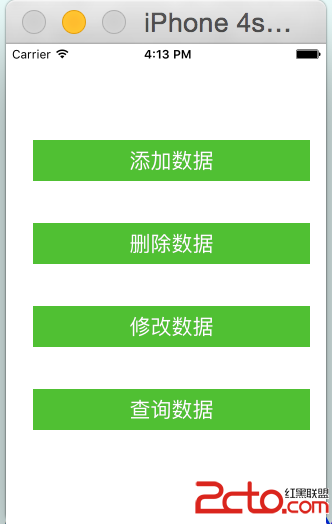
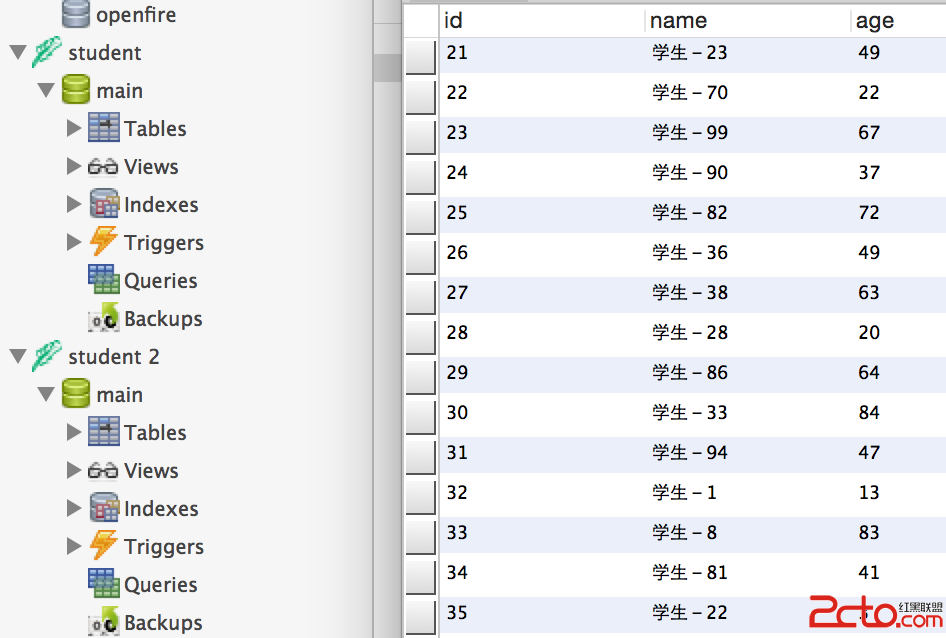
- (IBAction)insertData
{
    for (int i = 0; i < 20; i++) {
        NSString *name = [NSString stringWithFormat:@"學生-%d", arc4random() % 100];
        int age = arc4random() % 100;
        NSString *sql = [NSString stringWithFormat:
                         @"insert into t_student (name, age) values('%@', %d);", name, age];
        char *errorMessage = NULL;
        int result = sqlite3_exec(_db, sql.UTF8String, NULL, NULL, &errorMessage);
        if (result == SQLITE_OK) {
            NSLog(@"成功添加數據");
        } else {
            NSLog(@"添加數據失敗: %s", errorMessage);
        }
    }
}

#pragma mark - 查詢(更新、刪除流程相同)
- (IBAction)selectData
{
    // 1. 定義 SQL(以 ? 佔位,稍後綁定參數)
    const char *sql = "select id, name, age from t_student where name = ?;";

    // 2. 準備存放結果集的 statement
    sqlite3_stmt *stmt = NULL;

    // 3. 檢查 SQL 合法性
    int result = sqlite3_prepare_v2(_db, sql, -1, &stmt, NULL);
    if (result == SQLITE_OK) {
        NSLog(@"查詢語句合法");
        // sqlite3_bind_text(stmt, 1, "小明", -1, SQLITE_TRANSIENT);

        // 4. 逐列取出資料
        while (sqlite3_step(stmt) == SQLITE_ROW) {
            int sid = sqlite3_column_int(stmt, 0);
            const unsigned char *sname = sqlite3_column_text(stmt, 1);
            int sage = sqlite3_column_int(stmt, 2);
            NSLog(@"%d %s %d", sid, sname, sage);
        }
        sqlite3_finalize(stmt);
    } else {
        NSLog(@"查詢語句非法");
    }
}

@end
實務提醒:字串條件請一律走 sqlite3_bind_* 綁定參數,不要用字串格式化拼接,否則會有 SQL 注入風險;另外每個 statement 用完都要 finalize,連線在 App 結束前用 sqlite3_close 關閉。
- 上一篇文章: iOS 9 環境下微信 SDK 升級指南
- 下一篇文章: 貓貓學 iOS:iPad Popover 調色板實作(彈出後其他控件仍可互動)