
iOS 支付寶錢包接入詳解:第三方支付實作(韓俊強)
一、在 App 中成功完成支付寶支付的流程
1、申請支付寶錢包。參考網址:
https://b.alipay.com/order/productDetail.htm?productId=2014110308141993&tabId=4#ps-tabinfo-hash這是使用支付寶支付的第一步。合作申請通過之後,會整合一個開發檔案。即使不申請也可以下載,只是 demo 中會缺少幾個必填的參數:在 demo 的 PartnerConfig.h 檔案中可以看到
//合作身份者 id,以 2088 開頭的 16 位純數字
#define PartnerID @""
//收款支付寶帳號
#define SellerID @""
//安全校驗碼(MD5)密鑰,以數字和字母組成的 32 位字元
#define MD5_KEY @""
//商戶私鑰,自助生成
#define PartnerPrivKey
//支付寶公鑰(老闆給你的)
#define AlipayPubKey @"MIGfMA0GCSqGSIb3DQEBAQUAA4GNADCBiQKBgQCnxj/9qwVfgoUh/y2W89L6BkRAFljhNhgPdyPuBV64bfQNN1PjbCzkIM6qRdKBoLPXmKKMiFYnkd6rAoprih3/PrQEB/VsW8OoM8fxn67UDYuyBTqA23MML9q1+ilIZwBC2AQ2UBVOrFXfFl75p6/B5KsiNG9zpgmLCUYuLkxpLQIDAQAB"
只有這幾個參數準備齊全,demo 才能完成支付,所以接下來是第二步。
2、生成 RSA。這需要在 Windows 系統下生成,開發文件中也提供了生成步驟。我是直接向後台索取了這幾個參數,所以這一步只能簡單帶過。 3、導入框架。依照整合文件的開發文件導入框架,可以參考 demo。當四個參數都準備齊全後,可以先在 demo 上試試能否成功支付,然後再往自己的專案中導入。二、程式碼的使用 1、支付所需的參數。在 demo 的 ViewController.h 中可以看到這麼一段程式碼
@interface Product :NSObject{
@private
float _price;
NSString *_subject;
NSString *_body;
NSString *_orderId;
}
@property (nonatomic,assign) float price;
@property (nonatomic,retain) NSString *subject;
@property (nonatomic,retain) NSString *body;
@property (nonatomic,retain) NSString *orderId;
@end
這就是所支付產品必須具備的幾個欄位。開發文件中列了許多參數,但真正使用時,只要特別留意這幾個即可。demo 中有自動拼接的方法,到時候直接呼叫就行。
2、App 與支付寶客戶端之間的跳轉
NSString *appScheme = @"AlipaySdkDemo"; //應用跳轉的 URL
*這裡要和 plist 檔中 URL types 下面的欄位保持一致。
3、支付結果的入口
首先是 WAP 端的入口,在 ViewController.m 中可以找到,這裡會返回支付結果,比較簡單,不多贅述。
獨立端的入口在 AppDelegate 裡面。我試著在 ViewController 中找這個入口,但最後沒找到,只能設定一個觀察者,把支付結果傳送過來再進行處理。
三、總結
第一次接觸支付相關的東西,一開始頗感迷茫,不明白財務方面究竟是怎麼對上帳的。那些其實都是在後台處理的,iOS 開發時需要做的,就是完成這個支付流程。
==================================具體看下面流程====================================
第一步:引入框架
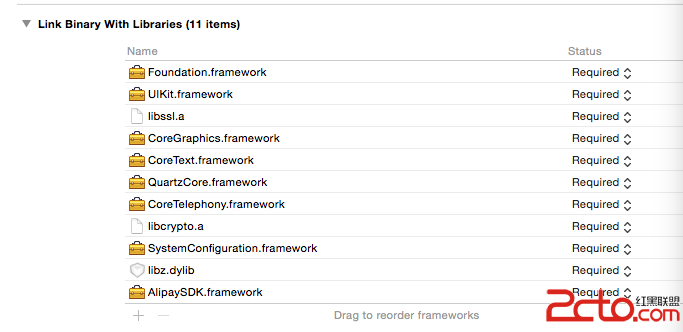
第二步:注意框架及拉進相關檔案

第三步:上程式碼,直接建立根視圖:
#import "RootViewController.h" #import #import "Order.h" #import "DataSigner.h" @interface RootViewController () @end @implementation RootViewController - (void)viewDidLoad { [super viewDidLoad]; UIButton *button = [UIButton buttonWithType:(UIButtonTypeSystem)]; [button addTarget:self action:@selector(buttonAction :) forControlEvents:(UIControlEventTouchUpInside)]; button.frame = CGRectMake(100, 200, 100, 100); [button setTitle:@"支付" forState:(UIControlStateNormal)]; [button setBackgroundColor:[UIColor yellowColor]]; [self.view addSubview:button]; self.view.backgroundColor = [UIColor greenColor]; }
點擊事件:
- (void)buttonAction : (UIButton *)sender { // NSLog(@"支付"); /* *點擊獲取prodcut實例並初始化訂單信息 */ // Product *product = [self.productList objectAtIndex:indexPath.row]; /* *商戶的唯一的parnter和seller。 *簽約後,支付寶會為每個商戶分配一個唯一的 parnter 和 seller。 */ /*============================================================================*/ /*=======================需要填寫商戶app申請的===================================*/ /*============================================================================*/ // 16位的純數字 NSString *partner = @"2088。。公司唯一ID"; // 收款賬戶 NSString *seller = @"收款賬號"; NSString *privateKey = @"密鑰"; /*============================================================================*/ /*============================================================================*/ /*============================================================================*/ //partner和seller獲取失敗,提示 if ([partner length] == 0 || [seller length] == 0 || [privateKey length] == 0) { UIAlertView *alert = [[UIAlertView alloc] initWithTitle:@"提示" message:@"缺少partner或者seller或者私鑰。" delegate:self cancelButtonTitle:@"確定" otherButtonTitles:nil]; [alert show]; return; } /* *生成訂單信息及簽名 */ //將商品信息賦予AlixPayOrder的成員變量 Order *order = [[Order alloc] init]; order.partner = partner; order.seller = seller; order.tradeNO = @"123456"; //訂單ID(由商家自行制定) order.productName = @"太空杯"; //商品標題 order.productDescription = @"耐摔的太空杯"; //商品描述 order.amount = [NSString stringWithFormat:@"%.2f",0.01]; //商品價格 order.notifyURL = @"https://www.lanou3g.com"; //回調URL order.service = @"mobile.securitypay.pay"; order.paymentType = @"1"; order.inputCharset = @"utf-8"; order.itBPay = @"30m"; order.showUrl = @"m.alipay.com"; //應用注冊scheme,在AlixPayDemo-Info.plist定義URL types NSString *appScheme = @"xiaohange"; //將商品信息拼接成字符串 NSString *orderSpec = [order description]; NSLog(@"orderSpec = %@",orderSpec); //獲取私鑰並將商戶信息簽名,外部商戶可以根據情況存放私鑰和簽名,只需要遵循RSA簽名規范,並將簽名字符串base64編碼和UrlEncode id signer = CreateRSADataSigner(privateKey); NSString *signedString = [signer signString:orderSpec]; //將簽名成功字符串格式化為訂單字符串,請嚴格按照該格式 NSString *orderString = nil; if (signedString != nil) { orderString = [NSString stringWithFormat:@"%@&sign=\"%@\"&sign_type=\"%@\"", orderSpec, signedString, @"RSA"]; [[AlipaySDK defaultService] payOrder:orderString fromScheme:appScheme callback:^(NSDictionary *resultDic) { NSLog(@"reslut = %@",resultDic); }]; } } //選中商品調用支付寶極簡支付 - (void)tableView:(UITableView *)tableView didSelectRowAtIndexPath:(NSIndexPath *)indexPath { }
最終效果:

- 上一篇文章: iOS 開發:純程式碼生成 TabBar 與視圖切換詳解
- 下一篇文章: iOS App 桌面圖標突然不見了該怎麼辦?