
iOS 接入 Ping++ 支付的完整步驟詳解
一、Ping++ SDK 簡介
Ping++ SDK 分為 Server 與 Client 兩大部分。其中 Server 目前支援 PHP、Java、Python、Node.js、Ruby、Go、C# 七種語言;Client 則支援 iOS、Android、手機網頁與 PC 網頁 四大平台,分別對應 iOS、Android、HTML5 與 PC 這四種 Client SDK。
二、測試與正式環境
為了提升接入效率,Ping++ 提供了 Test 與 Live 兩個工作模式。兩者切換非常簡單,只需在設定 Server SDK 的 API Key 時,依需求選用對應的 Key 即可:設為 Test Key 即進入 Test 模式,設為 Live Key 則進入 Live 模式。Test Key 在完成 Ping++ 註冊後即可自動獲得,Live Key 則需完成簽約後才會取得。
1. Test 模式:供開發測試使用。由於 Test 模式把支付流程與實際渠道隔離開來,因此開發與渠道申請可以並行推進,縮短整體接入時間。在 Test 模式下發起的虛擬交易不會調起真實支付控件,而會跳轉到 Ping++ 提供的模擬支付頁面。
2. Live 模式:即應用上線的模式。此模式下會產生真實交易、調起真實支付控件並產生真實資金流動,因此請務必確保 Test 模式下所有功能都測試通過後,再切換到 Live 模式。
三、必要參數
接入時需要使用以下三個參數,它們都可在管理平台中取得:
1. API Key:Ping++ 分配給你的唯一身份標識,即前面提到的 Test Key 與 Live Key。
2. 應用 ID:Ping++ 分配給你該應用的唯一標識。
3. Notify URL:Ping++ 系統向你的應用後台推送異步通知時所使用的地址,必須是一個可被網際網路訪問的位址,可在管理平台對應的應用中設定。
下面說明 Ping++ 如何發起並完成支付:
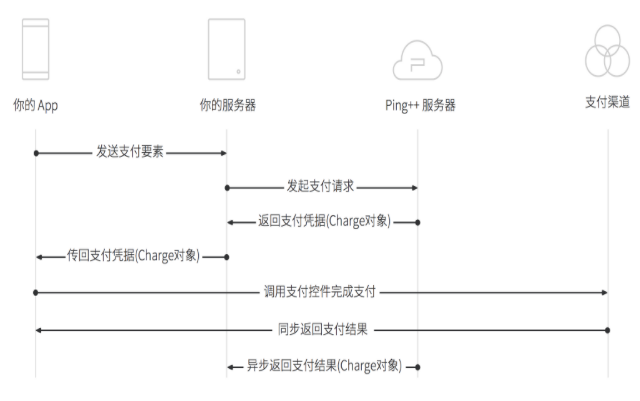
1. Client 將支付要素傳給 Server
使用者選擇渠道並點擊交易按鈕後,Client 會收集交易所需的相關參數並傳給 Server(伺服器位址即程式碼中的 URL):
NSMutableURLRequest * postRequest=[NSMutableURLRequest requestWithURL:url];
NSDictionary* dict = @{
@"channel" : self.channel,
@"amount" : amountStr
};
[postRequest setHTTPMethod:@"POST"];
[postRequest setValue:@"application/json; charset=utf-8" forHTTPHeaderField:@"Content-Type"];
NSData* data = [NSJSONSerialization dataWithJSONObject:dict options:NSJSONWritingPrettyPrinted error:nil];
NSString *bodyData = [[NSString alloc] initWithData:data encoding:NSUTF8StringEncoding];
[postRequest setHTTPBody:[NSData dataWithBytes:[bodyData UTF8String] length:strlen([bodyData UTF8String])]];
ViewController * __weak weakSelf = self;
NSOperationQueue *queue = [[NSOperationQueue alloc] init];
[self showAlertWait];
[NSURLConnection sendAsynchronousRequest:postRequest queue:queue completionHandler:^(NSURLResponse *response, NSData *data, NSError *connectionError) {
dispatch_async(dispatch_get_main_queue(), ^{
NSHTTPURLResponse* httpResponse = (NSHTTPURLResponse*)response;
[weakSelf hideAlert];
if (httpResponse.statusCode != 200) {
NSLog(@"statusCode=%ld error = %@", (long)httpResponse.statusCode, connectionError);
[weakSelf showAlertMessage:kErrorNet];
return;
}
if (connectionError != nil) {
NSLog(@"error = %@", connectionError);
[weakSelf showAlertMessage:kErrorNet];
return;
}
NSString* charge = [[NSString alloc] initWithData:data encoding:NSUTF8StringEncoding];
NSLog(@"charge = %@", charge);
//客戶端從服務器端拿到charge對象後,調用下面的方法
//請看3.Client 調起支付控件完成支付
});
}];
2. Server 發送支付請求並把支付憑據回傳 Client
Server 接收並處理 Client 傳來的資料,使用 Ping++ 提供的方法向 Ping++ 發起交易,再把取得的、帶有支付憑據的 Charge 物件回傳給 Client。
3. Client 調起支付控件完成支付
Client 收到帶有支付憑據的 Charge 物件後,用它來調起支付插件完成交易:
//客戶端從服務器端拿到charge對象後,調用下面的方法
[Pingpp createPayment:charge viewController:weakSelf appURLScheme:kUrlScheme withCompletion:^(NSString *result, PingppError *error) {
NSLog(@"completion block: %@", result);
if (error == nil) {
NSLog(@"支付成功");
} else {
NSLog(@"PingppError: code=%lu msg=%@", (unsigned long)error.code, [error getMsg]);
NSLog(@"支付失敗");
}
[weakSelf showAlertMessage:result];
}];
4. 渠道同步返回支付結果給 Client
使用者完成支付後,渠道會回傳支付結果給 Client,Client 需要處理此結果。若渠道為銀聯、百度錢包,或渠道為支付寶但未安裝支付寶錢包時,交易結果會在調起插件時的 Completion 中返回。若渠道為微信、支付寶且已安裝支付寶錢包時,則需實作 UIApplicationDelegate 的 - application:openURL:sourceApplication:annotation: 方法:
#warning 渠道為微信、支付寶且安裝了支付寶錢包時實現方法
- (BOOL)application:(UIApplication *)app openURL:(NSURL *)url options:(NSDictionary
[Pingpp handleOpenURL:[NSURL URLWithString:kUrl] withCompletion:^(NSString *result, PingppError *error) {
if ([result isEqualToString:@"success"]) {
//...
}else{
NSLog(@"PingppError: code=%lu msg=%@", error.code, [error getMsg]);
}
}];
return YES;
}
5. Server 收到 Ping++ 的交易結果異步通知
Ping++ 會把從渠道收到的異步通知轉告商戶 Server。商戶 Server 收到的異步通知,是一個帶有支付狀態的完整 Charge 物件,收到後需回覆 success 給 Ping++ 以示成功接收。請注意:所有交易結果都必須以異步通知為準,關於異步通知的細節可參閱 API Reference 文件。
- 上一篇文章: iOS 開發證書顯示「此證書的簽發者無效」怎麼辦
- 下一篇文章: iOS 工具篇:用 CocoaPods 輕鬆管理第三方框架